10
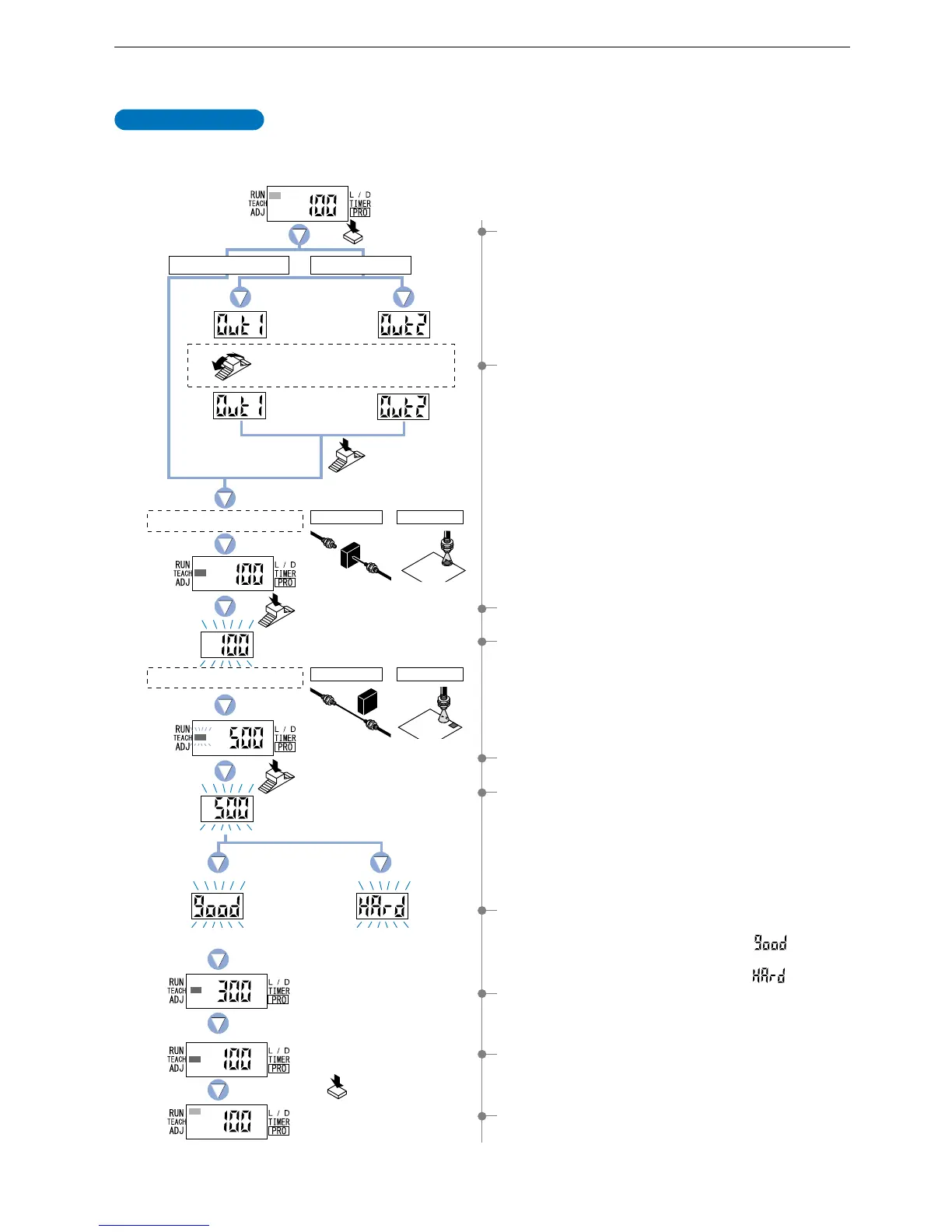
4-2. Teaching Mode [when using FX-301(P)(-HS) or FX-305(P) normal mode]
The ‘threshold value’ can be set by utilizing three kinds of teaching, whichever ‘2-level teaching’, ‘limit teaching’ or ‘full-auto teaching’.
* The factory setting is this mode for FX-305(P). (Refer to p.55)
2-level teaching is a method of setting the ‘threshold value’ by teaching the amplifier two different
status conditions - sensing object present and sensing object absent. The ‘threshold value’ is
usually set using this method.
2-level Teaching
1 Press the [MODE key] once to select ‘TEACH mode’.
3 Press the [Jog switch] when in the status condition of -
sensing object is present.
2 FX-305(P): Turn the [Jog switch] to select the desired
‘output’ for setting.
5 Press the [Jog switch] when in the status condition of -
sensing object is absent.
8 The ‘threshold value’ setting will be displayed.
9 The incident light intensity will again be displayed, indicating
that configuration is now complete.
FX-305(P): The output that has been set will be displayed.
0 Press the [MODE key] 5 times or keep it pressed for 2 sec.
or more, the amplifier will return to ‘RUN mode’ (normal
sensing operation).
4The digital display will blink and indicate the incident light
intensity reading, then the MODE indicator / TEACH
(yellow) will blink.
This indicates that the second point item is now ready for
input.
6
The digital display will again blink and indicate the incident light intensity reading
and the ‘threshold value’ will be set to a value midway between the incident
light intensities when the sensing object is present and when it is absent. The
blinking MODE indicator / TEACH will stop blinking and continuously light up.
*
Fine adjustment of the ‘threshold value’ can be performed in the ‘4-4.
Threshold Value Fine Adjustment Mode [when using FX-301(P)(-HS) or
FX-305(P) normal mode]’ described on p.19.
()
7 The sensing stability status will be displayed.
• When stable sensing can be performed
nThe digital display will blink the word ‘ ’.
• When stable sensing cannot be performed
nThe digital display will blink the word ‘ ’.
Place a fiber within sensing range.
Turn the Jog switch to select
the desired output for setting.
Press the
MODE key once.
Press the
Jog switch.
Press the
Jog switch.
Press the
Jog switch.
Status condition - sensing object is present
Status condition - sensing object is absent
Stable sensing
Output 1 Output 2
In case of FX-301(P)(-HS)
In case of FX-305(P)
Thru-beam type Reflective type
Thru-beam type Reflective type
Difference between incident light
intensities is not great enough.
Press the MODE key
5 times or keep it pressed
for 2 . or more.



 To Next Page