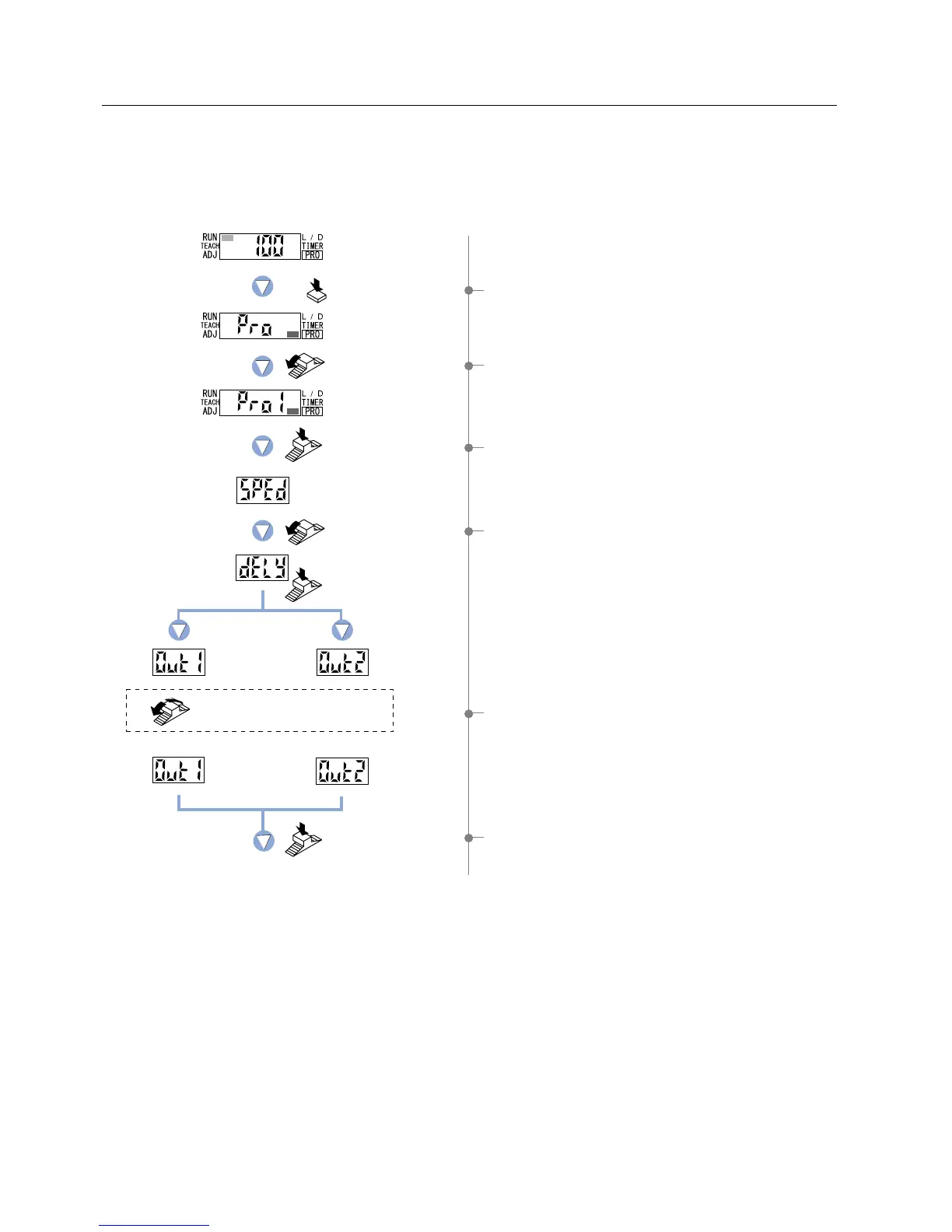
5-4. Timer Setting Function [FX-305(P)]
1 Press the [MODE key] 5 times to select ‘PRO mode’.
2 Turn the [Jog switch] once toward the ‘
’ direction,
to select ‘PRO1 mode’.
3 Press the [Jog switch] to enter the ‘response time change’
state.
4 Turn the [Jog switch] once toward the ‘
’ direction,
to enter the ‘timer setting’ state.
5 Turn the [Jog switch] to select the desired ‘output’ for setting.
6 If the [Jog switch] is pressed, the ‘output’ will be confirmed.
Press the MODE
key 5 times.
Turn the Jog switch
once toward
the ‘’ direction.
Turn the Jog switch
once, toward
the ‘’ direction.
Press the
Jog switch.
Press the
Jog switch.
Turn the Jog switch to select
the desired timer operation .
Press the
Jog switch.
Output 1 Output 2
To be continued on the next page
For output 1, six different timer operations can be selected: Without timer / OFF-delay / ON-delay / ONE SHOT /
ON-delay • OFF-delay / ON-delay • ONE SHOT.
For output 2, four different timer operations can be selected: Without timer / OFF-delay / ON-delay / ONE SHOT.
Available timer periods are; Output 1: 0.5 to 9,999 ms,
Output 2: 0.5 to 500 ms
29



 To Next Page