28
The digital display will quickly
blink 3 times to confirm the setting.
Press the MODE key
3 times or keep it
pressed for 2 sec. or
more.
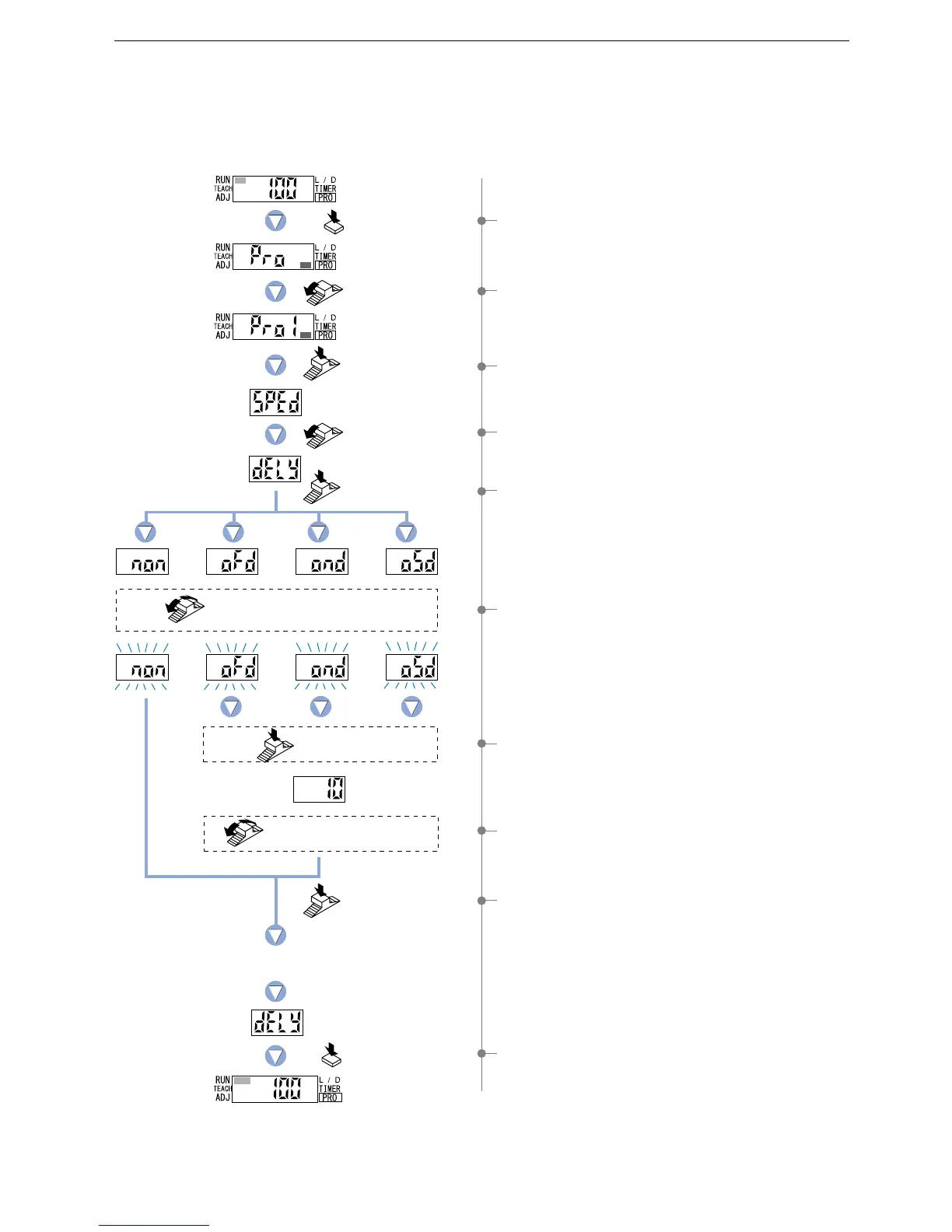
5-3. Timer Setting Function [FX-301(P)(-HS)]
1 Press the [MODE key] 5 times to select ‘PRO mode’.
2 Turn the [Jog switch] once toward the ‘’ direction,
to select ‘PRO1 mode’.
3
Press the [Jog switch] to enter the ‘response time change’ state.
4 Turn the [Jog switch] once toward the ‘’ direction,
to enter the ‘timer setting’ state.
5 If the [Jog switch] is pressed, the current timer
operation will be displayed.
* The factory setting is ‘Without timer’.
6 If the [Jog switch] is turned, the digital display will blink.
Select the desired timer operation.
7 Press the [Jog switch] to enter the ‘timer period setting’ state.
* The factory setting is ‘10 ms’.
8 Turn the [Jog switch
]
to select the desired timer period.
* Timer period will be switched to the values set by timer
operations, unless ‘Without timer’ is chosen.
9 If the [Jog switch] is pressed, the digital display will quickly
blink 3 times, confirming the setting.
0 Press the [MODE key] 3 times or keep it pressed for 2 sec.
or more, the amplifier will return to ‘RUN mode’ (normal
sensing operation).
Four different timer operations can be selected: Without timer / OFF-delay / ON-delay / ONE SHOT.
The available timer periods are 0.5 to 9,999 ms.
* Timer selection is also possible in NAVI mode.
Turn the Jog switch to select
the desired timer operation .
Turn the Jog switch to select
the desired timer period .
Press the
Jog switch.
Press the
Jog switch.
Press the
Jog switch.
Press the
Jog switch.
Turn the Jog switch
once toward
the ‘’ direction.
Press the MODE
key 5 times.
Turn the Jog switch
once toward
the ‘’ direction.
Without
timer
OFF-
delay
ON-
delay
ONE
SHOT



 To Next Page