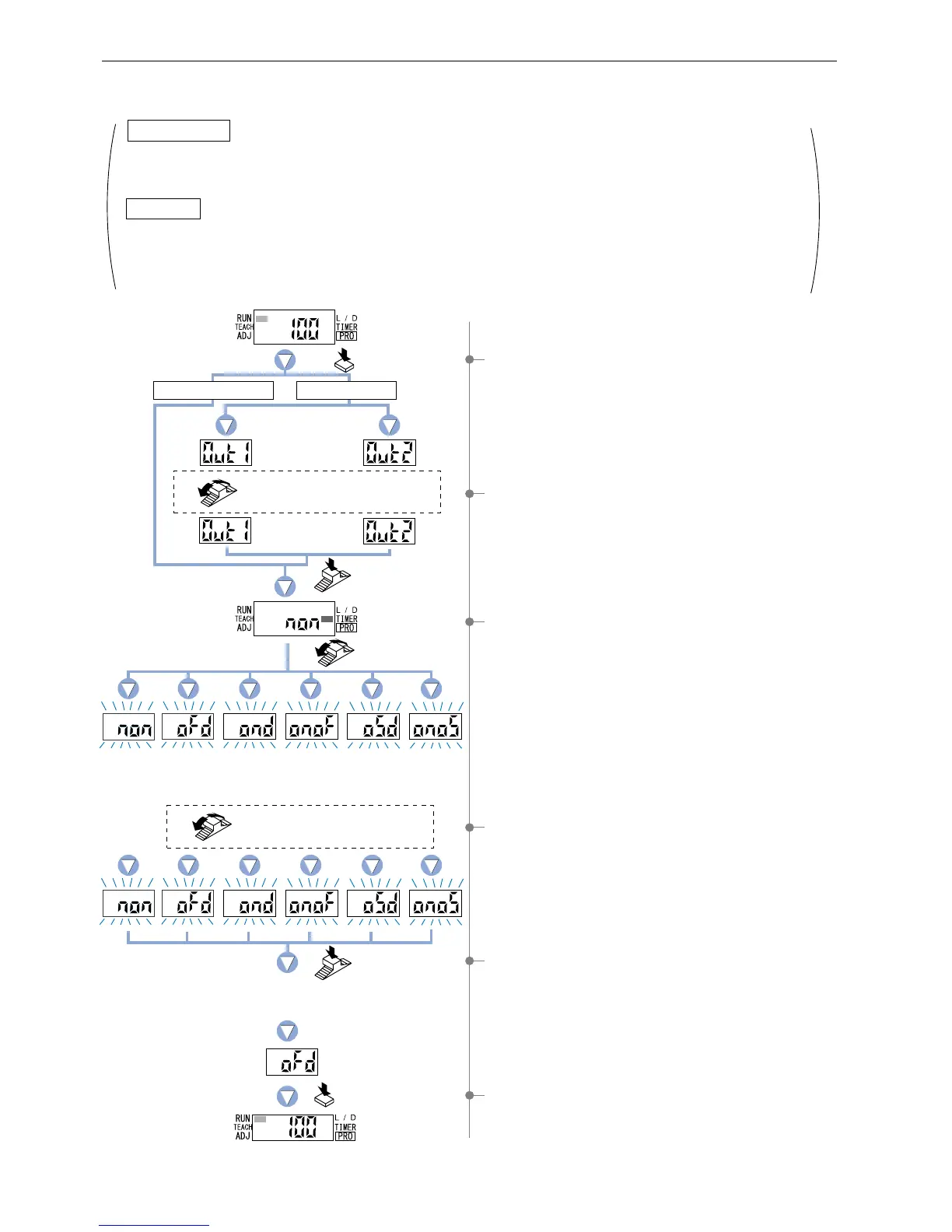
4-7. Timer Operation Setting Mode
This mode sets the timer operation. Timer period is set in PRO1 mode.
The factory settings is ‘Without timer’.
1 Press the [MODE key] 4 times to select ‘timer operation
setting mode’.
3 The current setting will be displayed.
If the [Jog switch] is turned, the timer operation on the digital
display will change and blink.
* The factory setting is ‘Without timer’.
5 If the [Jog switch] is pressed, the digital display will quickly
blink 3 times and selected ‘timer operation’ will be confirmed.
6 Press the [MODE key] twice or keep it pressed for 2 sec.
or more, the amplifier will to return to ‘RUN mode’ (normal
sensing operation).
4 Turn the [Jog switch] to select the desired setting for timer
operation.
2 FX-305(P): Turn the [Jog switch] to select the desired
‘output’ for setting.
This mode allows the configuration and usage of the following timer operations: OFF-delay / ON-delay / ONE SHOT.
Timer period can be selected from 0.5 ms to 9,999 ms.
Please refer to ‘5-3. Timer Setting Function [FX-301(P)(-HS)]’ in ‘PRO1 Mode’ on p.28.
This mode allows the configuration and usage of the following timer operations: OFF-delay / ON-delay / ONE SHOT
/ ON-delay • OFF-delay / ON-delay • ONE SHOT.
Timer period can be selected from; Output 1: 0.5 ms to 9,999 ms, Output 2: 0.5 ms to 500 ms.
Please refer to ‘5-4. Timer Setting Function [FX-305(P)]’ in ‘PRO1 Mode’ on p.29.
FX-305(P)
FX-301(P)(-HS)
Turn the Jog switch to select
the desired setting.
The current
timer operation
In case of setting
OFF-delay timer
Turn the
Jog switch.
Press the
Jog switch.
Press the MODE key
twice or keep it pressed
for 2 sec. or more.
Press the
MODE key 4 times.
Turn the Jog switch to select the
desired output.
Press the
Jog switch.
Output 1
Output 2
ON-delay •
OFF-delay
[
FX-305(P):
output 1 only
]
ONE SHOT ON-delay •
ONE SHOT
[
FX-305(P):
output 1 only
]
ON-delayOFF-delayWithout timer
The digital display will quickly
blink 3 times to confirm the setting.
In case of FX-301(P)(-HS)
In case of FX-305(P)
23



 To Next Page