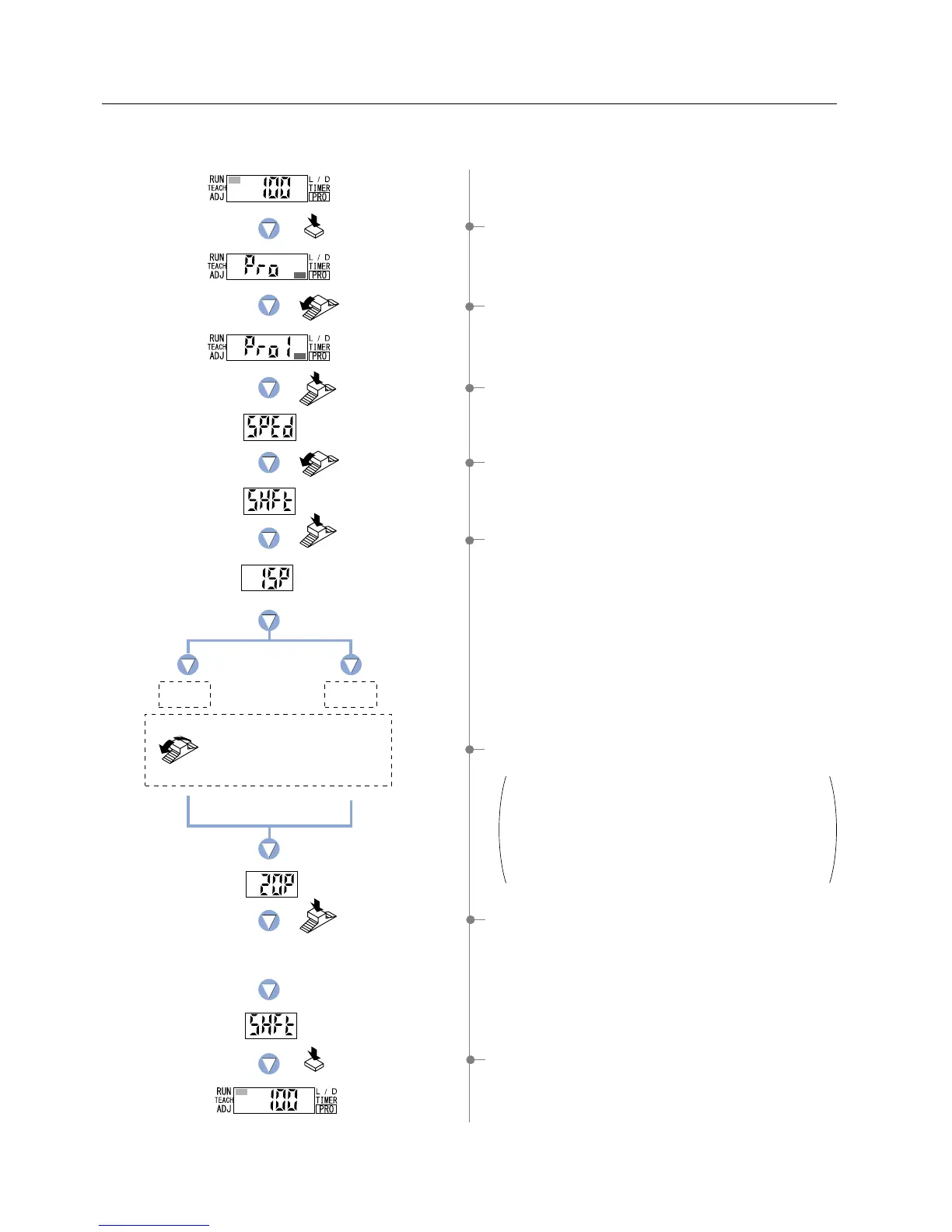
5-7. Shift Function
This function allows changing of the shift amount for the ‘threshold value’ during ‘limit teaching’.
(The percentage adjustment is variable from 0 to 80 %, in increments of 5 %.)
1 Press the [MODE key] 5 times to select ‘PRO mode’.
2 Turn the [Jog switch] once toward the ‘’ direction,
to select ‘PRO1 mode’.
3 Press the [Jog switch] to enter the ‘response time change’
state.
4 Turn the [Jog switch] 4 times toward the ‘’ direction,
to enter the ‘shift setting’ state.
5 If the [Jog switch] is pressed, the current
‘shift amount’ will be displayed.
6 If the [Jog switch] is turned, the digital display will blink.
Select the desired ‘shift amount’.
If the [Jog switch] is turned once toward the ‘’
direction, the shift amount will be
5 %.
If the [Jog switch] is turned once toward the ‘
’
direction, the shift amount will be
5 %.
The available range for the shift amount:
The percentage adjustment is variable from 0 to 80 %, in
increments of 5 %.
The digital display will quickly
blink 3 times to confirm the setting.
7 If the [Jog switch] is pressed, the digital display will quickly
blink 3 times, confirming the ‘shift amount’ setting.
8 Press the [MODE key] 3 times or keep it pressed for 2 sec.
or more, the amplifier will return to ‘RUN mode’ (normal
sensing operation).
Press the MODE
key 5 times.
Turn the Jog switch
once toward
the ‘
’ direction.
Press the
Jog switch.
Press the
Jog switch.
Press the
Jog switch.
Turn the Jog switch to select
the desired shift amount.
(
The percentage adjustment is
variable from 0 to 80 %,
in increments of 5 %.
)
Press the MODE key
3 times or keep it pressed
for 2 sec. or more.
Turn the Jog switch
4 times toward
the ‘’ direction.
5 % 5 %
33



 To Next Page