22
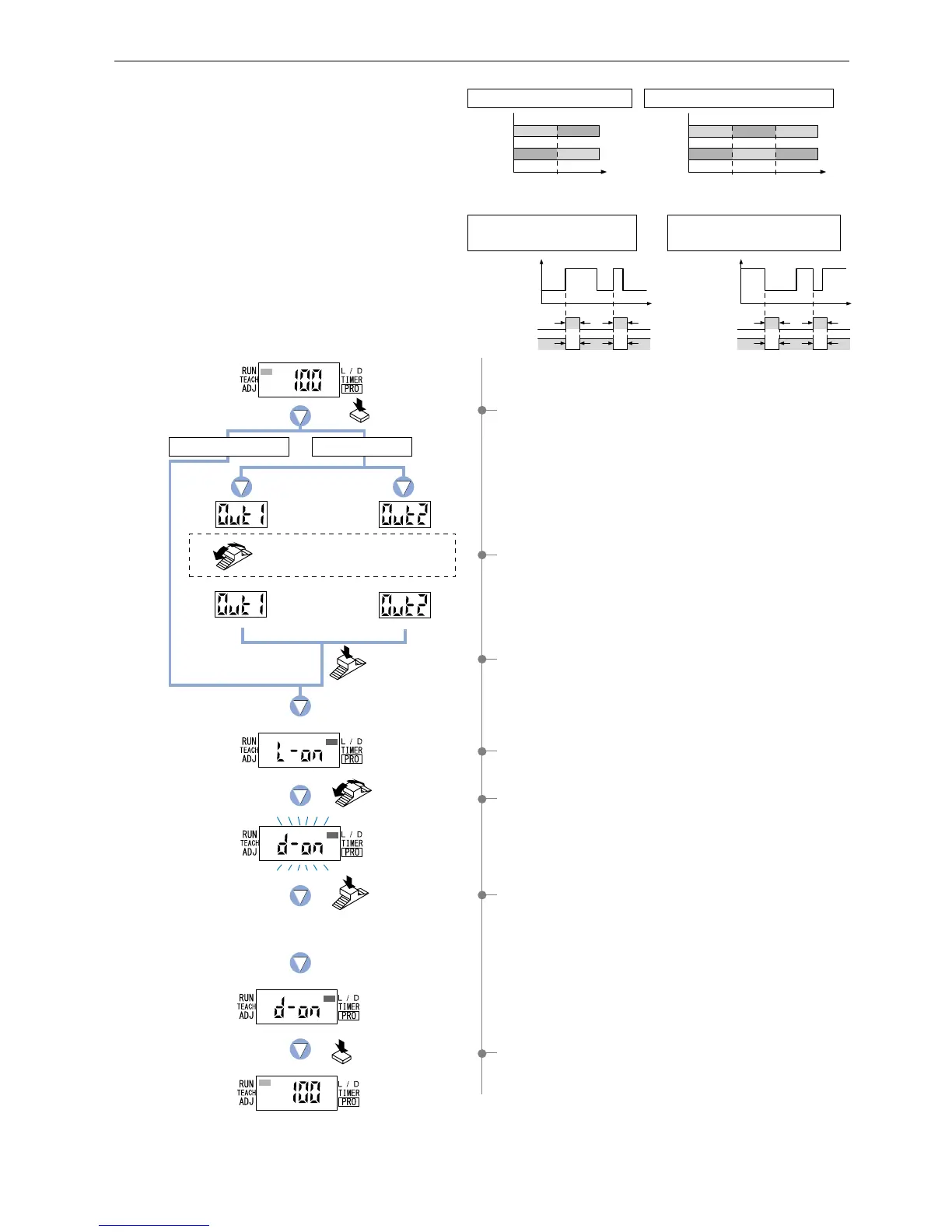
4-6. Output Operation Setting Mode
1 Press the [MODE key] 3 times to select ‘output operation
setting mode’.
4 The current setting will be displayed.
* The factory setting is ‘L-ON (Light-ON)’.
5 If the [Jog switch] is turned, the opposite setting for output
operation will blink on the display.
6
If the [Jog switch] is pressed, the digital display will blink quickly
3 times and the selected output operation will be confirmed.
2 FX-305(P): Turn the [Jog switch] to select the desired
‘output’ for setting.
3 If the [Jog switch] is pressed, the ‘output’ will be confirmed.
7 Press the [MODE key] 3 times or keep it pressed for 2 sec.
or more, the amplifier will return to ‘RUN mode’ (normal
sensing operation).
This mode allows the selection of output operation
from either L-ON (Light-ON) or D-ON (Dark-ON).
Incident
light
intensity
Threshold
value 2
(2_SL)
Threshold
value 1
(1_SL)
ONOFF OFF
OFFON ON
Output
operation
L-ON
D-ON
Incident
light
intensity
Threshold value
ONOFF
OFFON
Output
operation
L-ON
D-ON
FX-301(P)(-HS) or FX-305(P) normal mode
Output operation
FX-305(P) window comparator mode
Time
Incident light
intensity
ON
TT
OFF
Time
Incident light
intensity
ON
TT
OFF
TT
TT
Output operation
L-ON
(Light-ON)
D-ON
(Light-OFF)
ON
OFF
Output operation
ON
OFF
L-ON
(Light-ON)
D-ON
(Light-OFF)
When setting rising differential
mode for FX-305(P)
When setting trailing
differential mode for FX-305(P)
The current
setting
Press the
MODE key
3 times.
Turn the
Jog switch.
Press the
Jog switch.
Press the MODE key
3 times or keep it pressed
for 2 sec. or more.
Turn the Jog switch to select the
desired output.
Press the
Jog switch.
Output 1
The digital display will quickly
blink 3 times to confirm the selection.
In case of FX-301(P)(-HS)
In case of FX-305(P)
Output 2



 To Next Page