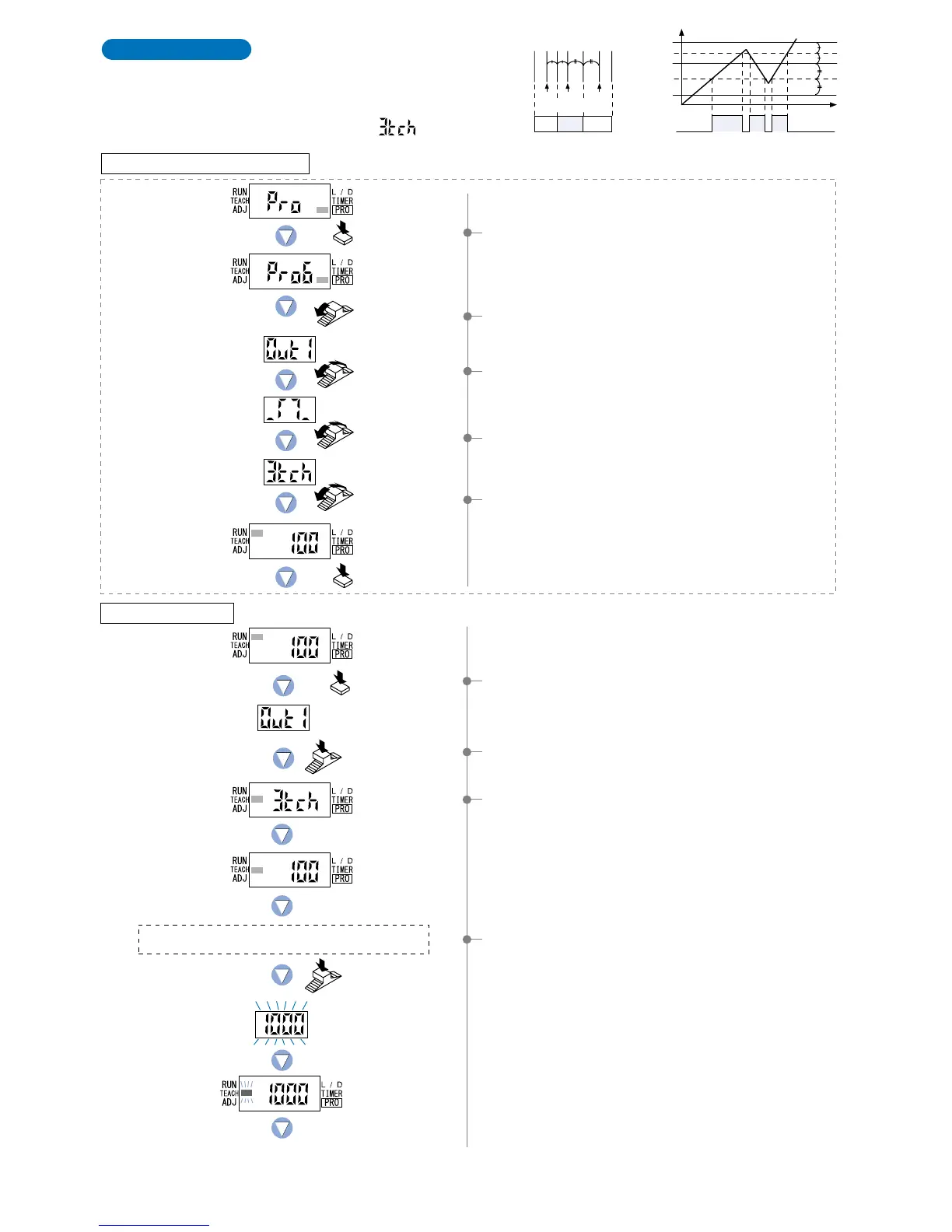
3-level Teaching
This is a method of setting the threshold range by three
levels (P-1, P-2, P-3) teaching and set the threshold values
at the middle of ‘A’ and ‘B’ (1_SL) and ‘B’ and ‘C’ (2_SL).
After teaching, P-1, P-2 and P-3 are automatically
assigned in ascending order to ‘A’, ‘B’, and ‘C’.
Select ‘3-level teaching ( )’ in PRO6 mode
beforehand.
The status condition when sensing object ‘A’ is present
that has the lowest incident light intensity.
1Press the [MODE key] once to select ‘TEACH mode’.
2Press the [Jog switch] to select ‘output 1’.
3The current teaching method will be displayed, and then the
unit will enter the ‘P-1’ setting state.
4If the [Jog switch] is pressed while in the status condition
when sensing object ‘A’ is present that has the lowest
incident light intensity, then the display will blink and indicate
the incident light intensity reading.
And then the unit will enter the ‘P-2’ setting state and
‘TEACH’ (yellow) will blink on the MODE display.
Note) ‘P-1’, ‘P-2’ and ‘P-3’ are set in that order even if
procedures 4, 5 and 6 are changed around.
Output
(L-ON)
Time
ON
A
1_SL
2_SL
B
C
0
OFF
Incident light
intensity 9,999
Output
(L-ON)
P-1
1_SL
OFF ON OFF
P-2
2_SL
P-3
AB C
For further details, refer to ‘10-2. Output 1 Sensing Mode Settings’ on p.56.
Setting in PRO6 mode beforehand
Turn the Jog switch
6 times toward the
‘’ direction.
Turn the Jog switch
to select output 1.
Press the MODE key
3 times or keep it pressed
for 2 sec. or more.
Press the
MODE key 5 times.
Turn the Jog switch
to select window
comparator mode.
Turn the Jog switch
to select 3-level
teaching.
1Press the [MODE key] 5 times to select ‘PRO mode’.
2Turn the [Jog switch] 6 times towards the ‘
’ direction to
select ‘PRO mode’.
3Turn the [Jog switch] to select ‘output 1’, and then press
the [Jog switch] to confirm the setting.
4Turn the [Jog switch] to select ‘window comparator mode’,
and then press the [Jog switch] to confirm the setting.
5Turn the [Jog switch] to select ‘3-level teaching’, and then
press the [Jog switch] to confirm the setting.
Setting in NAVI mode
Press the
MODE key once.
Incident light
intensity of P-1.
Press the
Jog switch.
Press the
Jog switch.
Output 1
To be continued on the next page
17



 To Next Page