Page 11 of 24 Form 0161F 2805 09/2/2008
Superchips Inc
.
Superchips Inc. 1790 East Airport Blvd., Sanford, FL. 32773 (407) 585-7000 http://www.Superchips.com
Superchip & Superchips are registered trademarks of Superchips, Inc.
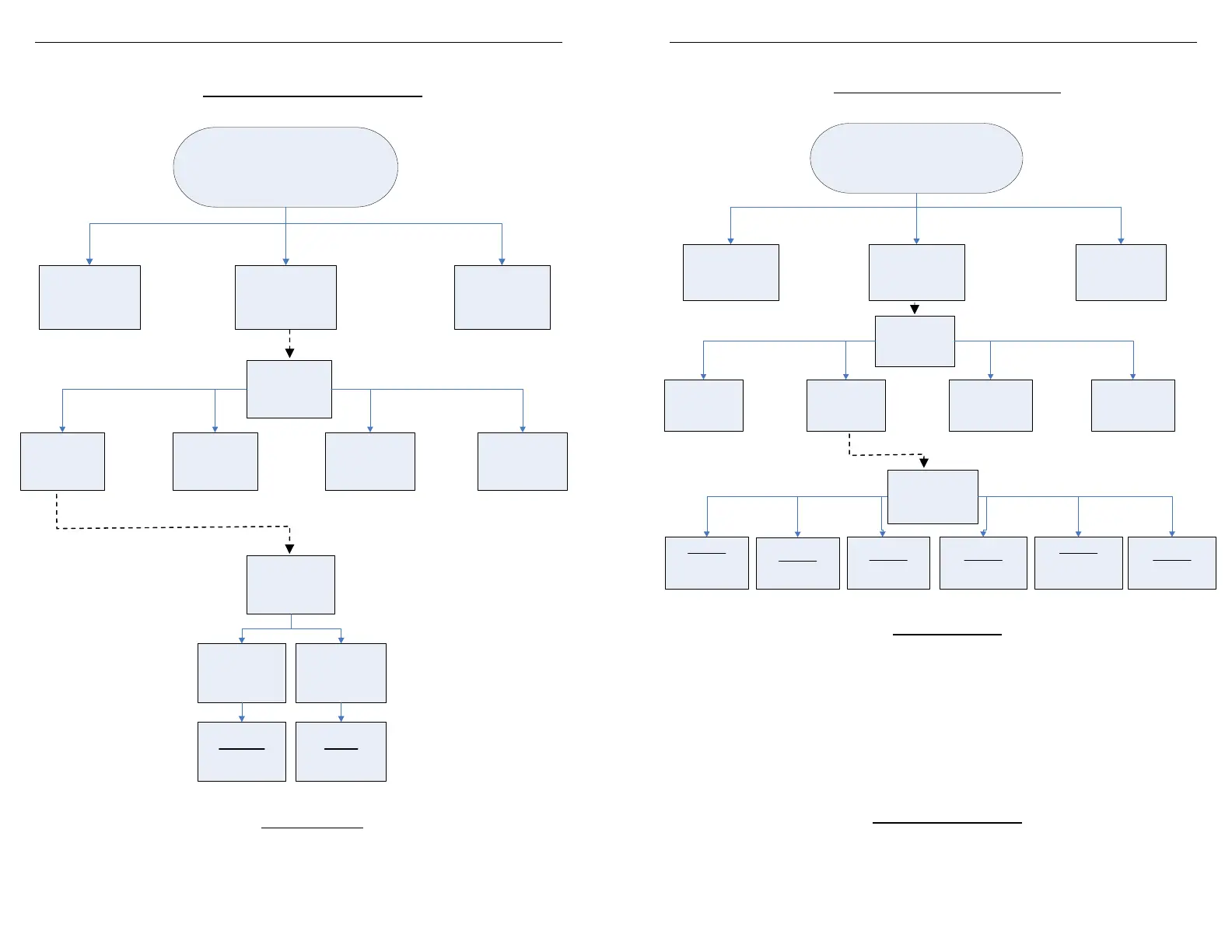
Menu Layout
¾ Read Vehicle – Menu Layout
¾ Read Vehicle
Display Vehicle ID: Displays vehicle identification from the connected vehicle
Read Stock Vehicle: Reads the factory stock file(s) from the connected vehicle
Tuning
screen
Read
Vehicle
Change
Setup
View
Settings
Program
Vehicle
Read
Vehicle
screen
Read
Vehicle ID
Read Stock
Display
Vehicle ID
Read
Stock Vehicle
FlashPaq
Main Menu
Tuner
Setup
Tuning
Advanced
Features
Page 12 of 24 Form 0161F 2805 09/2/2008
Superchips Inc
.
Superchips Inc. 1790 East Airport Blvd., Sanford, FL. 32773 (407) 585-7000 http://www.Superchips.com
Superchip & Superchips are registered trademarks of Superchips, Inc.
Menu Layout
¾ Change Setup – Menu Layout
¾ Change Setup
MileageXS SAVE: Selects Superchips optimum economy tuning.
Note: With MileageXS SAVE tuning installed you MUST NOT tow or haul.
Performance: Selects Superchips optimum performance tuning.
Note: With Performance tuning installed you MUST NOT tow or haul.
Tow/Perf: Selects Superchips mid-range tuning.
Note: With Tow/Perf tuning installed you can safely tow/haul up to 6000 lbs.
Tow: Selects Superchips tow safe program tuning.
Note: With Tow tuning installed you can safely tow/haul up to the OEM’s listed
maximum towing limit.
Stock w/ Options: Selects factory stock tuning while allowing user option changes.
Stock: Selects factory stock tuning.
¾ Option Adjustments
*Speed Limiter: Allows selection of a raised vehicle speed limiter.
*Tire Height: Allows changes for after-market tires for speedometer correction.
*Note: This option is not available on some applications.
Change Setup
screen
Select
Performance
Select
Tow/Perf
Select
Stock
Select
Stock w/
Options
Select
Tow
Select
MileageXS
SAVE
Select
Tow
Tuning
screen
Read
Vehicle
Change
Setup
View
Settings
Program
Vehicle
FlashPaq
Main Menu
Tuner
Setup
Tuning
Advanced
Features


 To Next Page