42
Super X13SEI-TF/-F User's Manual
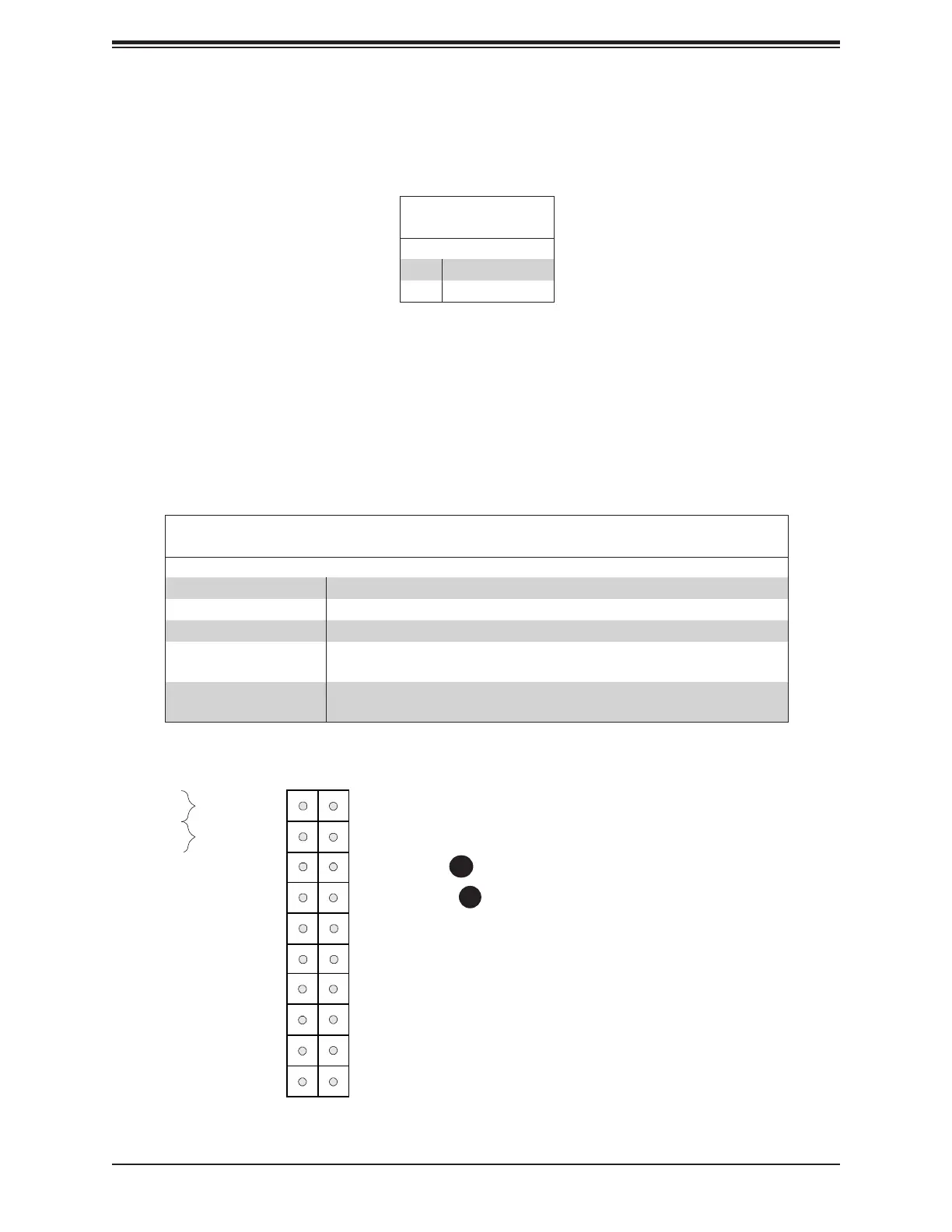
Information LED (OH/Fan Fail/PWR Fail/UID LED)
The Information LED (OH/Fan Fail/PWR Fail/UID LED) connection is located on pins 7 and 8
of JF1. The LED on pin 7 is active when the UID switch on the rear I/O panel is pressed. The
LED on pin 8 provides warnings of overheat, power failure, or fan failure. Refer to the table
below for more information.
OH/Fan Fail LED
20
NIC1 Activity LED
19
HDD LED
PWR LED
3.3V Stby
3.3V Stby
UID LED
X
Ground
NMI
X
NIC2 Activity LED
3.3V Stby
3.3V Stby
Power Button
Reset Button
Reset
PWR
Ground
Ground
1 2
Power Fail LED
3.3V
1. Information LED
2. Power Fail LED
1
2
Power Fail
The Power Fail LED connection is located at pins 5 and 6. Refer to the table below for pin
denitions.
Power Fail LED
Pin Denitions (JF1)
Pin# Denition
5 3.3V
6 Power Fail LED
Information LED-UID/OH/PWR Fail/Fan Fail LED
Pin Denitions (JF1)
Status Description
Solid Red An overheat condition has occured. This may be caused by cable congestion.
Blinking Red (1Hz) Fan failure: check for an inoperative fan.
Blinking Red (0.25Hz) Power failure: check for a non-operational power supply.
Solid Blue
Local UID is activated. Use this function to locate a unit in a rack mount
environment that might be need of service.
Blinking Blue (300msec)
Remote UID is on. Use this function to identify a unit from a remote location
that might be in need of service.






 To Next Page