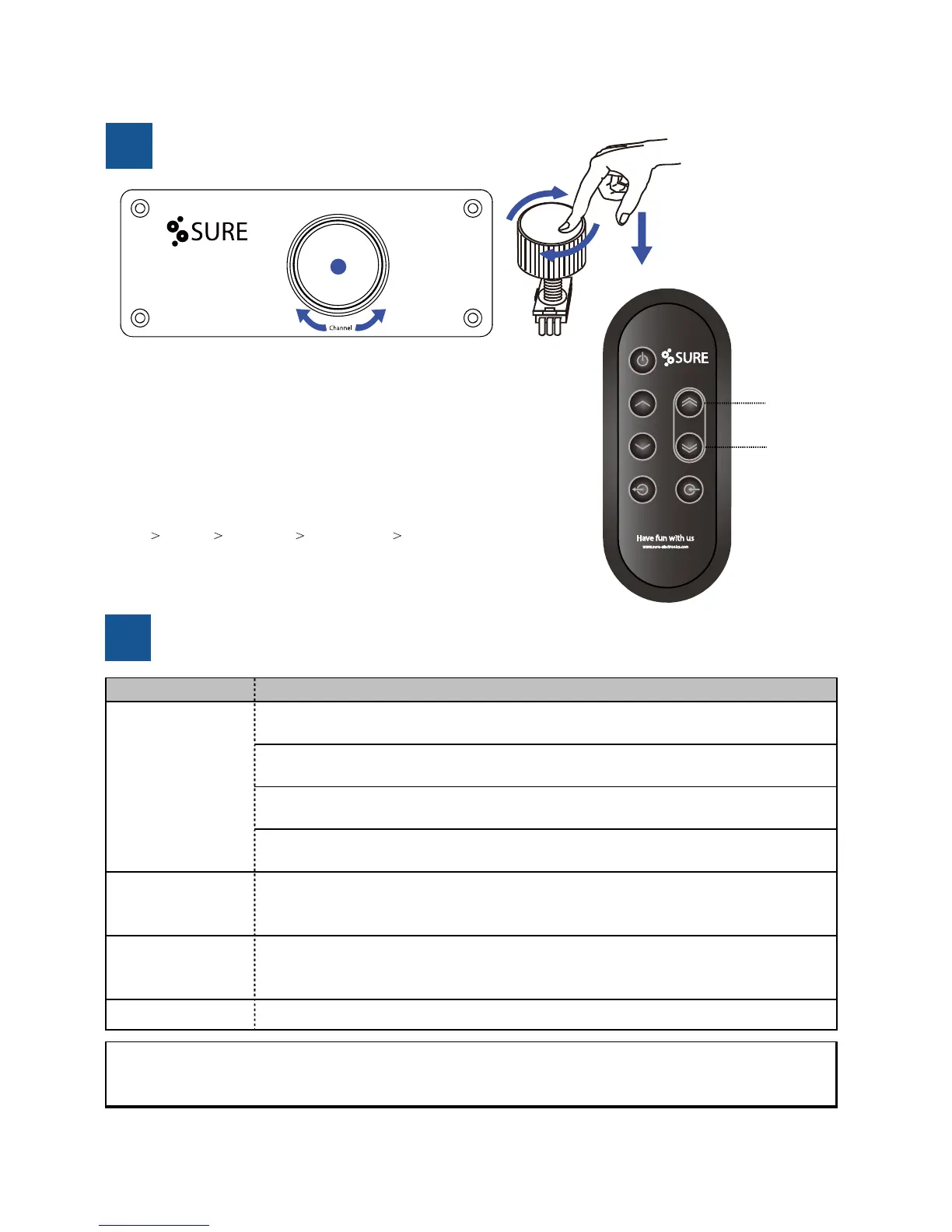
How to Switch Channels?
7
Q&A
8
Channel +
Channel -
No sound
1. Check if it is connected with the power and confirm that the voltage regulator
works well. If not, connect the power according to the connecon schemacs.
2. Check if the signal input cable is connected correctly and if there is signal. If not,
connect the cables according to the schemac and input the audio signal.
3. Check if the output cable is damaged and if the speaker works or not. If not,
change the output cable and the speaker.
4. Check if the LED keeps off or not. If not, restart it and ensure that the LED displays
breathing effect in standby. If it sll doesn’t work, remove the power and contact us
Suddenly no sound
when the product is
working
1. Check if the product
Situaon Soluons
has worked for long me or if the audio signal is too high. If
it is, turn off the power and turn it on again.
LED off
1. Check if it is connected with the power and confirm that the voltage regulator
works well or not. If not, correctly connect it to the power according to the
Note: If the problems above sll cannot be solved, maybe the product has something wrong. Now please turn off the
power, pull out the power cord from the socket and then contact us. Please refer to chapter eleven for our contact
informaon.
There are five various input methods for audio amplifier.
a) Audio signal input terminal (RCA) —LED blink once
b) Audio signal input terminal (3.5mm) —LED blink twice
c) Bluetooth signal input —LED blink three mes
d) Opcal fiber input terminal —LED blink four mes
f) USB Sound Card —LED blink five mes (
Available for next version)
The priority of Input signals:
RCA 3.5mm Bluetooth Opcal fiber USB Sound Card
You can switch channels by pushing and rotang the knob.
Also you can switch channels by using remote controller.
+ -
No sound with Opcal
1. Only supports 48KHz sampling rate, 8/16/24-bit word length.



 To Next Page