How to Connect?
4
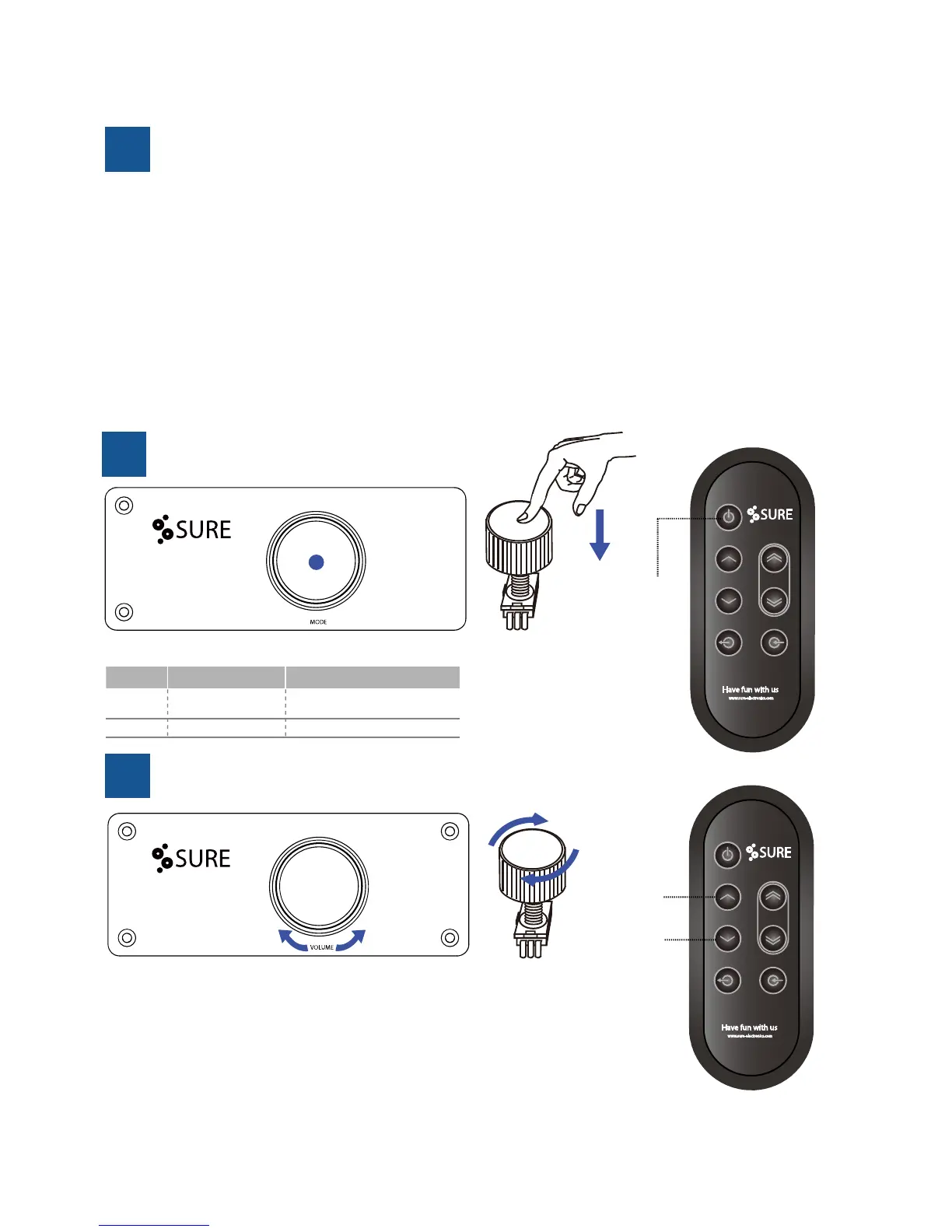
How to Adjust the Volume?
6
+ -
+
-
Volume +
Volume -
We adopt digital volume potenometer of high-quality in Classic series
which can adjust the volume precisely aer long-me use.
Clockwise rotaon —Volume +
Anclockwise rotaon —Volume -
Volume will not be changed during the further adjustment when reach to maximum
or minimum level.
How to Switch Modes?
5
Operaon/ Standby
Push on the volume knob to switch between operaon mode and standby mode.
TABLE 2-2 SWITCH FUNCTION
State Funcon LED state
Standby
Amplifier not
working
LED lighng in a breathing-effect
state
Operaon Amplifier working LED turn off
1. 3.5mm Jack or RCA
It is suggested to finish the connecon before you power up the amplifier. Hot plug-in is not recommanded.
2. Bluetooth
Aer power up the amplifier, just pair BT device "SURE-A2100" with your mobile device without PIN number. Only
one mobile device is allowed to be connected every me.
3. Toslink
Plug two ends of a TOSLINK cable into the TOSLINK ports on the both sides seperately. And set output data with
48KHz sampling rate and 24-bit word length.
4. USB DAC (
Available for next version)
You may connect the computer's USB to the amplifer microUSB port with a USB cable.



 To Next Page