Hardware Detail
© 2004-2012 Sure Electronics Inc.
A-AB32231_Ver1.0_Page 7
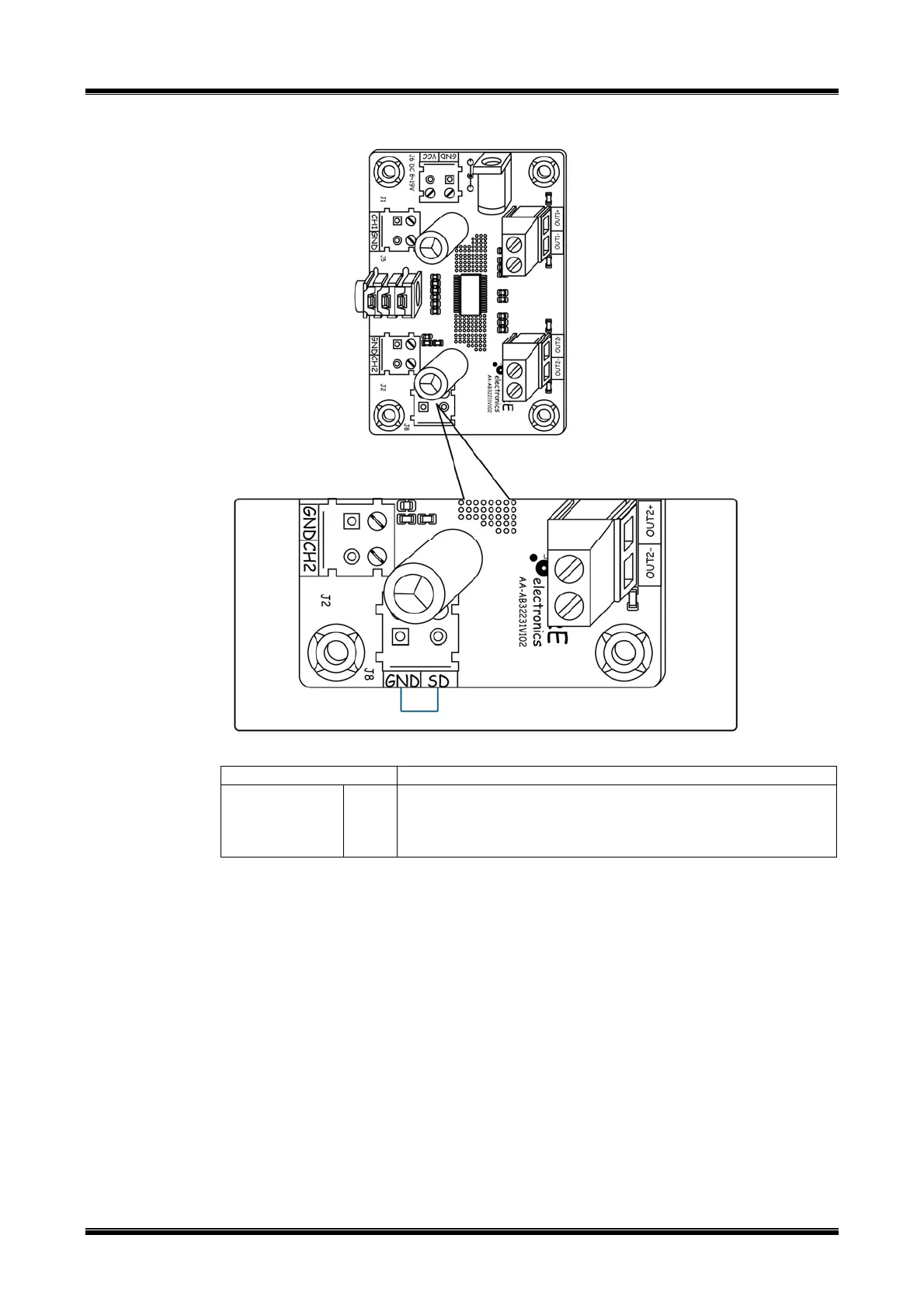
FIGURE 2-4 MUTE SETTINGS
TABLE 2-4 OUTPUT CONNECTION
Terminal blocks Description
J8(optional)
SD
Connect SD and GND, and then two channels will be in Mute
mode.
Leave SD unconnected and two channels will restore normal
working.
2.5 LED Indicators
This amplifier has 1 power LED indicator which is marked as “Status”. It will be
illuminated in green when power-up.
FIGURE 2-4 LED INDICATOR
2.6 Volume Control
No potentiometer is provided for manually adjusting the volume. The volume control of
sound source like MP3 or PC can be used to adjust the volume of the audio output or a
50KΩ potentiometer can be installed by users themselves, which may cause signal
attenuation.
Please be aware that audio clippings may occur to some portable players because of the
audio source not the amplifier itself.



 To Next Page