CM2020 Amplifier - Installation Manual
22
Copyright 2011 Cellphone-Mate, Inc. All rights reserved.
When the amplifier is powered on:
• The green Power light (3) should illuminate.
• The red Warning lights (1, 2, 4, 5) should
remain OFF. If one or more Warning lights illu-
minates, power off the amplifier immediately.
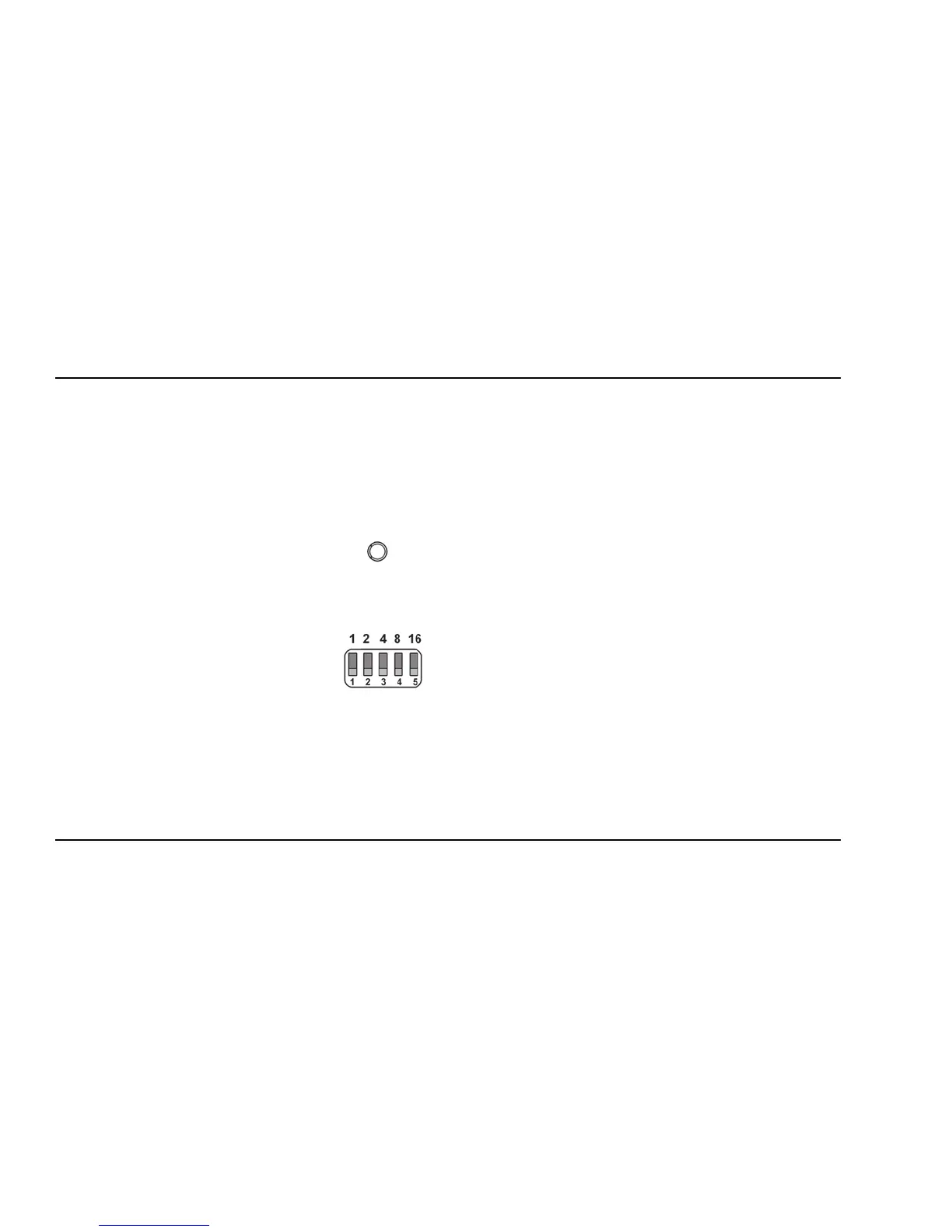
Each bank of DIP switches con-
tains five switches.
• Moving a switch down (away
from the indicator lights)
turns that switch OFF and
increases amplifier gain for
the selected channel.
• Moving a switch up (toward
the indicator lights) turns that switch ON and
decreases amplifier gain for the selected chan-
nel.
From left to right, the DIP switches in each bank
provide 1, 2, 4, 8, and 16 dB of attenuation
(reduced amplification). These switches are cumu-
lative, meaning that the total amount of attenua-
tion for a channel is equal to the combined dB of
all ON DIP switches in the corresponding bank. For
example:
• Turning all switches OFF = 0dB attenuation
(amplifier is at full gain).
• Turning ON Switch #1 in a bank = 1dB attenua-
tion (amplifier maximum gain is reduced by
1dB).
• Turning ON Switches #1, 3, and 5 in a bank =
1+4+16dB attenuation = 21dB attenuation.
For example, in a 68dB amplifier, this means
that the selected channel would be reduced to
47dB (68db-21db).


 To Next Page