Copyright 2011 Cellphone-Mate, Inc. All rights reserved.
21
This chapter describes how to power
on, configure, and test the amplifier.
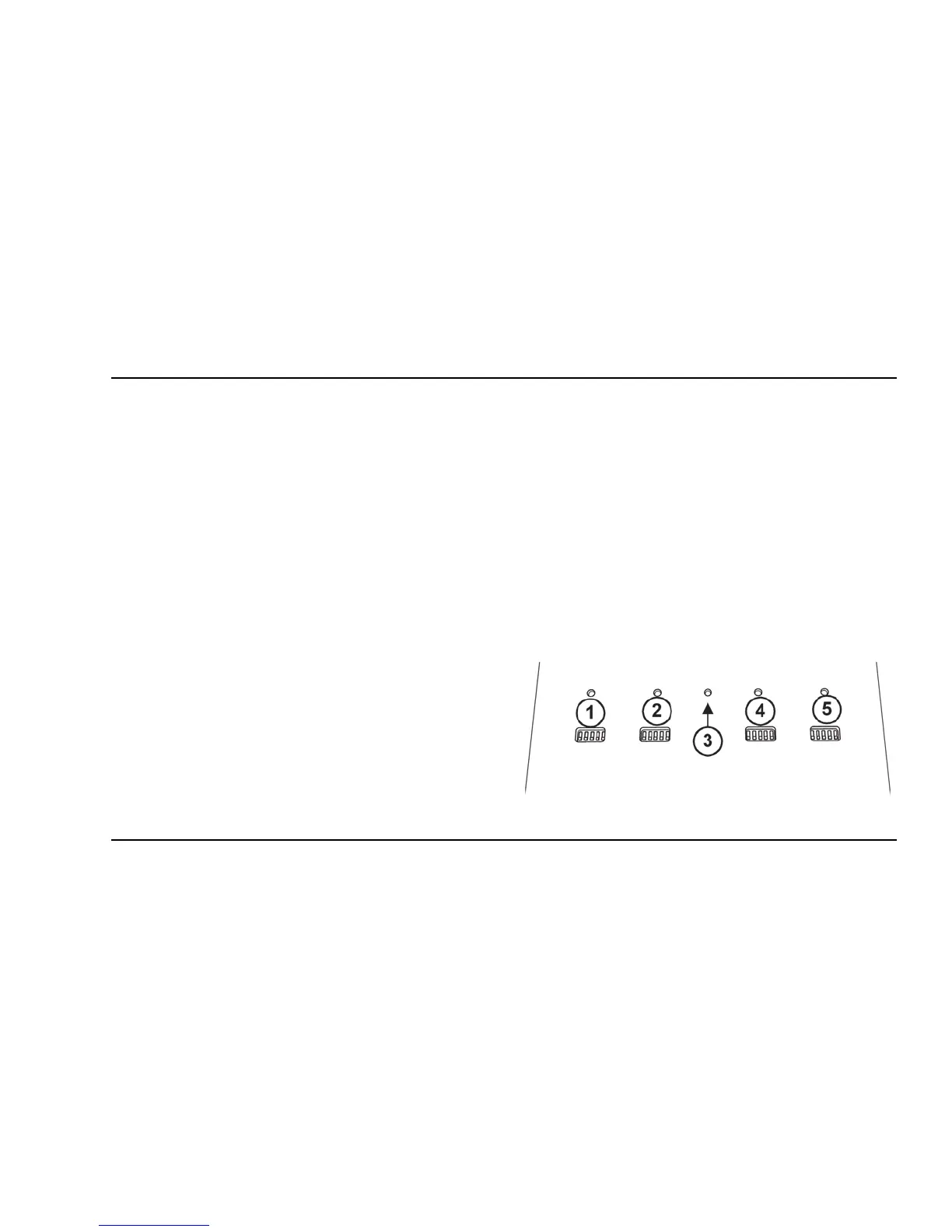
5.1 - DIP Switches and Lights
The CM2020 amplifier has the following indicators
and controls:
• PCS Uplink Warning light/DIP switches (1):
These DIP switches control the PCS communi-
cations with the cellular tower.
• PCS Downlink Warning light/DIP switches (2):
These DIP switches control the PCS amplifica-
tion within the building.
• Power light (3): This light should be illumi-
nated or blinking green at all times while the
amplifier is powered on.
• Cellular Downlink Warning light/DIP switches
(4): These DIP switches control the cellular
amplification within the building.
• Cellular Uplink Warning light/DIP switches
(5): These switches control the cellular com-
munications with the tower.
CHAPTER 5: Configuration & Testing


 To Next Page