SureCall | 48346 Milmont Drive, Fremont CA 94538 | 1-888-365-6283 | sales@surecall.com
13
Installing your Hardware
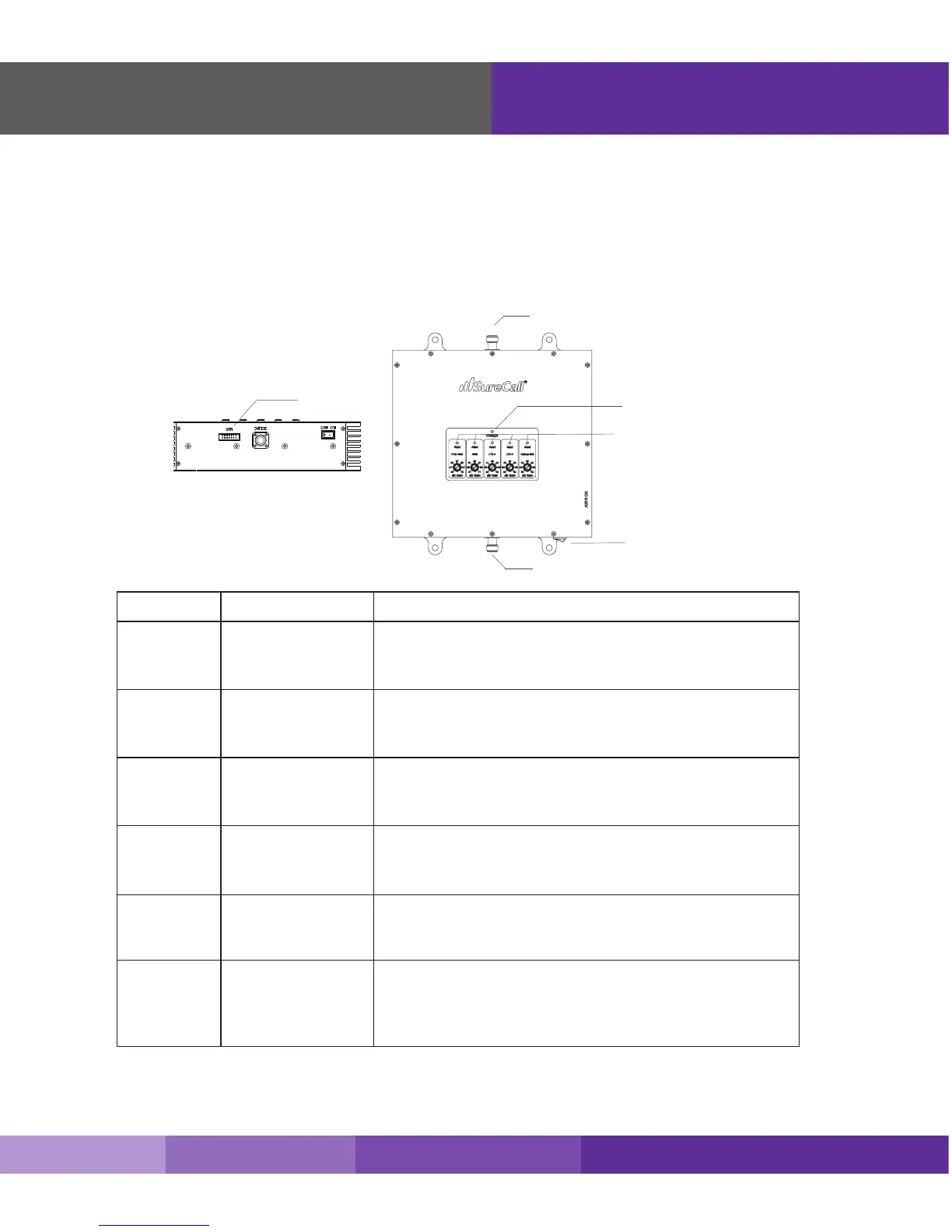
Booster Hardware
The following image shows the key hardware components on the cellullar booster.
Refer to this image as you install your Fusion5 kit components.
The signal booster turns on automatically.
Note: If the Power LED does not turn ON or the Alert LEDs continue to ash, (see PAGES 15-16).This booster is rated for 5-20V input
voltage. DO NOT use the booster with a higher voltage power supply. This can damage the booster, cause personal injury, and void your warranty
5
6
4 PCS 1900
Uplink
AWS 2100
Uplink
Power
OFF = normal operation.
ON = AWS uplink warning.
Power o booster immediately
.
Green ON or blink = booster receiving power.
OFF = booster not receiving power
Red ON = oscillation has occurred for longer than 15
minutes and the booster is shuttin down
OFF = normal operation.
ON = PCS downlink warning.
Power o booster immediately.
LED
1
2
3
LTE 707 Uplink
LTE 781 Uplink
Cellular 800
Uplink
OFF = normal operation.
ON = LTE Verizon uplink warning.
Power o booster immediately.
OFF = normal operation.
ON = LTE AT&T uplink warning.
Power o booster immediately.
OFF = normal operation.
ON = Cellular uplink warning.
Power o booster immediately.
Designation Description











 To Next Page