SureSafeGO 24/7 Monitored
Switching the device on and off
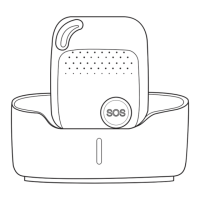
- To turn on the device: press the side power button for 1 second, all the LEDs will flash rapidly. The device can be also turned on automatically by placing
it into the docking station.
※ To get your first GPS location, use outdoors or near a window so the device can get its first fix onto the satellites.
- To turn off the device: press and hold the side button and SOS button together for 1 second until the LEDs switch off.
What do the lights mean?
Power Status LED
Blue Off or blinking slowly
Battery power is lower than 20%
Device does not require charging at this time
GSM LED--GREEN
Light shows a single quick flash every 3
seconds
Light shows a 2 quick flashes
every 3 seconds
Light shows a slow flash every 3
seconds
Light Solid (not flashing)
The device is connected to the GSM
network
The device is registered to the
GPRS network
The device is connecting to the
GSM network
GPS LED--BLUE
Light shows a single quick flash every 3
seconds
Light shows a slow flash every 3 seconds
Blue Off (when device not charging)
The device has a GPS positioning fix
The device has no GPS fix


 To Next Page