The SURPASS AUDIO COMMERCIAL SOUND SYSTEM 2CH WIFI CEILING SPEAKER, model SP-WF640, is a sophisticated audio solution designed for commercial and residential environments. This system utilizes a master/slave speaker configuration, where the master speaker is a 2-channel Class D stereo power amplifier with speaker outlets to power the slave speaker. It is compatible with Android and iOS devices, allowing for independent control of music content by multiple users via an APP Streaming music directly from a smartphone. The system features an RJ45 network port for wired connectivity, ensuring a backup for situations where the WiFi signal is weak.
Function Description:
The SURPASS SP-WF640 is a 2-channel WiFi ceiling speaker system that provides high-quality audio streaming. It is designed to be integrated into ceilings, offering a discreet and aesthetically pleasing audio solution. The system supports various streaming services and local music playback, making it versatile for different audio needs. The master speaker acts as the central hub, powering and controlling the slave speaker, which simplifies installation and wiring.
Important Technical Specifications:
- Model: SP-WF640
- Rated Power: 2*30W@8Ω
- Amplifier Channel: 2 Channel
- Amplifier Type: Digital Class D
- Frequency Response: 80Hz-20KHz(±3dB)
- THD: <0.05% at 1KHz, 1/3 rated power
- S/N: >70 dB
- Speaker Driver: Woofer 6''*1 + tweeter 1''*1
- Power Consumption: 50W
- Installation: In-ceiling
- Material: ABS enclosure, metal clamps
- Power Supply: DC24V
- Dimension: Φ230*155mm
- Cutting Hole: Φ200mm
- Net Weight: 3.20kg (1+1)
The system includes coaxial ceiling speaker system of 6" PP cone woofer and 1" titanium dome tweeter, supported by a professional 2-way crossover. These outstanding features enable the loudspeakers to deliver realistic accurate low and reproduce high frequencies with extreme accuracy, ideal for use in various settings such as living rooms, bedrooms, hotel rooms, entertainment areas, offices, workspaces, show rooms, and restaurants.
Usage Features:
- Built-in digital Class D amplifier: 2*30W.
- Built-in WiFi wireless music streaming receiver: Allows for seamless wireless audio streaming.
- Smart device connectivity: Connect with your smart device via the free app.
- Support AIRPLAY/DLNA/Q PLAY: Broad compatibility with various streaming protocols.
- RJ45 port: Provides a wired network connection for stable performance when WiFi signal is weak.
- 2-way coaxial system: Features one 6" woofer and one 1" tweeter for balanced sound.
- DC 24V power supply: Ensures reliable power delivery.
- Flush-mount dog ears installation: Simplifies installation into ceilings.
- Attractive color ABS resin finish with white metal grille suits any decor.
- MUZO Hi-Fi System: The device uses the public MUZO Wireless Hi-Fi System for its WiFi speaker functionality.
- Getting Started: Connect the active master speaker with the passive slave speaker using a desired length cable.
- Turning on the Active Master Speaker: Turn on the unit; the power cord indicator light will flash red. Connect to your Wi-Fi network using your network credentials.
- Minimum Requirements: Compatible with iPhone, iPod Touch, and iPad devices running on iOS 6.0 or later, and Android 2.3.3 or later.
- Network Requirements: Access to music services, internet radio, and any digital music stored on your smart device or DLNA enabled Network-Attached Storage (NAS) device. A high-speed internet connection is required for optimal performance.
- MUZO Player App: Install the MUZO Player App on your smartphone or tablet. Ensure your smartphone is connected to the same network as your Wi-Fi speaker.
- Device Setup: Open the MUZO Player App, select 'Add Device' at the bottom of the screen, then follow the on-screen instructions to set up your speaker. This involves connecting to the speaker's Wi-Fi network, entering Wi-Fi SSID and password, and naming the device.
- Music Playback:
- My Music: Access music saved on your iOS or Android device's internal storage, or music stored in music servers.
- Spotify: Stream music through your Spotify app. Connect to the Connect screen and select your speaker.
- iHeartRadio: Stream radio stations to your WiFi speaker.
- AirPlay: Stream audio from your iOS device and WiFi speakers connected to the same Wi-Fi network. Supports multi-channel mode for playing selected music on all speakers.
- TIDAL: Stream lossless, high fidelity audio quality music.
- TuneIn: Stream different channels of music and streaming talk radio.
- TTPOD: Stream different channels of music and streaming talk radio.
- QQMusic: Stream millions of tracks from QQMusic.
- QINGTINGFM: Enjoy live radio, news, music, fiction, comic, and podcast radio service.
- Alarm Clock: Set alarms to wake up to your own music from iTunes library or subscribed music services.
- Sleep Timer: Set a timer for the speaker to turn off.
- Web Based Wi-Fi Setup: Configure network settings via a web browser by entering the speaker's IP address.
- Language Setup: Select the system language from English, French, German, Deutsch, Español, Português, and Italiano.
- Change Device Name: Customize the factory default device name.
Maintenance Features:
- Safety Precautions:
- Read instructions carefully before use.
- Observe safety symbols and messages.
- Do not expose the unit to rain or splash with water or other liquids.
- Use the unit only with the voltage specified on the unit.
- Do not cut, kink, or otherwise damage the power supply cord.
- Avoid installing or mounting the unit in unstable locations.
- Do not use if the unit falls, or the unit case breaks.
- If the power supply cord is damaged, disconnect it.
- If it is malfunctioning, do not use it.
- Check Wi-Fi Strength: Access the speaker info menu to check Wi-Fi status, signal strength, and IP address.
- Speaker Wi-Fi Password Protection: Protect your speaker with a password.
- Factory Reset: Restore factory settings through the speaker info menu.
- Firmware Update: Check for new firmware versions and update the device via the MUZO Player App or web interface.
- Troubleshooting:
- Connecting to Wi-Fi: Instructions for connecting the speaker to your Wi-Fi network using the MUZO Player app or a web browser.
- Factory Reset: Steps to perform a factory reset to resolve issues.
- Firmware Check: How to check and update the device's firmware.
- Music Streaming Issues: Guidance on how to stream music from DLNA enabled NAS, iTunes, or other sources.
- Multi-room Spotify: Instructions for logging into multiple Spotify accounts and streaming to multiple devices.
- Maximum Number of Speakers: Information on the maximum number of speakers that can stream music on the same Wi-Fi network (6 in order to ensure a stable Wi-Fi connection).
- Firmware Sync: Ensure all speakers are on the same firmware version for optimal performance.

 Need help?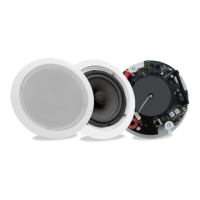

 To Next Page
 General