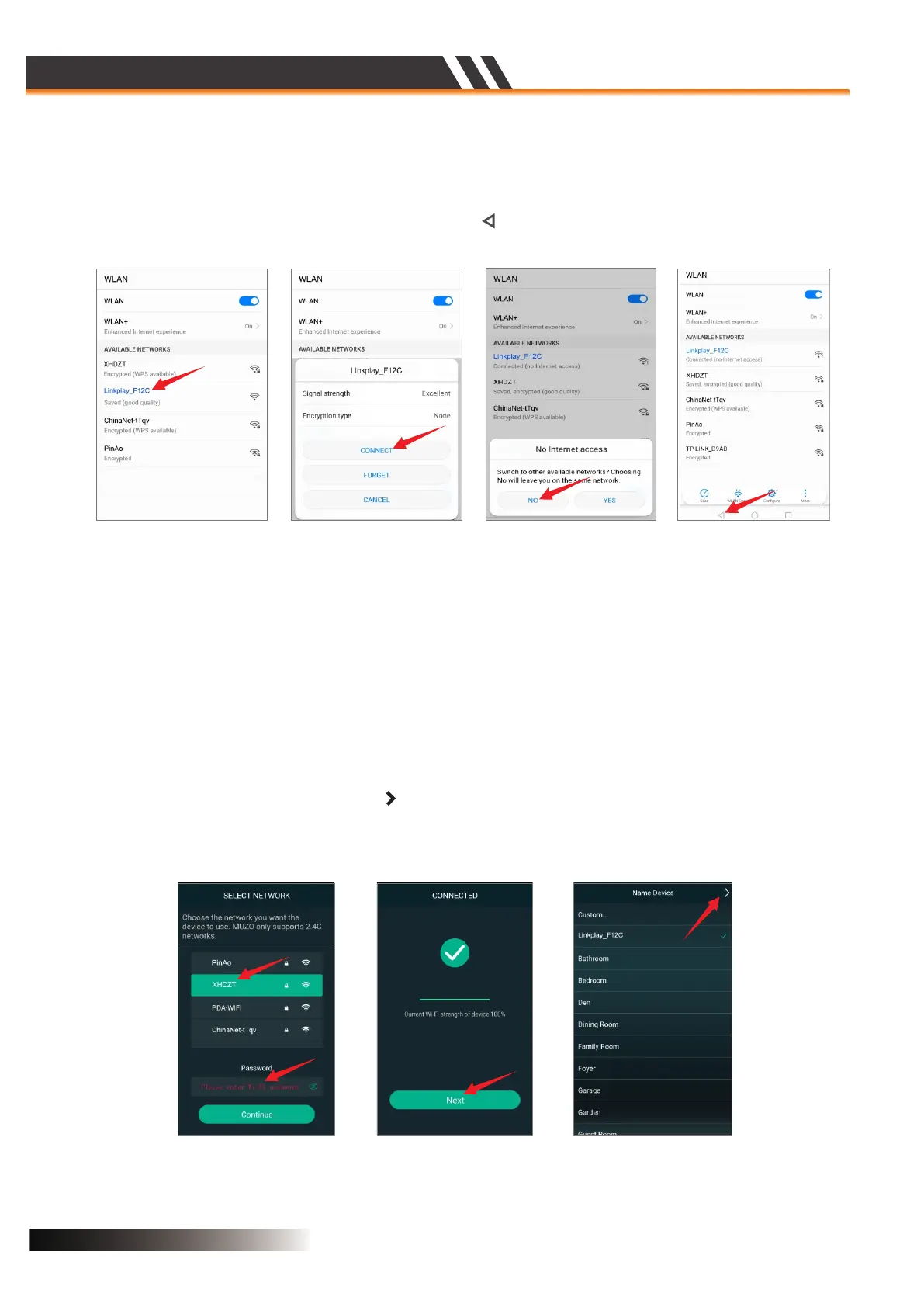
• Enter the MUZO Player APP,you will see the Figure 7.
• Select your Wi-Fi SSID and input its password,then ‘Continue’,when connected successfully you will
see the Figure 8.
• Select ‘Next’,a pop up menu Figure 9 will come up and you can select the name from pre-defined
names or write a desired name for your unit. This will help you to easily differentiate units from one
other on different locations(You cannot have two units with same name in the MUZO Player App) .
• As the Figure 10 shows,press the icon ‘ ’ to enter the DEVICE LIST as the Figure 11,
• Select ‘Settings’ then you will see Figure 4.
• Select the Wi-Fi speaker’s SSID,ex. “Linkplay_XXXX”,then you will see the Figure 5.
• Select ‘CONNECT’ then you will see the Figure 6.
• Select ‘NO’you will see Figure 7,then press triangle ‘ ’ to exit the Wi-Fi discovery menu.
Figure 8 Figure 9 Figure 10
Figure 4 Figure 5 Figure 6 Figure 7
ACTIVE SPEAKER SERIES
2CH WIFI CEILING SPEAKER
Page 5


 To Next Page