WIFI & APP OPERATIONS
Connect the active master speaker with the passive slave speaker using a desired length cable.
GETTING STARTED
TURNING ON THE ACTIVE MASTER SPEAKER
To turn this unit ON, plug in the power cord.When the unit turns on, the indicator light will flash Red.
In order to connect this device to your Wi-Fi, you need to know your network credentials.
MINIMUM REQUIREMENTS
This device is compatible with iPhone, iPod Touch and iPad devices running on iOS 6.0 or later and
Android 2.3.3 or later.
NETWORK REQUIREMENTS
To access music services, Internet radio, and any digital music stored on your smart device or DLNA
enabled Network-Attached Storage (NAS) device, your network must meet the following requirements:
NOTE: If you want to stream music through built-in App features such as Spotify,you will need to
have a high speed internet connection. (Playback experience may differ depending on your
internet connection speed.)
• If you are going to use the MUZO Player App on Android or iOS devices, a Wi-Fi Network will be
required.
• You need to have your Wi-Fi network SSID and password.
• Your network configuration should not be in isolation mode.
This Wi-Fi Speaker uses the public MUZO Wireless Hi-Fi System
CONNECT YOUR WI-FI SPEAKER TO YOUR NETWORK VIA MUZO PLYAER APP.
• Install the MUZO Player App to your Smartphone or Tablet.
• Ensure that your Smartphone is connected to the same network that you are going to connect your
Wi-Fi to.
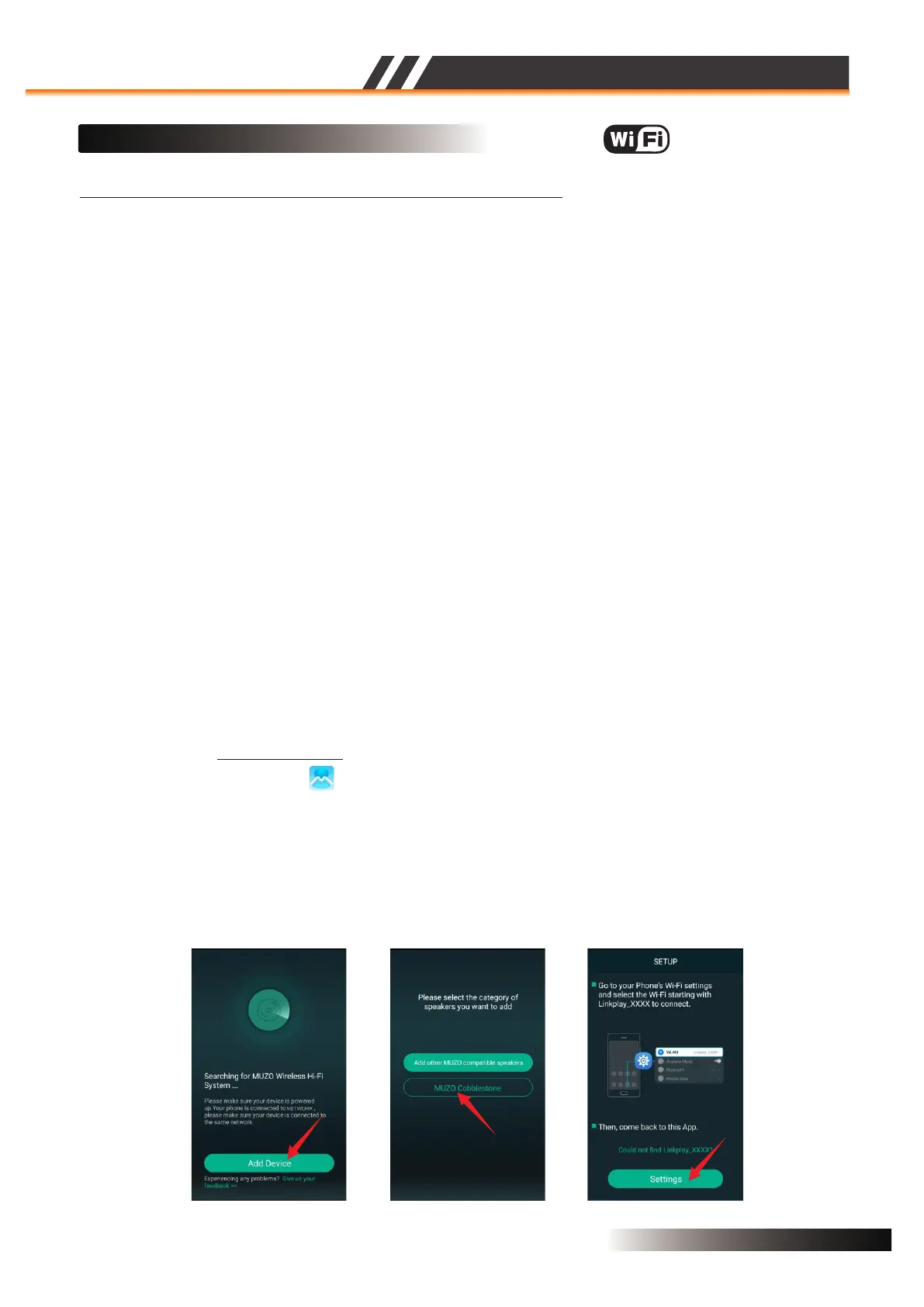
• Open the MUZO Player App and you will see the Figure 1.
• Select ‘Add Device’ at the bottom of the screen then you will see the Figure 2.
• Select ‘MUZO Cobblestone’ then you will see the Figure 3.
MUZO Pl ayer
Figure 1 Figure 2 Figure 3
The Wi-Fi speaker’s Service Set Identifier(SSID) is: ex. “Linkplay_XXXX”
ACTIVE SPEAKER SERIES
2CH WIFI CEILING SPEAKER
Page 4


 To Next Page
 Loading...