MPC-325 SERIES OPERATION MANUAL – REV. 3.20F (20200303)
command return data (written in C/C++ and is easily
portable to Python, Java, C#, MATLAB script, etc.).
Minor version number as an integer (e.g., 15):
// “ret” is the array of bytes containing
// the ‘K’ command’s return data
unsigned char verbyte; // temp work byte
verbyte = ret[1]; // get minor ver. digits
// get 1’s digit & then get & add 10’s digit
int minver = (verbyte & 0x0F) +
((verbyte >>4 & 0x0F) * 10);
Major version number as an integer (e.g., 3):
verbyte = ret[2]; // get major ver. digits
int majver = (verbyte & 0x0F) +
((verbyte >>4 & 0x0F) * 10);
Complete (thousands) version as an integer (e.g., 315):
int majminver = majver * 100 + minver;
Complete version as a floating-point number (e.g., 3.15):
float version = majminver * .01;
16. ‘S’ Command’s Streaming Return Data for Current Position:
The Straight-Line Move (‘S’) command has two modes of
operation:
a. a CR is returned when the target position has been
reached (F’ (Off) command before the ‘S’ command
sequence), or
b. streaming positional data is returned while movement is
occurring, and then a CR once movement is complete
(‘O’ (On) command before the ‘S’ command sequence).
Positional data is streamed at every 1 micron of movement,
and the rate (data per second) depends on the ‘S’ command
speed level used. Each positional data block streamed consists
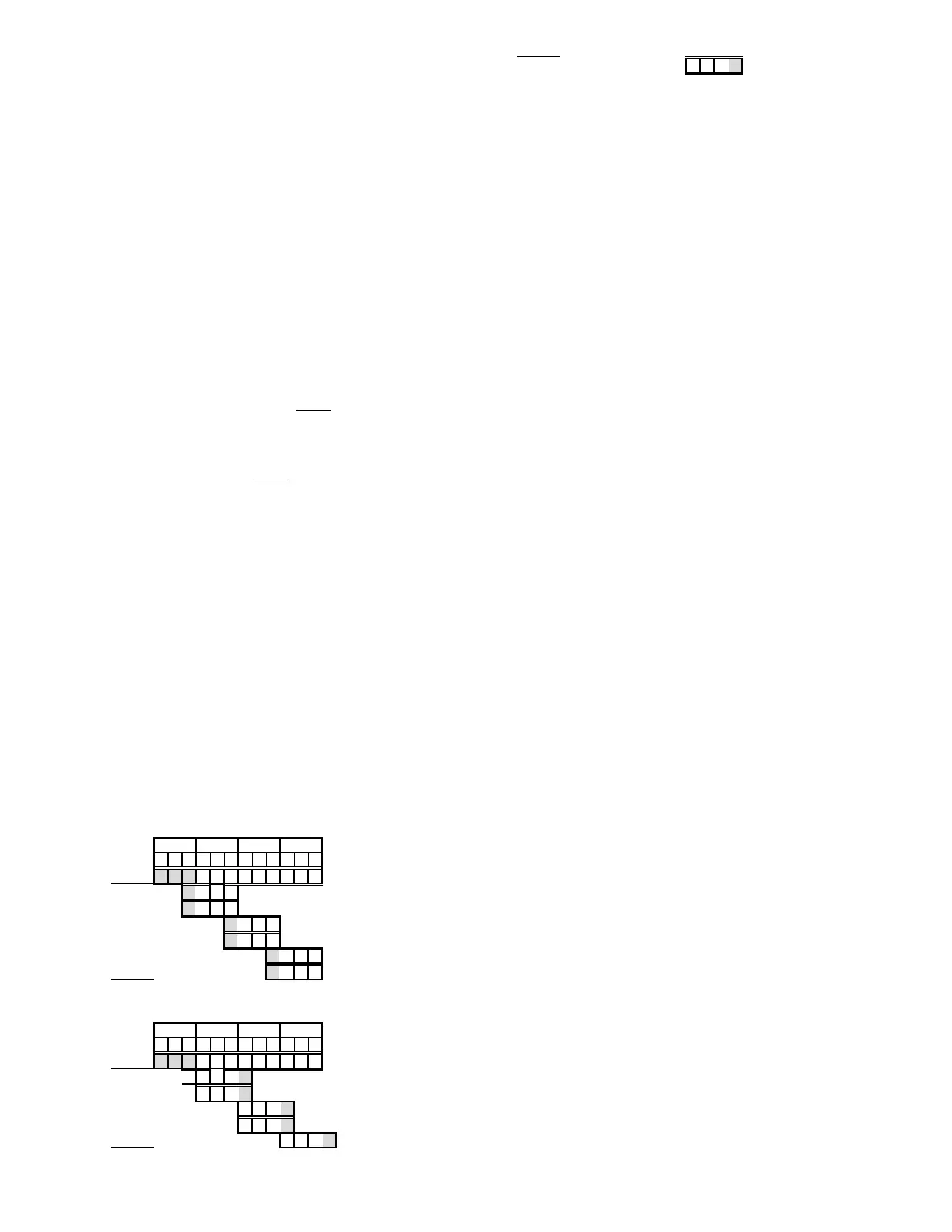
of 12 bytes:
1 The 1
st
three bytes each contains FF hexadecimal (255
decimal) as a data block signature,
2 the next 3 contains positional data for the X axis,
3 the penultimate is for Y, and
4 last for Z.
All positional data are in microsteps. Each 3-byte position
needs to be converted into 4-byte blocks by prepending a byte
containing 0, so that the resulting data (now 4 bytes) can be
treated programmatically as an unsigned 32-bit “long”
(C/C++) or “U32” (LabVIEW) data type. All positional data
streamed is in Little-Endian bit/byte order (Wintel), so
conversion to 32-bit longs will require bit-order reversal (byte
swapping) for Big-Endian platforms (e.g., LabVIEW). The
appropriate microstep-to-microns conversion factor is needed
according to the device type being moved (see
Microns/microsteps conversion factors (multipliers)
table).
Little-Endian bit/byte order environment:
pos[x]
cpxus
cpyus
cpzus
Big-Endian bit/byte order environment (“pos” is in Little-
Endian format):
pos[x]
cpxus
cpyus
The following C/C++ code snippets can be used to process
the streaming data.
Array for a streamed 12-byte block of data containing current
position
unsigned char pos[12];
32-bit variables for current position in microsteps, all
initialized to 0 to ensure MSB allows only positive values
long cpxus, cpyus, cpzus;
cpxus = cpyus = cpzus = 0;
Copy 24-bit (3-byte) position for each axis to 32-bit (4-byte)
equivalents. Use the byte position offsets shown in the
diagram above. (“le” means Little Endian; “be” means Big
Endian bit/byte order.)
If in Little-Endian environment (e.g., Windows, Intel-
MacOSX), copy all 3 U24 bytes for each axis to the respective
U32 variables.
memcpy(&cpxus[1], &pos[3], 3); // X
memcpy(&cpyus[1], &pos[6], 3); // Y
memcpy(&cpzus[1], &pos[9], 3); // Z
If in Big-Endian environment (e.g., legacy MacOS,
LabVIEW), copy U24 to U32 byte at a time (1
st
to 3
rd
, 2
nd
to
2
nd
, & 3
rd
to 1
st
). Note that “pos” is always in Little-Endian
bit/byte order.
memcpy(&cpxus[2], &pos[3], 1); // X
memcpy(&cpxus[1], &pos[4], 1);
memcpy(&cpxus[0], &pos[5], 1);
memcpy(&cpyus[2], &pos[6], 1); // Y
memcpy(&cpyus[1], &pos[7], 1);
memcpy(&cpyus[0], &pos[8], 1);
memcpy(&cpzus[2], &pos[9], 1); // Z
memcpy(&cpzus[1], &pos[10], 1);
memcpy(&cpzus[0], &pos[11], 1);
Ready to update UI with current position in microsteps using
32-bit integer values.
Convert microsteps to microns. Use double-precision
variables for current position in microns; initialize each to 0.
double cpxum, cpyum, cpzum;
cpxum = cpyum = cpzum = 0;
Microsteps-to-microns conversion factor (see “Microns /
microsteps conversion” table for appropriate factor)
double us2umCF = 0.0625;
Get microns from microsteps for each axis
cpxum = cpxus * us2umCF;
cpyum = cpyus * us2umCF;
cpzum = cpzus * us2umCF;
Ready to update UI with current position in microns using
double-precision values. Loop for next data block as desired
until streaming ends.
For LabVIEW, a 3-byte positional value for an axis can be
transferred into a byte array, and then into a U32 data type
via a byte-swap function to ensure 24-bit to 32-bit conversion
while making sure that no high-order value is misinterpreted
as a sign bit (there should never be a negative positional
value in the MPC-200). LabVIEW data types (e.g., U16, U32,
I32) are always in Big-Endian bit/byte order, while MPC-200
multibyte values are always transcieved in Little-Endian
bit/byte order.
A single completion indicator byte (ASCII CR) is returned
when streaming ends and target position has been reached.


 To Next Page