EasyManua.ls Logo

Suunto WING - User Manual

Suunto WING
20 pages
Print Icon
To Next Page IconTo Next Page
Loading...
SUUNTO WING
USER GUIDE
2023-10-09
Question and Answer IconNeed help?

Do you have a question about the Suunto WING and is the answer not in the manual?

Summary

Intended Use of Suunto Wing Headphones

Suunto Wing Safety Precautions

Getting Started with Suunto Wing

Suunto Wing Buttons Overview

Details the function of each button on the Suunto Wing headphones for various controls.

Suunto Wing Microphone System

Describes the dual microphone system and noise reduction technology for clear calls.

Suunto Wing Bluetooth Connectivity

Explains how to connect the headphones to Bluetooth-enabled devices for audio playback.

Pairing Suunto Wing Headphones

Provides step-by-step instructions for pairing the headphones with compatible devices via Bluetooth.

NFC Pairing for Suunto Wing

Details how to pair the headphones with a mobile phone using NFC technology.

Using the Suunto App with Headphones

Explains how to pair and use the Suunto app to customize headphone settings and features.

Wearing the Suunto Wing Headphones

Offers guidance on how to properly wear the bone conduction headphones for optimal fit and comfort.

Suunto Wing Features and Functions

Suunto Wing Head Movement Control

Describes the hands-free operation using head gestures to control audio playback and calls.

Suunto Wing LED Indicator Lights

Explains the purpose and control of the LED lights for visibility and status indication.

Suunto Wing Sound Modes

Details the different sound modes available for various environments and user preferences.

Suunto Wing Voice Feedback

Explains how voice feedback from a Suunto watch can provide exercise information.

Dual Device Connection for Suunto Wing

Describes how to connect and manage two Bluetooth devices simultaneously with the headphones.

Suunto Wing Low Latency Mode

Explains the low latency mode for reduced audio delay, especially for video.

Suunto Wing Settings and Management

Suunto Wing Device Information

How to check device information, such as software version, via the Suunto app.

Updating Suunto Wing Software

Instructions on how to update the headphone's firmware via the Suunto app.

Resetting Suunto Wing Headphones

Steps to reset the headphones to factory settings, including data lost.

Suunto Wing Care and Support

Suunto Wing Handling Guidelines

Advice on handling the headphones carefully to prevent damage and ensure longevity.

Suunto Wing Battery and Charging

Details battery life, charging times, and how to charge the headphones using the provided cable.

Disposing of Suunto Wing

Guidance on proper disposal of the device as electronic waste according to regulations.

Suunto Wing Reference Information

Suunto Wing Compliance Details

Information on product safety and technical specifications, directing users to online resources.

Suunto Wing CE Declaration

States compliance with EU directives and provides a link to the declaration of conformity.

Overview

The Suunto Wing headphones are wireless Bluetooth® compatible headphones designed for outdoor sports, allowing users to safely and comfortably listen to music and make phone calls during exercises. They are intended for recreational use and should not be used in situations requiring special or full attention.

Usage Features:

The Suunto Wing headphones feature three buttons for controlling audio playback, volume adjustment, and phone calls.

  • Switching on/off: Keep the [+] button pressed for 3 seconds.
  • Listening to audio:
    • Press the multifunction button once to start or stop audio.
    • Press the multifunction button twice to skip to the next track.
    • Press the multifunction button three times to return to the previous track.
    • Press the [+] button to increase volume.
    • Press the [-] button to decrease volume.
    • Keep the multifunction button and the [+] button pressed simultaneously for 3 seconds to switch sound mode.
  • Making a phone call:
    • Press the multifunction button once to answer or decline a call.
    • Press the [+] button to increase volume.
    • Press the [-] button to decrease volume.
  • Adjusting settings when the device is on:
    • Keep the [-] button pressed for 3 seconds to switch the LED lights on.
    • Keep the [-] button pressed again for 3 seconds to switch between different light modes.
    • Keep the multifunction button and the [–] button pressed simultaneously for 3 seconds to enable Head Movement Control.
    • Keep the [+] and [–] buttons pressed simultaneously for 3 seconds to enter pairing mode.
    • In pairing mode, keep the multifunction button and the [+] button pressed simultaneously for 3 seconds to enable dual device connection.

The headphones are equipped with dual microphones and clear voice call (cVc) noise reduction technology, ensuring good voice quality even in noisy or windy conditions.

Bluetooth Connectivity and Pairing:

Suunto Wing headphones communicate with compatible devices via Bluetooth. They can be paired with any Bluetooth audio device like mobile phones, smartwatches, or tablets.

  • If Suunto Wing is not switched on:
    1. Keep the [+] button pressed for 3 seconds to switch on, then continue holding for 2 more seconds to enter pairing mode (red LED lights blink).
    2. Enable Bluetooth on the compatible device.
    3. Find "Suunto Wing" in the list of nearby devices and pair.
  • If Suunto Wing is already on:
    1. Keep the [+] and [–] buttons pressed simultaneously for 3 seconds to enter pairing mode (red LED lights blink).
    2. Enable Bluetooth on the compatible device.
    3. Find "Suunto Wing" in the list of nearby devices and pair.
  • Near-field communication (NFC): When the headphones are on, place the left side with the NFC logo near the NFC chip of a compatible mobile phone. A popup message will appear to initiate pairing.
  • Dual device connection: The headphones can connect to two Bluetooth devices simultaneously. This allows for easy switching between devices, for example, listening to music from a computer and answering a call from a phone.
    • When headphones are switched off:
      1. Keep the [+] button pressed for 5 seconds to switch on and enter pairing mode.
      2. While red LED lights blink, keep the multifunction button and [+] button pressed simultaneously for 3 seconds to enable dual device connection.
      3. Pair with the first device via Bluetooth settings.
      4. Keep the [+] and [-] buttons pressed simultaneously for 3 seconds to enter pairing mode again.
      5. Pair with the second device via Bluetooth settings.
    • When headphones are already switched on and paired with a device:
      1. Enable dual device connection in the Suunto app.
      2. Keep the [+] and [-] buttons pressed simultaneously for 3 seconds to enter pairing mode.
      3. Pair with the second device via Bluetooth settings.
      4. To reconnect the first device, go to its Bluetooth settings or restart the headphones.

Suunto App Integration:

The Suunto app enhances the Suunto Wing experience, allowing users to adjust Head Movement Control, sound mode, light mode, and other settings.

  1. Pair Suunto Wing with your mobile device.
  2. Download and install the Suunto app.
  3. Start the Suunto app.
  4. The app automatically connects to the headphones.
  5. Access the headphones menu in your profile to adjust settings.

Wearing the Headphones:

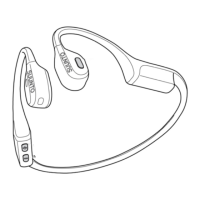
Suunto Wing headphones are bone conduction, open-ear style, allowing users to hear surroundings while listening to audio. For proper use, place the headphones at the back of the head, with hooks on the ears and transducers in front of the ears, keeping the back parallel to the ground. They are lightweight and stable, suitable for various activities and can be worn with helmets or hats. Earplugs are included for better acoustic experience in noisy conditions.

Head Movement Control:

This hands-free function allows users to switch audio tracks and answer/decline calls by nodding and shaking their head.

  • Activation: Activate in the Suunto app or by pressing the multifunction button and the [-] button simultaneously for 3 seconds.
  • Music control: Shake your head twice to switch to the next track.
  • Call control: Nod twice to answer an incoming call or shake your head twice to decline it.
  • Note: Ensure head movements are sufficiently large and completed within 1 second. Allow at least 5 seconds between operations. This feature may cause false triggering during exercise and increases battery consumption by about 15%. It is intended for auxiliary operation, and users should prioritize safety and manual control for critical actions.

LED Lights:

Red LED lights on the sides enhance visibility in darker conditions.

  • Control: Turn on/off or switch between static and blinking modes via the Suunto app or by long-pressing the [-] button.
  • Note: LED lights do not replace professional protective equipment. Visibility may be affected by environmental factors. They increase battery consumption by about 50%. A protective coating on the lights may wear off over time, which is normal and does not affect quality.

Sound Mode:

Users can choose between a normal sound mode for everyday use and light exercises, and an outdoor sound mode with higher volume for outdoor training and noisy conditions.

  • Switching: While listening to audio, keep the multifunction button and the [+] button pressed simultaneously for 3 seconds. Can also be changed in the Suunto app.
  • Note: Noise may occur at high volume levels. Prolonged use at high volumes can cause hearing damage and sound distortion. Wearing headphones may impact awareness of surroundings; prioritize safety.

Voice Feedback:

With a voice feedback capable Suunto watch, users can receive valuable information during exercise from their phone, providing progress updates and indicators.

  • Activation on watch before exercise:
    1. Scroll down to "Voice feedback" and select.
    2. Toggle "Voice feedback from app" on.
    3. Select desired voice feedback options.
    4. Ensure headphones are on and paired with the Suunto app.
    5. Start exercise.
  • Activation on watch during exercise:
    1. Press the upper button to pause.
    2. Select "Options," then "Voice feedback."
    3. Toggle "Voice feedback from app" on.
    4. Select desired voice feedback options.
    5. Ensure headphones are on and paired with the Suunto app.
    6. Resume exercise.

Low Latency Mode:

This mode reduces sound delay when listening to audio or watching video.

  • Note: Requires the compatible device to support APTX Adaptive Bluetooth audio. After pairing, switch the audio format to APTX Adaptive in the device's Bluetooth settings. Some devices may require separate activation of low latency mode. The effect may vary based on device model, system version, app, and content type.

Maintenance Features:

Device Info and Software Updates:

  • Device info: Check software version and other details in the Suunto app.
  • Software updates: Updates add improvements. Headphones must be connected to the Suunto app and have at least 20% battery. Internet connection is required to download updates. A popup will offer updates when available. Keep headphones connected during the process.

Resetting the Headphones:

To delete all settings, reset the product. While charging, keep the multifunction button pressed for 5 seconds. The red LED lights will blink twice, and a sound will play to confirm the reset.

  • Note: Resetting deletes Bluetooth pairing records, requiring re-pairing for future use.

Handling Guidelines:

  • Handle with care; avoid knocking or dropping.
  • Do not store under heavy items to prevent deformation.
  • Resistant to sweat and rain, but avoid prolonged soaking.
  • Clean with a soft dry cloth, paying attention to microphones, buttons, and charger pins.
  • Normally, no servicing is required.
  • Use only original Suunto accessories; damage from non-original accessories is not covered by warranty.

Battery and Charging:

Battery performance varies with usage and conditions (e.g., low temperatures reduce duration). Rechargeable battery capacity decreases over time.

  • Charging time: Fully charged in one hour, providing up to 10 hours of music.
  • Low battery: Alarm tone every 5 minutes and blinking red LED lights when battery is below 5%.
  • Battery status: Check in the Suunto app when connected.
  • Charging methods: Use the supplied USB cable or portable power bank.
    • USB cable: Connect the magnetic end to the charging port. Headphones switch off automatically when charging starts. LED lights are on during charging and turn off when fully charged.
    • Power bank: Included in the package, offers an additional 20 hours of battery life. Charge the power bank with a USB-C cable (not included). Check power bank battery status by pressing the button on the front (lights blink, each representing 25% capacity). To charge headphones, insert them into the holes on top of the power bank. Headphones switch off automatically. LED lights on headphones turn on, and power bank lights blink for one minute. LED lights on headphones turn off when fully charged.
  • Note: Ensure charging ports are in contact for charging to begin (lights on headphones and blinking lights on power bank confirm contact).
  • Safety: Before charging, ensure charging ports of both headphones and power bank are free from residual liquid, as liquid can cause damage. Do not charge wet headphones to prevent fire or electrical shock.

Disposal:

Dispose of the device according to local regulations for electronic waste. Do not discard in general garbage. Return to the nearest Suunto dealer if desired.

Suunto WING Specifications

General IconGeneral
BacklightYes
Control typeButtons
Headset typeBinaural
Product typeHeadset
Product colorBlack, Red
Wearing styleEar-hook
Volume controlButton
Control unit typeOn-ear control unit
Recommended usageSports
Protection featuresDust resistant, Sweat resistant, Water resistant
International Protection (IP) codeIP67
MaterialSilicone, Titanium
Battery typeBuilt-in battery
Battery recharge time1 h
Continuous audio playback time10 h
Operating temperature (T-T)-20 - 55 °C
Wireless range10 m
Bluetooth profilesA2DP, AVRCP, HFP, HSP
Connectivity technologyWireless
Impedance6 Ω
Ear couplingBone conduction
Headphone frequency20 - 20000 Hz
Headphone sensitivity117 dB
Total Harmonic Distortion (THD)5 %
Microphone typeBuilt-in
Microphone frequency100 - 10000 Hz
Microphone sensitivity-38 dB
Weight and Dimensions IconWeight and Dimensions
Depth126.5 mm
Width102.5 mm
Height46.5 mm
Weight33 g

Videos

How to Enter Pairing Mode on SUUNTO Wing Open-Ear

How to Pair SUUNTO Wing Open-Ear With Android

How to Pair SUUNTO Wing Open-Ear With iOS Device

How to Pair SUUNTO Wing Open-Ear With PC

How to Pair SUUNTO Wing Open-Ear With MacBook

How to fix bluetooth pairing issues on SUUNTO Wing Open-Ear