3. Getting started
3.1. Buttons
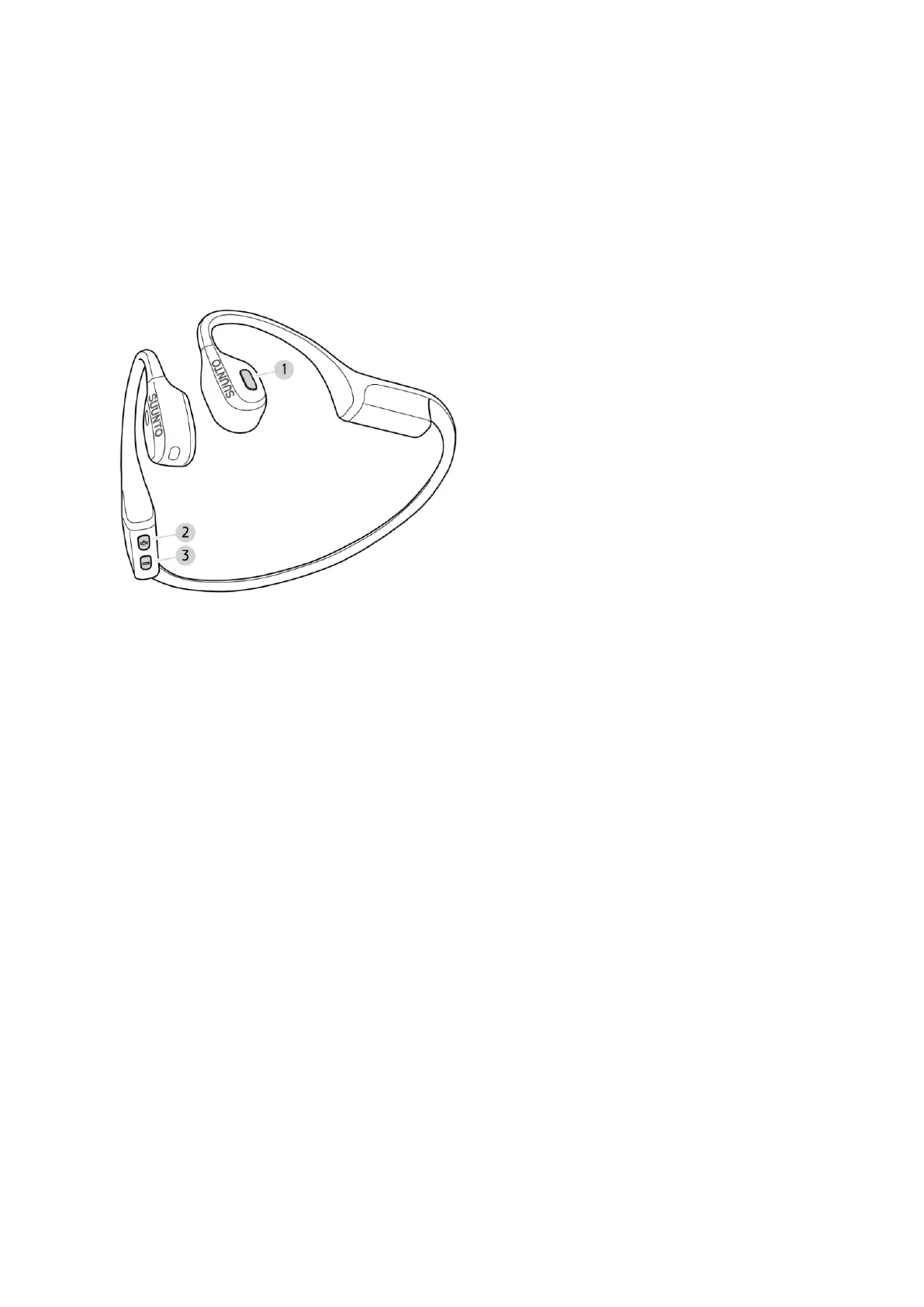
Suunto Wing has three buttons you can use to switch song, adjust volume and answer or
decline phone calls.
1. multifunction button
2. [+] and power button
3. [–] button
Switching
on/o the device
•
keep the [+] button pressed for 3 seconds to switch the device on or
o
Listening to audio
•
press the multifunction button once to start or stop playing the audio
•
press the multifunction button twice to skip to the next track
•
press the multifunction button three times to return to the previous track
•
press the [+] button to increase volume
•
press the [–] button to decrease volume
•
keep the multifunction button and the [+] button pressed simultaneously for 3 seconds to
switch sound mode
Making a phone call
•
press the multifunction button once to answer or decline a call
•
press the [+] button to increase volume
•
press the [–] button to decrease volume
Suunto Wing
6


 To Next Page