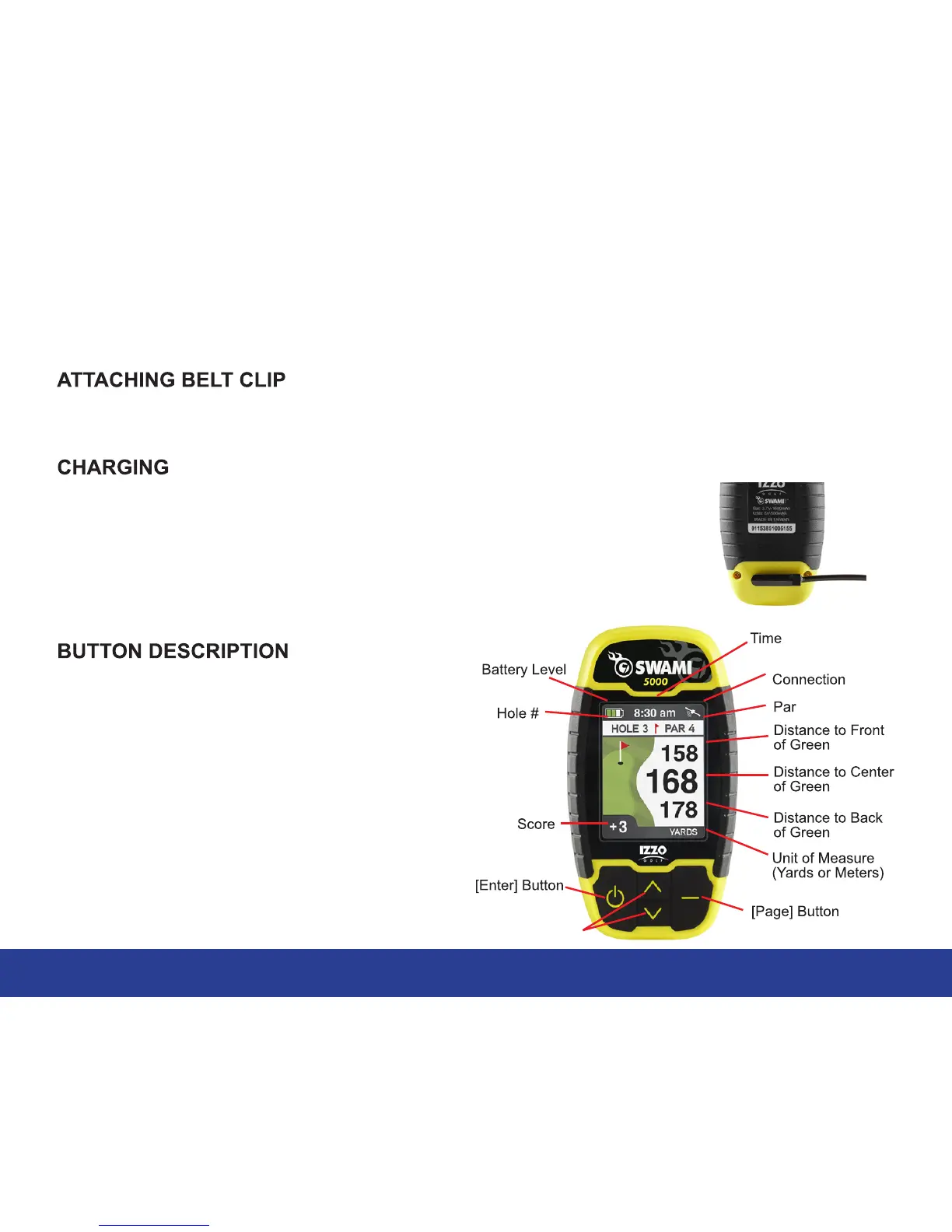
1. General Description of Hardware
1.1 Screen Display Description
3
General Description of Hardware
1. Attach the magnetic pins on the charging cord to the magnetic charging
port located on the back of the Swami. Be sure the pins are aligned, &
then insert the other end of the charging cord into a USB port or AC
adapter (not included).
2. The Swami 5000 needs about 7 hours to charge a fully depleted battery.
• [Enter] Button: Hold to power on, press
select options.
• [Page] Button: Press to toggle between
Green, Hazards, and Scorecard in Play Mode.
Press to return to the previous screen.
• [Up] Button: Press to scroll up, change holes.
• [Down] Button: Press to scroll down,
change holes.
Screw the belt clip into the threaded hole located on the back of the Swami. The belt clip should be
able to move/spin freely without loosening the screw.
[Up] & [Down] Buttons
Satellite



 To Next Page