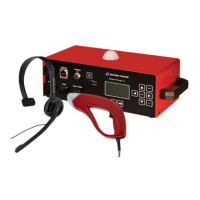
E-GUN / StartTime IV
P.O. Box 138, rue de l'Envers 1 Phone +41 32 488 36 11
2606 Corgémont, Switzerland Fax +41 32 488 36 09
www.swisstiming.com info@swisstiming.com
SWISS TIMING LTD
TABLE OF CONTENTS
1 INTRODUCTION........................................................................................................... 1
1.1 Concept .......................................................................................................................... 1
1.2 Rear panel ...................................................................................................................... 2
1.3 Start & Microphone unit (SMU) ....................................................................................... 3
1.4 E-Gun ............................................................................................................................. 4
2 INSTALLATION ............................................................................................................ 5
2.1 Connecting the installation ............................................................................................. 5
2.1.1 Connections overview ..................................................................................... 5
2.1.2 External loudspeakers connection ................................................................... 6
2.1.3 Extension cables ............................................................................................. 7
2.2 Operation ........................................................................................................................ 8
2.2.1 Stand Alone Operation with TIMER (Quantum, Chronos, ARES) ................... 8
2.2.2 Stand Alone Operation (PowerTime) ............................................................... 9
2.2.3 Independent Operation .................................................................................... 9
2.2.4 Audio levels ................................................................................................... 10
2.2.5 Battery level ................................................................................................... 10
3 GETTING STARTED .................................................................................................. 11
3.1 First use ........................................................................................................................ 11
3.2 Main Menu .................................................................................................................... 11
3.3 Exit Set Up ................................................................................................................... 12
3.4 Set Up menu ................................................................................................................ 12
3.4.1 Start Sound .................................................................................................... 12
3.4.2 False Sound .................................................................................................. 12
3.4.3 Flash Output .................................................................................................. 12
3.4.4 Start 1 Output (Main / Primary) ...................................................................... 12
3.4.5 Start 2 Output (Backup / Secondary) ............................................................. 12
3.4.6 Ready 1 Needed (Main / Primary) ................................................................. 13
3.4.7 Ready 2 needed (Backup / Secondary) ......................................................... 13
3.4.8 Recaller mode ............................................................................................... 13
3.4.9 Auto Ready .................................................................................................... 13


 To Next Page