9
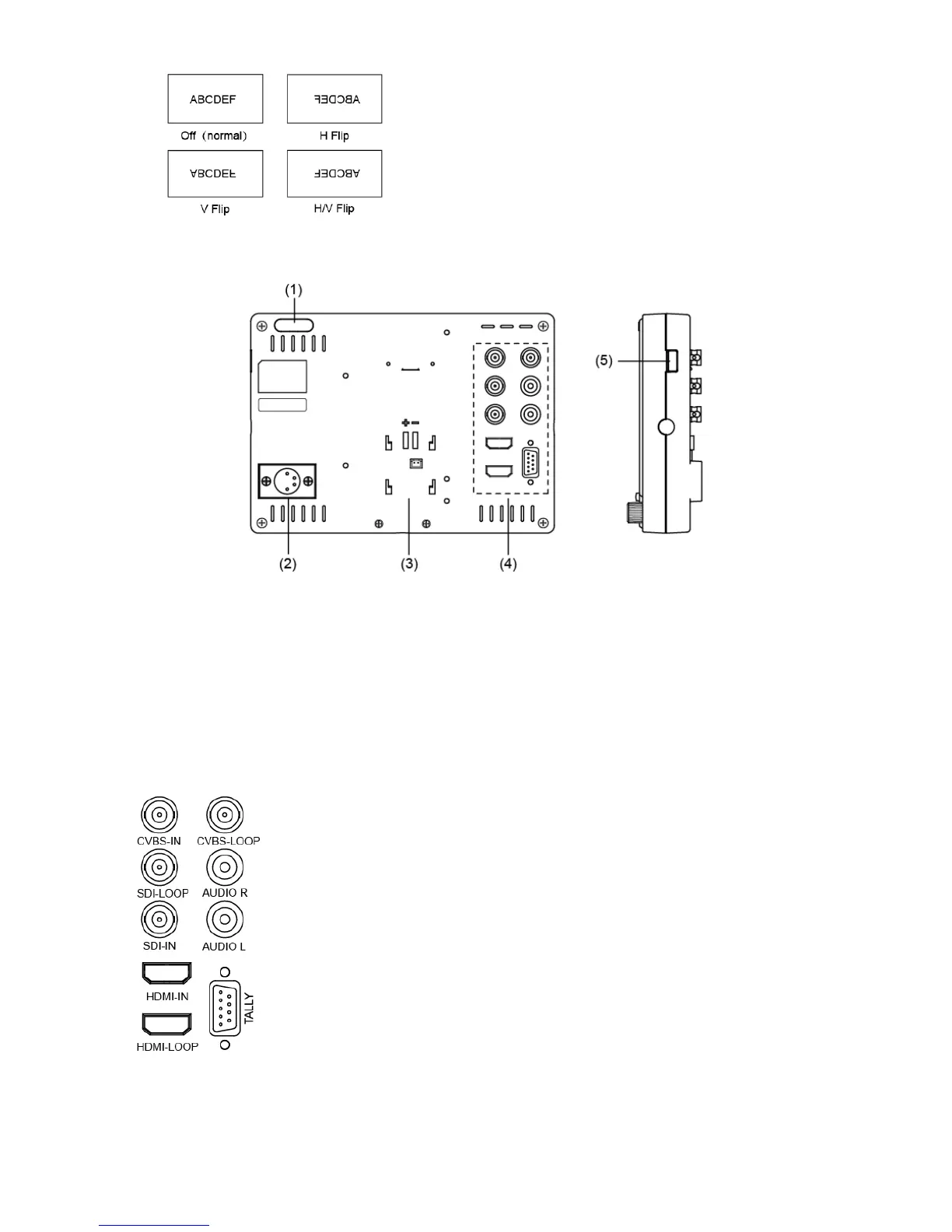
·Back Panel
⑴ TALLY Light: Red, Green and Yellow 3-color TALLY indicator
⑵ DC 12V IN: Connect with the provided DC12V 4-pin XLR power adapter, and support 6.5-17V wide
voltage Input (Pin 1: Negative, Pin 4: Positive)
⑶ Battery mount connector
Connect with SWIT S-7004 series quick release battery plate, and then mount corresponding
V-mount or DV batteries. See details in “Optional Battery Plate”.
⑷ Video Signal Interface
CVBS-IN: CVBS input (BNC connector)
CVBS-LOOP: CVBS loop through output (BNC connector)
SDI-LOOP: SDI loop through output (BNC connector)
SDI-IN: SDI input (BNC connector)
AUDIO L/R: analog audio output (RCA Female connector)
HDMI-IN: HDMI input (HDMI-A connector)
HDMI-LOOP: HDMI loop through output from HDMI-IN (HDMI-A connector)
TALLY: External Control Interface. Please see details in “5.GPI” under “Main
Menu”.
⑸ USB: For firmware upgrade



 To Next Page