16
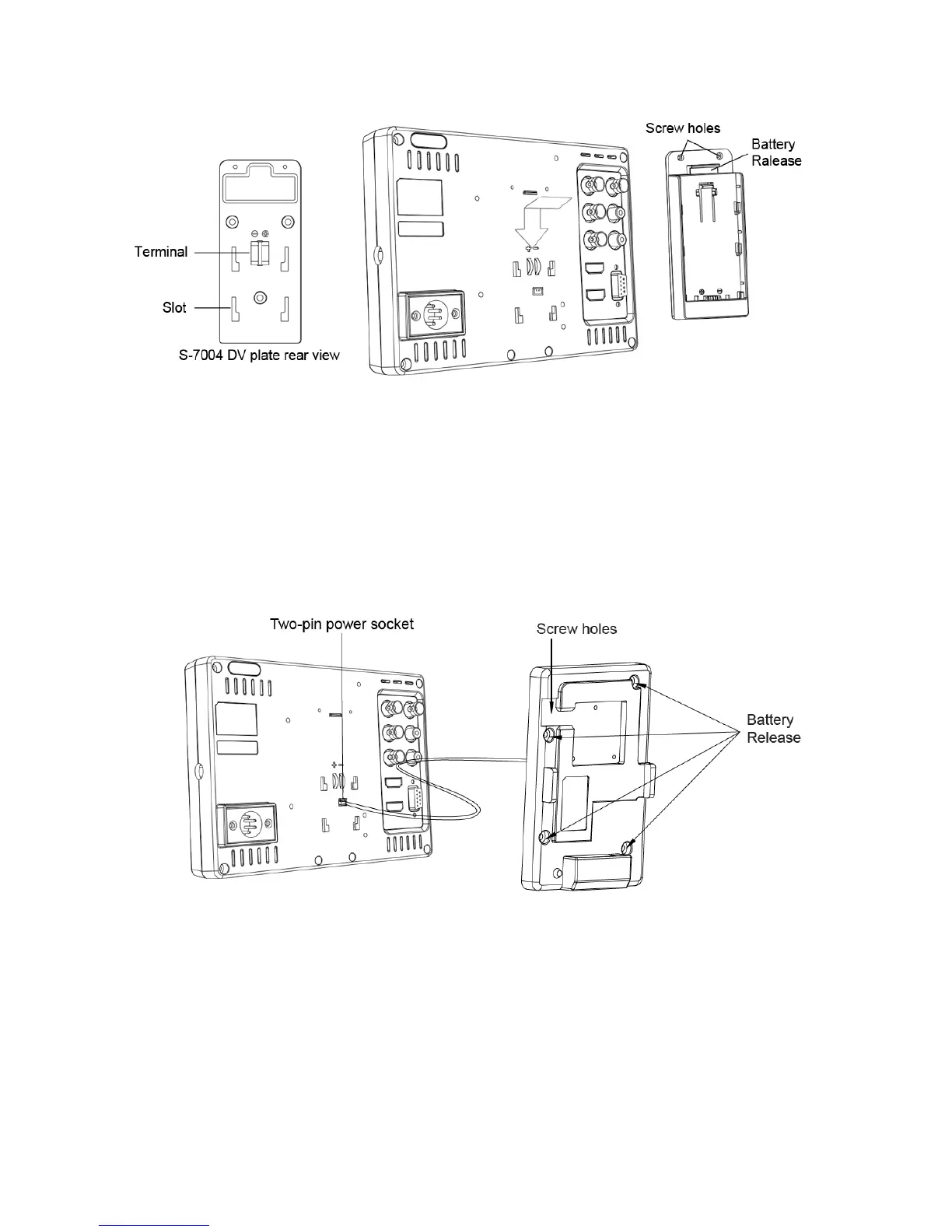
2. Installation of S-7004F/D/J/C/U/E/B/V/I snap-on type DV battery plate:
S-7004F/D/J/C/U/E/B/V/I DV plate is snap-on type, quick release and interchangeable. Please
follow the instructions to install:
(1) Please make sure the power terminals are clean and in well condition before use.
(2) Align the S-7004 DV plates slots to the bolts of the monitor rear panel, and press tightly in.
(3) Fix the S-7004 DV plates by provided screws on the top side.
(4) Mount the corresponding battery to S-7004 DV plate to power the monitor.
(5) To release the battery, press the battery release button to take out the battery
To use Gold mount or V-mount battery, please install the S-7004A/S plate as following
instructions:
(1) Please make sure the power terminals are clean and in well condition before use.
(2) Connect the wire of S-7004A/S to the 2-pin DC socket.
(3) Align the S-7004A/S screw holes to the bolts of the monitor rear panel.
(S-7004A Gold mount plate need a spare bedding between the monitor and plate)
(4) Fix the S-7004A/S mount by provided screws.
(5) Mount Gold mount / V-mount battery to S-7004A/S to power the monitor.
(6) Press the battery release to take down the battery



 To Next Page