6
Operation Instructions
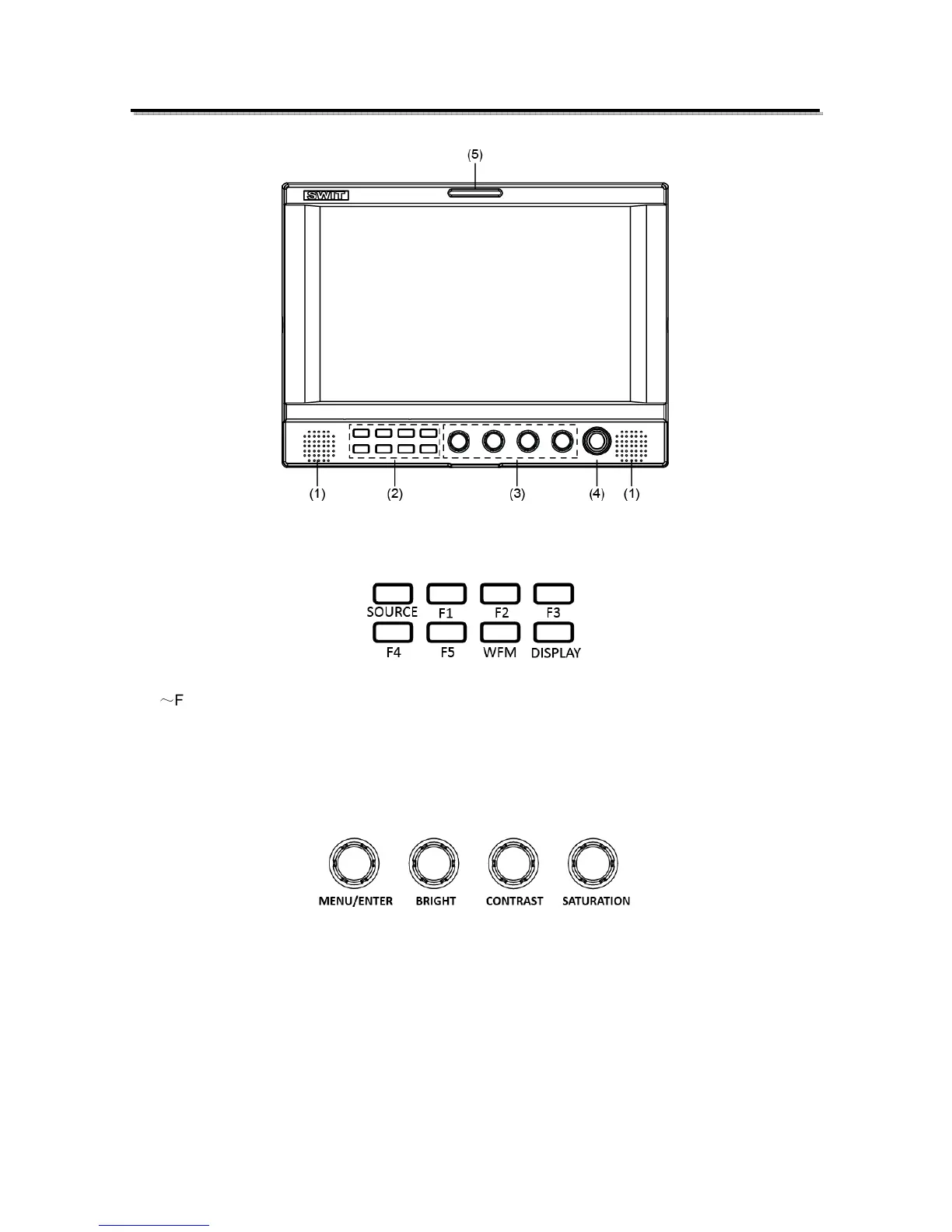
·Front Panel
⑴ Speaker: For SDI/HDMI embedded audio and analog audio monitoring.
(Will not work if earphone is plugged in)
⑵ Button
SOURCE: Press “SOURCE” to select SDI1, SDI2, HDMI, and CVBS signal input
F1
~
F5: User definable function keys. Please see details in “4. Function key” under “Main Menu”.
WFM: Waveform shortcut key, press “WFM” to quickly turn on or turn off the waveform. Please setup
parameters of waveform under “WFM” submenu.
DISPLAY: Press “DISPLAY” to turn on or turn off relevant status information, audio and video
waveform.
⑶ Rotary Knob
MENU/ENTER: When the menu is inactivated, presses “MENU/ENTE” to turn on the main menu;
Revolve “MENU/ENTER” to adjust settings or parameters, and press to apply;
When the menu is inactivated, revolve “MENU/ENTER” to adjust sound volume.
BRIGHT: 0-100 value adjustment and the default value is 50
CONTRAST: 0-100 value adjustment and the default value is 50
SATURATION: 0-100 value adjustment and the default value is 50
⑷ POWER: Power on/off
⑸ TALLY Light: Red, Green and Yellow 3-color TALLY indicator



 To Next Page