7
·OSD
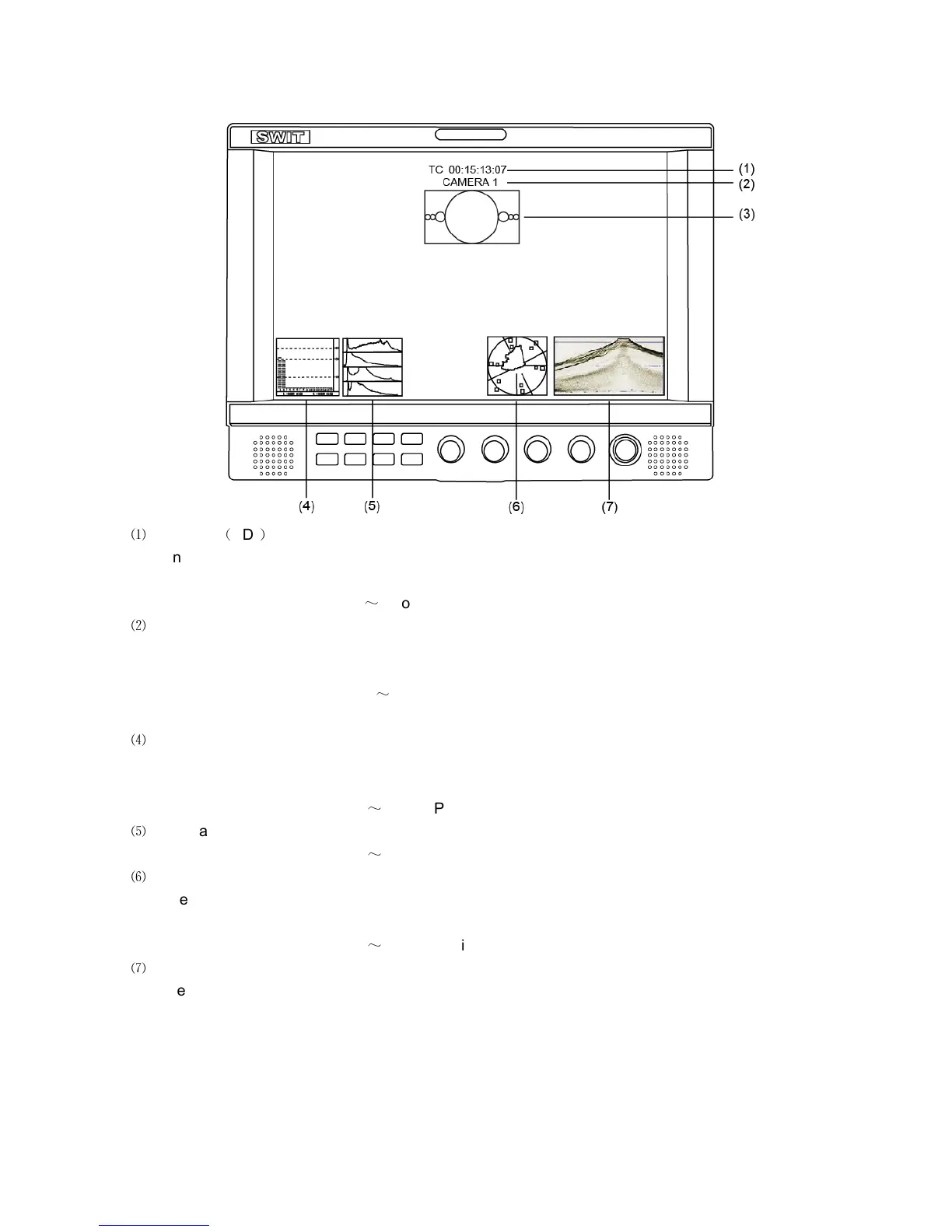
⑴
Timecode
(
SDI
)
Under SDI input, it can display Timecode. If no Timecode information is detected, it will be
displayed as “TC: UNLOCKED”.
User can set function keys F1
~
F5 or GPI pins as “Timecode” to turn on or off this function.
⑵
UMD
Set up the UMD under ‘UMD” submenu.
⑶ AFD (SDI)
User can set function keys F1
~
F5 or GPI pins as “AFD” to turn on or off this function. If no
relevant information is detected, it will be displayed as “AFD: UNLOCKED”.
⑷
Audio
Monitor the audio information. The relevant parameters like position, audio channels and
blending, etc can be changed under “Audio” submenu.
User can set function Keys F1
~
F5 or GPI pins as “Audio” to turn on or off this function.
⑸
Histogram
User can set function Keys F1
~
F5 or GPI pins as “Histogram” to turn on or off this function.
⑹
Vector
The relevant parameters like Vector position, Vector color and Vector blending, etc. can be
changed under “Vector” submenu.
User can set function Keys F1
~
F5 or GPI pins as “Vector” to turn on or off this function.
⑺
Waveform
Press “WFM” on the front panel to turn on/of this function. The relevant parameters like WFM
position, WFM color and WFM blending, etc can be changed under “Waveform” submenu.



 To Next Page