–
11
–
EN
0C28
–
11
–
CONNECTING TO EXTERNAL INPUT JACKS
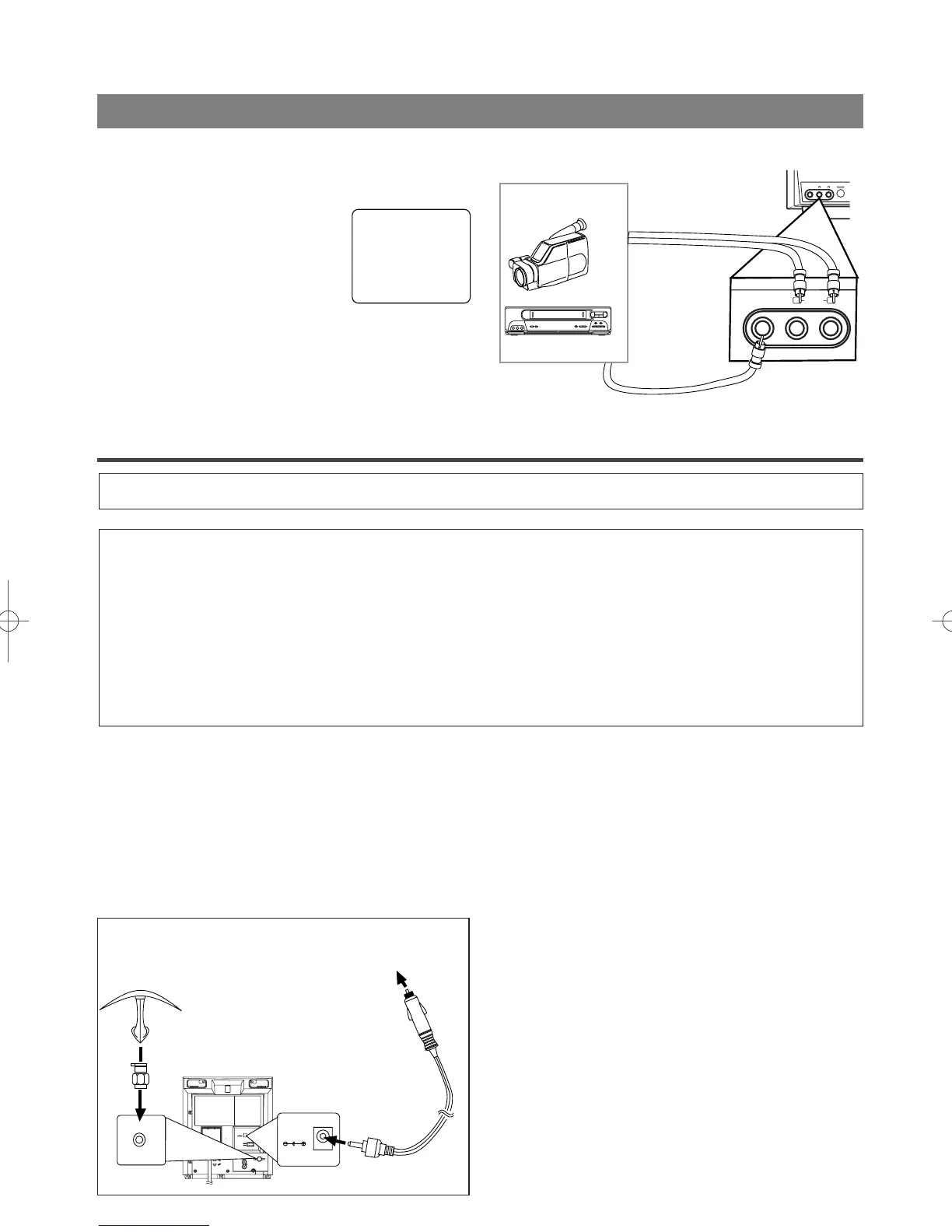
When you watch a program recorded on an another
source (VCR or video camera), use the audio/video
input jacks on the front of the TV/DVD.
Connect the audio/video output
jacks of another source to the
AUDIO L/R and VIDEO jacks of
this TV/DVD. Then press SELECT
until "AUX" appears on the screen.
NOTE:
•
When you connect a monaural VCR (another
source) to this TV/DVD, connect the Audio output
jack of the monaural VCR (another source) to the
AUDIO L jack of this TV/DVD. The audio will
output in both L and R channel equally.
AUX
POWER
AUDIO
L
VIDEO
R
VIDEO
L
AUDIO
R
[Another source]
To the audio
output jacks
Audio/Video
cables
(not supplied)
etc.
To the video
output jack
[Front of the TV/DVD]
[Fig. 6]
NOTES:
•
Be sure your vehicle has a 13.2-volt (12-volt), neg-
ative-ground electrical system.
•
Be sure you use only the supplied car battery cord.
Using another cord could damage the TV/DVD.
•
Be sure the socket is free of ashes and other debris.
•
Be sure to push the car battery cord’s plug com-
pletely into the cigarette-lighter socket.
•
Always unplug the car battery from the cigarette-
lighter socket before you unplug it from the
TV/DVD.
•
You must disconnect the car battery cord from the
TV/DVD before you can use the AC power.
•
Be sure to replace the fuse with only the same type,
6A, 250V.
WARNING: The driver should never watch the TV/DVD while operating a motor vehicle.
CAUTION:
•
When used in moving vehicle, be sure that the unit is secure at all the times to prevent injury.
Consult a professional installer.
•
If you use the TV/DVD with the vehicle’s engine off, recharge the vehicle’s battery after about
every 4 hours of use to prevent it from running down. After you finish using the TV/DVD be sure
you unplug the car-battery cord from the cigarette-lighter socket.
•
Do not use this TV/DVD while driving.
•
Do not leave this TV/DVD in a car.
•
This TV/DVD is not designed for use in a car.
AUDIO OUT
DC 13.2V
L
R
COAXIAL
ANT.
DC13.2V
ANT.
VHF/UHF Combination
Mobile Antenna
(Not supplied)
To the vehicle's
cigarette-lighter socket
Car battery cord
(Supplied)
1) The supplied indoor antenna is adequate when
your vehicle is stationary. For best reception on
the road, use a high-quality VHF/UHF mobile TV
antenna.
2) Attach the car battery cord to the DC13.2V(12V)
connector on the back of the TV/DVD. Then, con-
nect the other end to your vehicle’s cigarette-
lighter socket.
MOBILE CONNECTION
TD001.QX33 03.1.31 10:31 PM Page 11



 To Next Page