4-1 L3219DC
CABINET DISASSEMBLY INSTRUCTIONS
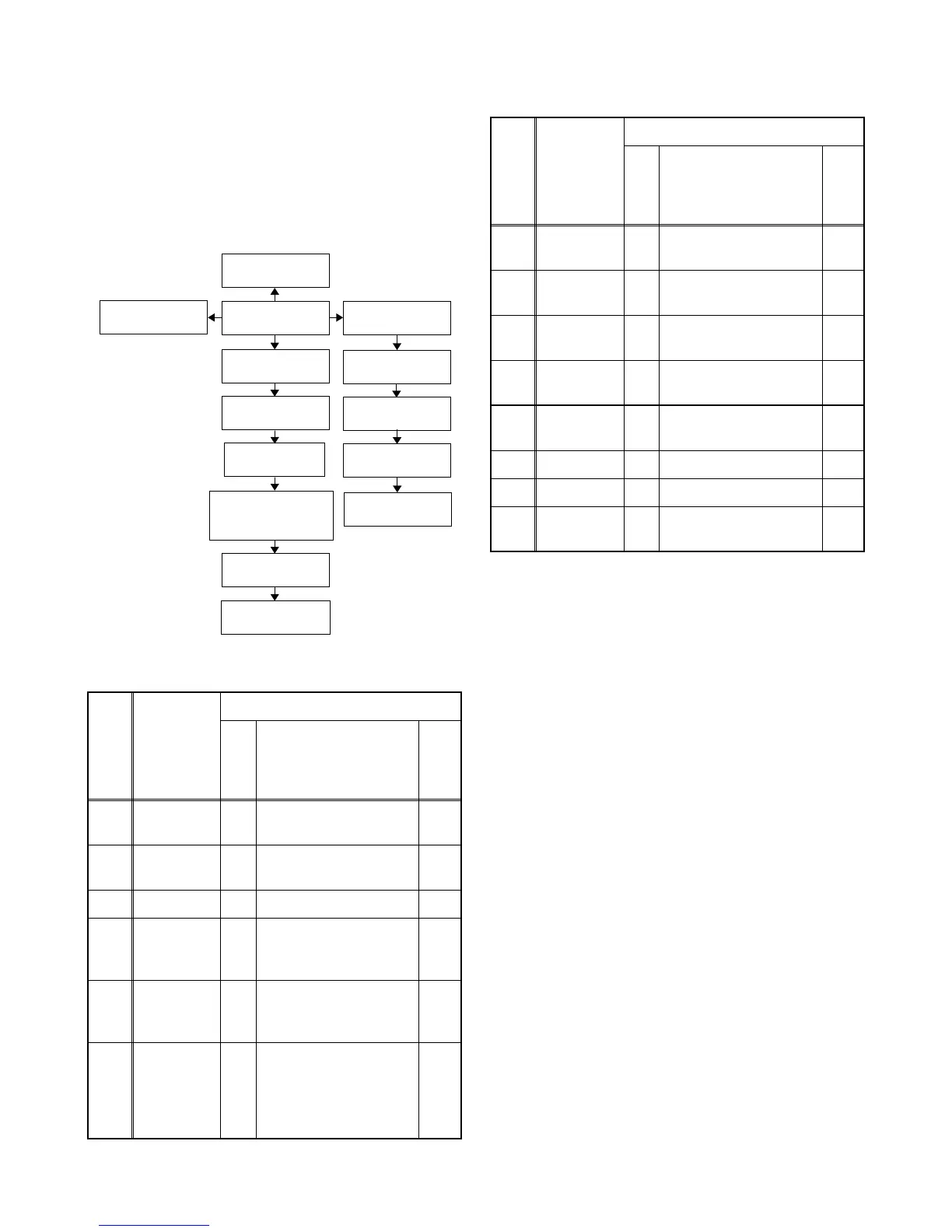
1. Disassembly Flowchart
This flowchart indicates the disassembly steps for the
cabinet parts, and the CBA in order to gain access to
item(s) to be serviced. When reassembling, follow the
steps in reverse order. Bend, route and dress the
cables as they were.
2. Disassembly Method
Note:
(1) Order of steps in procedure. When reassembling,
follow the steps in reverse order. These numbers
are also used as the Identification (location) No. of
parts in figures.
(2) Parts to be removed or installed.
(3) Fig. No. showing procedure of part location
(4) Identification of parts to be removed, unhooked,
unlocked, released, unplugged, unclamped, or
desoldered.
P = Spring, L = Locking Tab, S = Screw,
CN = Connector
* = Unhook, Unlock, Release, Unplug, or Desolder
e.g. 2(S-2) = two Screws (S-2),
2(L-2) = two Locking Tabs (L-2)
(5) Refer to the following "Reference Notes in the
Table."
Step/
Loc.
No.
Part
Removal
Fig.
No.
Remove/*Unhook/
Unlock/Release/
Unplug/Unclamp/
Desolder
Note
[1]
Rear
Cabinet
D1 8(S-1), 2(S-2), (S-3) ---
[2]
Tilt Stand
Assembly
D1 4(S-4) ---
[3] Jack Holder D2 3(S-5), (S-6) ---
[4]
Inverter
CBA
D2
D4
5(S-7), *CN450,
*CN460, *CN490,
*CLN411
---
[5] Main CBA
D2
D4
9(S-8), *CN101A,
*CN102A, *CN103A,
*CN801, *CN802
---
[6]
LCD Main
CBA Unit &
Liquid
Crystal
Panel Unit
D2
D4
13(S-9), *CN104,
*CN105
---
[4] Inverter CBA
[6] LCD Main CBA
Unit & Liquid Crystal
Panel Unit
[5] Main CBA
[1] Rear Cabinet
[7] Function CBA
[8] IR Sensor
CBA
[9] Speaker (s)
[3] Jack Holder
[2] Tilt Stand
Assembly
[10] Front Cabinet
[11] Stand Cover
[12] Arm Holder
[13] Sheet L, R
[14] Arm
Assembly
[7]
Function
CBA
D2
D4
4(S-10) ---
[8]
IR Sensor
CBA
D2
D4
(S-11) ---
[9] Speaker (s)
D2
D4
4(S-12), Speaker
Holder (s)
---
[10]
Front
Cabinet
D2 --------------- ---
[11]
Stand
Cover
D3 6(S-13) ---
[12] Arm Holder D3 2(S-14) ---
[13] Sheet L, R D3 --------------- ---
[14]
Arm
Assembly
D3 --------------- ---
↓
(1)
↓
(2)
↓
(3)
↓
(4)
↓
(5)
Step/
Loc.
No.
Part
Removal
Fig.
No.
Remove/*Unhook/
Unlock/Release/
Unplug/Unclamp/
Desolder
Note



 To Next Page