C. TV Rating
5
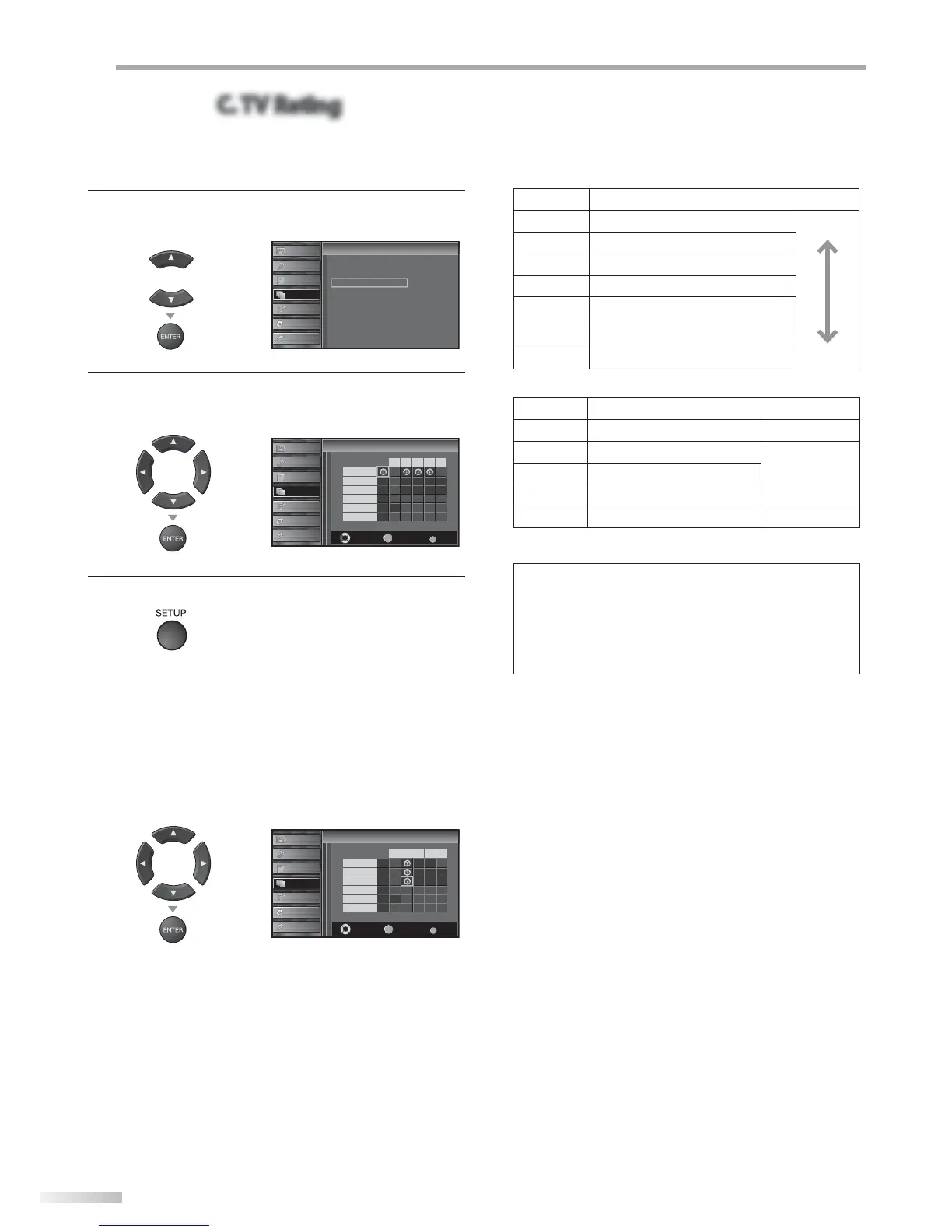
Use [Cursor K
/
L] to select “TV Rating”, then press
[ENTER].
or
Cannel Lock
MPAA Rating
TV Rating
Canadian English Rating
Canadian French Rating
Downloadable Rating
Clear Downloadable Rating
New Password
Child Lock
Child Lock
PICTURE
SOUND
CHANNEL
DETAIL
LANGUAGE
BLU-RAY
USB
6
Use [Cursor K
/
L
/
s
/
B
] to select the desired rating,
then press [ENTER] repeatedly to switch between
“View” and “Block”.
or
Select View/Block Back
BACK
ENTER
TV-MA
TV-14
TV-PG
TV-G
TV-Y7
TV-Y
FV
V S L D
TV Rating
TV Rating
PICTURE
SOUND
CHANNEL
DETAIL
LANGUAGE
BLU-RAY
USB
7
Press [SETUP] to exit.
To set the sub ratings
As for TV-MA, TV-14, TV-PG, or TV-Y7, you can further
set the sub ratings to block specific elements of
programming. To set the sub ratings, follow the step
below.
Use [Cursor K
/
L
/
s
/
B
] to select the desired rating,
then press [ENTER] repeatedly to switch between
“View” and “Block”.
or
Select View/Block Back
BACK
ENTER
TV-MA
TV-14
TV-PG
TV-G
TV-Y7
TV-Y
FV
V S L D
TV Rating
TV Rating
PICTURE
SOUND
CHANNEL
DETAIL
LANGUAGE
BLU-RAY
USB
Rating Category
TV-MA Mature audience only higher
TV-14 Unsuitable for children under 14
TV-PG Parental guidance suggested
TV-G General audience
TV-Y7
Appropriate for all children 7 and
older
TV-Y Appropriate for all children lower
Sub Rating Category Rating
FV Fantasy Violence TV-Y7
V Violence
TV-PG
TV-14
TV-MA
S Sexual Situation
L Coarse Language
D Suggestive Dialogue TV-PG, TV-14
Note:
• Blocked sub rating will appear beside the main rating
category in “TV Rating” menu.
• You cannot block a sub rating (D, L, S or V) if the main
rating is set to “View”.
• Changing the category to “Block” or “View” automatically
changes all its sub ratings to the same (“Block” or “View”).








 To Next Page