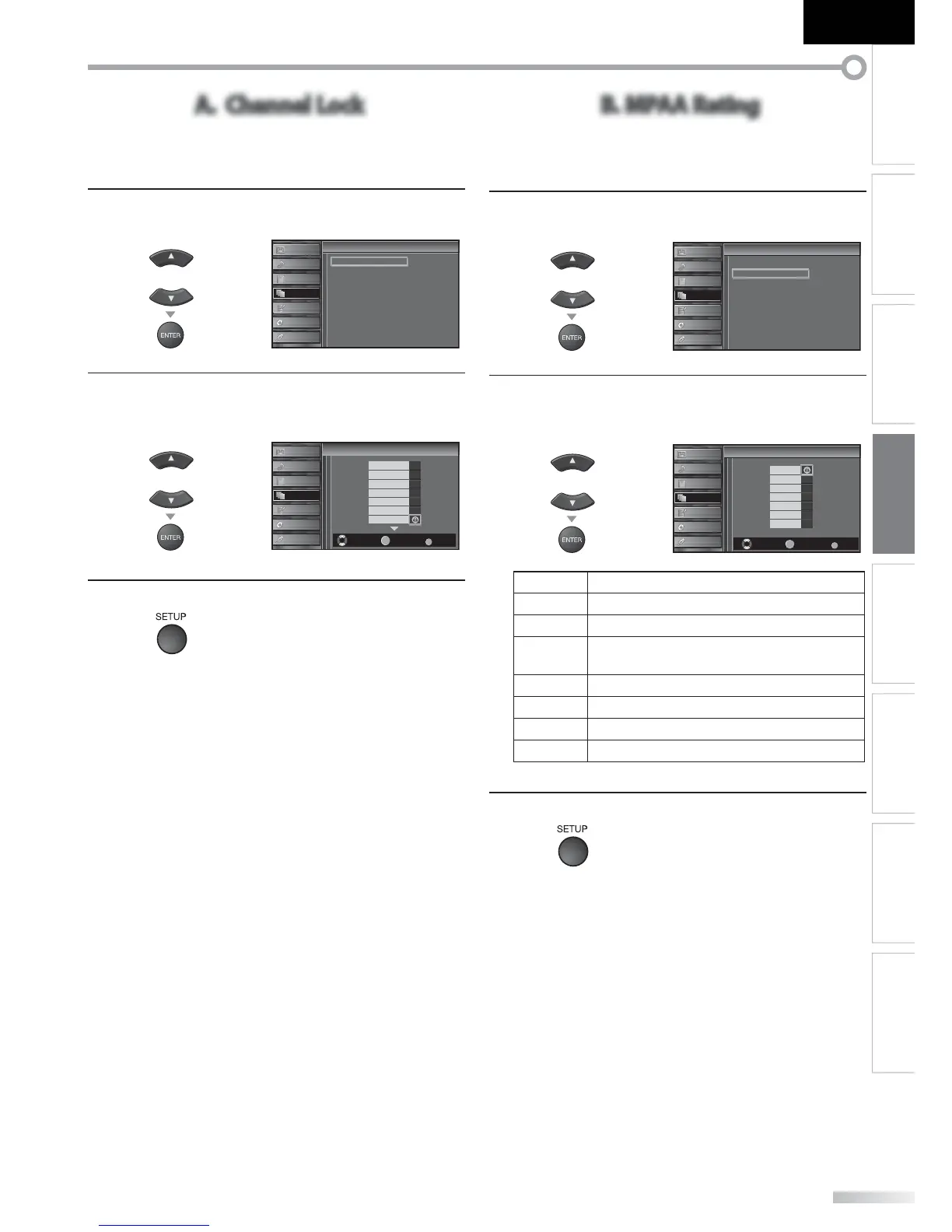
A. Channel Lock
Particular channels or external input modes can be invisible in this
function.
5
Use [Cursor K
/
L] to select “Channel Lock”, then press
[ENTER].
or
Cannel Lock
MPAA Rating
TV Rating
Canadian English Rating
Canadian French Rating
Downloadable Rating
Clear Downloadable Rating
New Password
Child Lock
Child Lock
PICTURE
SOUND
CHANNEL
DETAIL
LANGUAGE
BLU-RAY
USB
6
Use [Cursor K
/
L] to select the desired rating, then
press [ENTER] repeatedly to switch between “View”
and “Block”.
or
Select View/Block Back
BACK
ENTER
Channel Lock
Channel Lock
PICTURE
SOUND
CHANNEL
DETAIL
LANGUAGE
BLU-RAY
USB
Video 1
Video 2
Component
HDMI 1
HDMI 2
HDMI 3
11.1 DTV
7
Press [SETUP] to exit.
B. MPAA Rating
MPAA Rating is the rating system created by MPAA (Motion Picture
Association of America).
5
Use [Cursor K
/
L] to select “MPAA Rating”, then press
[ENTER].
or
Cannel Lock
MPAA Rating
TV Rating
Canadian English Rating
Canadian French Rating
Downloadable Rating
Clear Downloadable Rating
New Password
Child Lock
Child Lock
PICTURE
SOUND
CHANNEL
DETAIL
LANGUAGE
BLU-RAY
USB
6
Use [Cursor K
/
L] to select the desired rating, then
press [ENTER] repeatedly to switch between “View”
and “Block”.
or
Select View/Block Back
BACK
ENTER
X
NC-17
R
PG-13
PG
G
NR
MPAA Rating
MPAA Rating
PICTURE
SOUND
CHANNEL
DETAIL
LANGUAGE
BLU-RAY
USB
Rating Category
X Mature audience only
NC-17 No one under 17 admitted
R
Restricted; under 17 requires accompanying
parent or adult guardian
PG-13 Unsuitable for children under 13
PG Parental guidance suggested
G General audience
NR No rating
7
Press [SETUP] to exit.






 To Next Page