40
EN
O
PERATING BLU-RAY
Note:
• During the random playback, press [STOP C] once to set the
resume point, and then press [PLAY B] to resume random
playback from where [STOP C] was pressed (audio CD).
• To repeat the current track in the random mode, follow the
steps 1 and 2 in “Repeat Playback” on page 39 and select
“
Track”.
• To repeat the entire random selections, follow the steps 1
and 2 in “Repeat Playback” on page 39 and select “ All”.
• Playback from a desired track is not available during random
playback.
• Press [BACK] to switch to the program playback mode.
Programmed Playback
CD
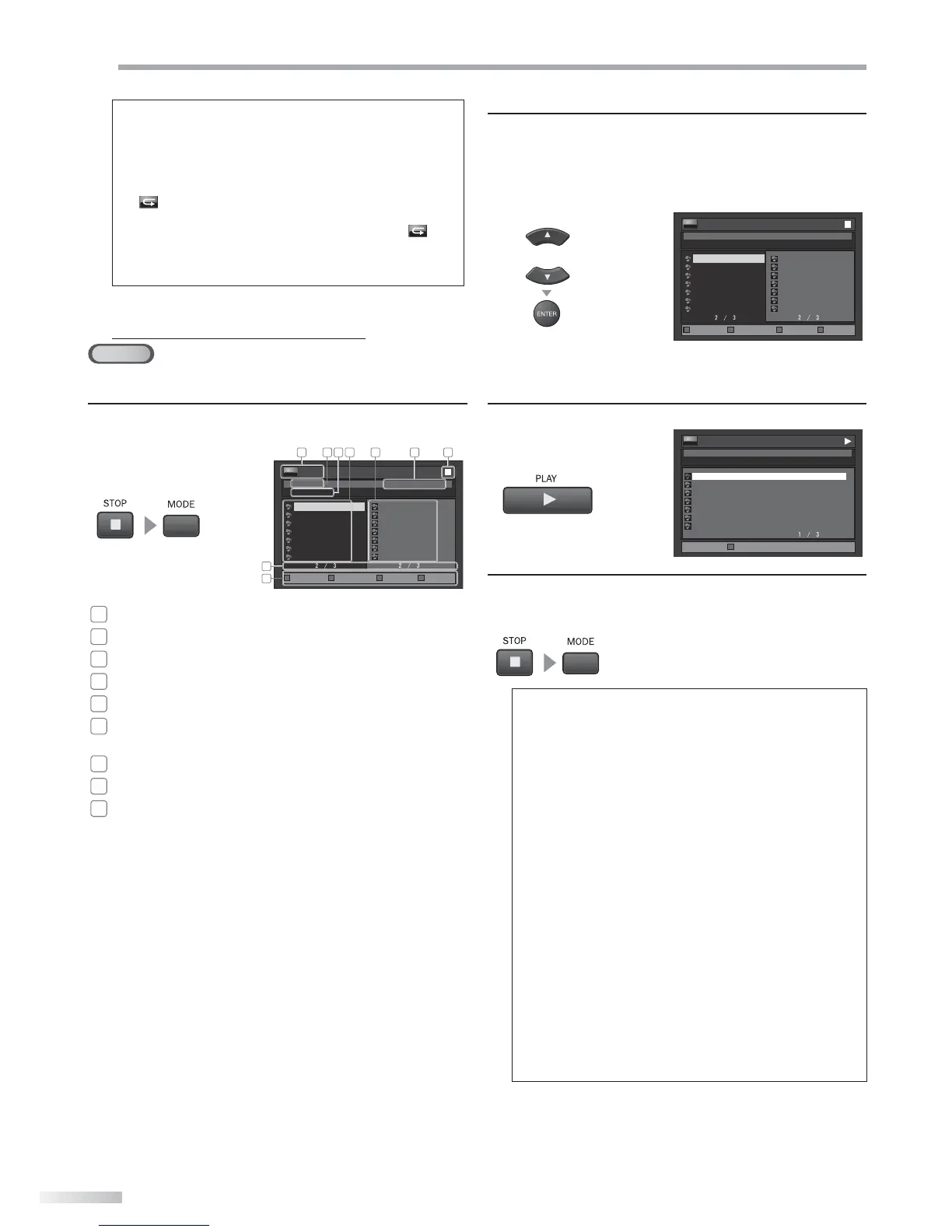
You may determine the order in which tracks will play back.
1
In stop mode, press [MODE] repeatedly until “Program”
menu appears.
0 : 26 : 24
CD_DA
0:36
1:14
0:45
0:50
0:53
0:20
0:54
8
9
10
11
12
13
14
1:14
0:50
1:14
0:50
0:53
0:54
0:36
2
4
9
11
12
14
8
- - / 16
1 732 4 5
8
6
9
TR
Page Down Page Prev Page NextPage Up
Program Total
1
audio CD
: Track information
2
“Program” will be displayed.
3
“CD-DA” will be displayed.
4
File list
: File list in the original order
5
Programmed list
: File list in the programmed order
6
Cumulative playback time of all tracks in the
programmed list
7
Playback status
8
Current page / Total page number
9
Operation guide
: Press [RED] to go to the previous
page in the le list.
Press [GREEN] to go to the next
page in the le list.
Press [BLUE] to go to the previous
page in the programmed list.
Press [YELLOW] to go to the next
page in the programmed list.
• The programmed tracks are displayed in the right
hand screen.
• Press [CLEAR] to erase the last track of the program.
• Use [Cursor K / L] to select “All Clear” at the bottom
of the list to erase all the tracks in the program.
2
Use [Cursor K / L] to select a desired track, then press
[ENTER] to store.
• Additional tracks may be on other screens. Use
[Cursor
K / L
] to go on to the next / previous pages.
• Repeat this step until you have selected all the tracks
you wish to play back in the program.
or
0 : 26 : 24
CD_DA
0:36
1:14
0:45
0:50
0:53
0:20
0:54
8
9
10
11
12
13
14
1:14
0:50
1:14
0:50
0:53
0:54
0:36
2
4
9
11
12
14
8
- - / 16
TR
Page Down Page Prev Page NextPage Up
Program Total
• Up to 99 tracks can be ordered.
• If 8 or more tracks were in a program, use
[BLUE/YELLOW] to see all the tracks.
3
Press [PLAY B] to start programmed playback.
TR
0:26:24
CD_DA
2/16
0:01:05
1:14
0:50
1:14
0:50
0:53
0:54
0:36
2
4
9
11
12
14
8
Page Down
Program Total
4
To exit from the programmed playback mode, press
[STOP C] first, then press [MODE] repeatedly until “File
List” appears.
Note:
• While a program is being played back, [STOP C] works as
follows:
- Pressing [STOP C] once: The track will be in the resume
mode. Next time you press [PLAY B], the playback
will resume from the point where it is stopped in the
programmed playback.
- During program playback, press [STOP C] twice to display
the program screen. To go back to the normal program
playback, press [BACK] to exit from the program screen,
then press [PLAY B].
• To repeat the current track in the program, press [REPEAT]
repeatedly until “ Track” appears during playback.
• To repeat the entire program, press [REPEAT] repeatedly
until “All” appears during playback.
• The program will be cleared when;
- the unit is turned into the standby mode.
- the media mode is switched to the TV mode.
- the disc is removed.
• You cannot use [the Number buttons] to select another
track during programmed playback. Use [RED/GREEN] to
select other tracks in the program.
• You cannot combine random playback with programmed
playback.
• You cannot alter a programmed order during playback.
• You can start programmed playback only while in “Program”
menu.








 To Next Page