B
LU-RAY SETTING
50
EN
Parental Setting
Parental setting prevents your children from viewing inappropriate
materials. (password protected.) Playback will stop if the ratings exceed
the levels you set.
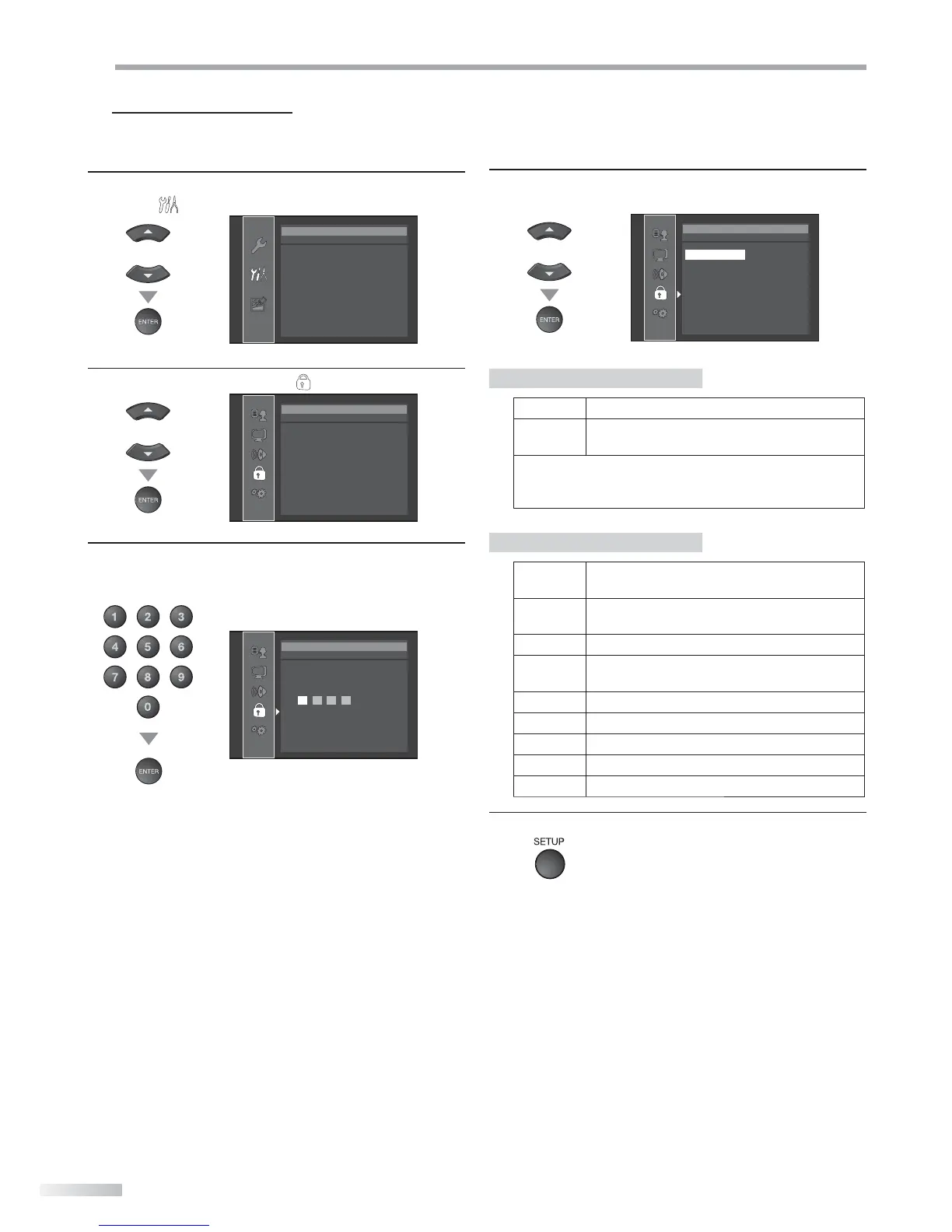
3
Follow steps 1-2 on page 47, then use [Cursor
K
/
L
] to
select “ ”, then press [ENTER].
or
Custom
Language
Video
Audio
Parental
Others
4
Use [Cursor
K
/
L
] to select “ ”, then press [ENTER].
or
Parental
BD Rating Level 0
DVD Rating Level All
5
Use [the Number buttons] to enter the 4-digit
numbers (except for the default password 4737) for
your password, then press [ENTER].
Parental
Password
Please enter a 4 - digit password.
• If you have set password already, use
[the Number buttons] to enter the current 4-digit
password.
• If you forget the password, enter [4], [7], [3], [7].
The password will be cleared and “BD Rating Level”,
“DVD Rating Level” will be set to “0”, “All” accordingly.
6
Use [Cursor
K
/
L
] to select the desired item, then press
[ENTER].
or
Parental
BD Rating Level 0
DVD Rating Level All
Password Change
BD Rating Level
All To release the limitation.
Age
Setting
To set the age limitation.
• After selecting Age Setting, use [the Number
buttons] to enter the age from 0 – 254. (e.g. for
age 15, press [0], [1], [5]).
DVD Rating Level
All
Parental Control is inactive; all discs can
played back.
8 [Adult]
DVD software of any grades (adult / general /
children) can be played back.
7 [NC-17] No one under 18 admitted.
6 [R]
Restricted; under 18 requires accompanying
parent or adult guardian.
5 [PGR] Parental guidance recommended.
4 [PG-13] Unsuitable for children under 13.
3 [PG] Parental guidance suggested.
2 [G] General audience.
1
[Kid Safe]
Suitable for children.
7
Press [SETUP] to exit.










 To Next Page