47
EN
INTRODUCTION
PREPARATION
WATCHING TV
OPTIONAL SETTING
OPERATING BLU-RAY
BLU-RAY SETTING
TROUBLESHOOTING
INFORMATION
B
LU-RAY SETTING
EnglishEspañol Français
Blu-ray Setup Menu
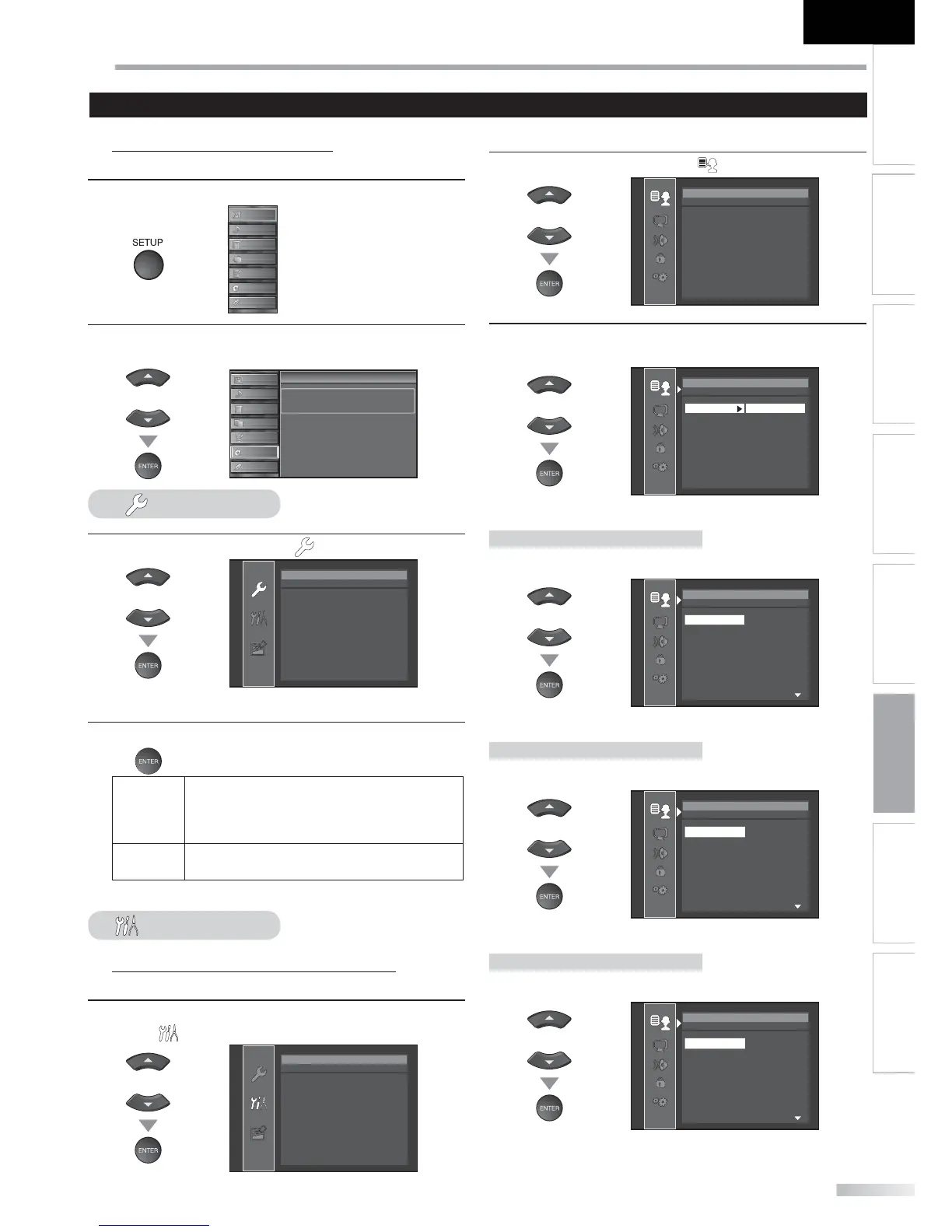
You can change the desired language when playing back the disc.
1
Press [SETUP] to display the main menu.
PICTURE
SOUND
CHANNEL
DETAIL
LANGUAGE
BLU-RAY
USB
2
Use [Cursor
K
/
L
] to select “BLU-RAY”, then press
[ENTER].
or
PICTURE
SOUND
CHANNEL
DETAIL
LANGUAGE
BLU-RAY
USB
Setup
Setup
Press “ENTER” key to move to BD Setup.
Quick
3
Use [Cursor
K
/
L
] to select “ ”, then press [ENTER].
or
Quick
Digital Out Bitstream
• The “Quick“ menu will appear on the TV screen.
4
Press [ENTER] to select your desired digital output.
Bitstream
When playing back discs recorded in Dolby
Digital, Dolby Digital Plus, Dolby TrueHD, DTS
or DTS-HD, the corresponding core stream
(Dolby Digital or DTS) are output.
LPCM
2ch LPCM will be output from Digital Audio
Output jack.
Custom
Blu-ray Language Setting
You can change the desired language when playing back the disc.
3
Follow steps 1-2 above, then use [Cursor
K
/
L
] to
select “ ”, then press [ENTER].
or
Custom
Language
Video
Audio
Parental
Others
4
Use [Cursor
K
/
L
] to select “ “, then press [ENTER].
or
Language
Audio Original
Subtitle Off
Disc Menu English
5
Use [Cursor
K
/
L
] to select the desired item, then press
[ENTER].
or
Language
Audio Original
Subtitle Off
Disc Menu English
Audio *1, *2 (Default: Original)
Select the desired audio language.
or
Language
Original
English
French
Spanish
German
Italian
Swedish
Audio
Subtitle *1, *2 (Default: Off )
Select the desired subtitle language.
or
Language
Off
English
French
Spanish
German
Italian
Swedish
Subtitle
Disc Menu *1 (Default: English)
Select the desired language in Blu-ray menu.
or
Language
English
French
Spanish
German
Italian
Swedish
Dutch
Disc Menu
Settings are only effective when the unit is in BLU-RAY mode and any discs should not be played back.






 To Next Page