35
EN
INTRODUCTION
PREPARATION
WATCHING TV
OPTIONAL SETTING
OPERATING BLU-RAY
BLU-RAY SETTING TROUBLESHOOTING
INFORMATION
EnglishEspañol Français
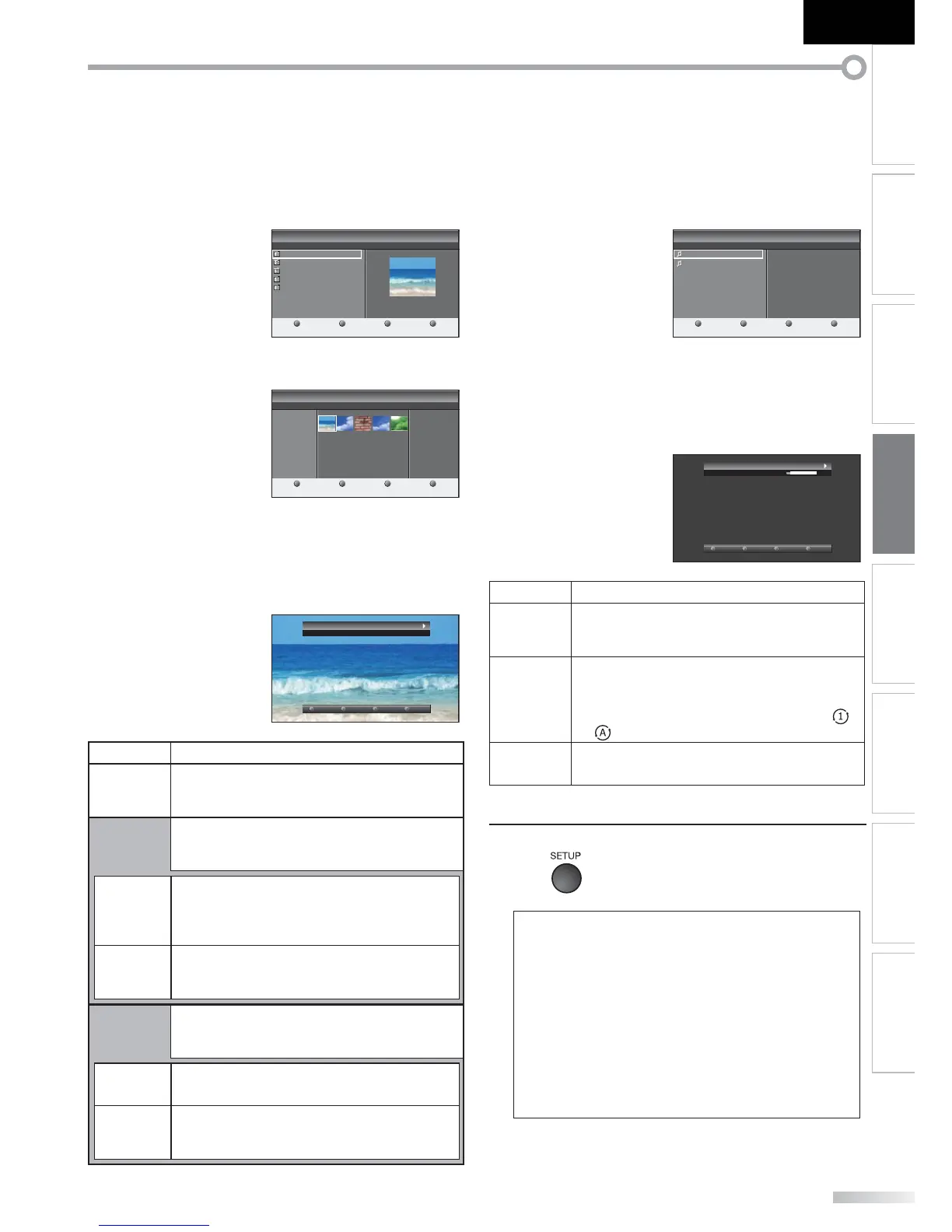
[Picture]
Use [Cursor
K
/
L] to select the desired file, and then
press [ENTER] or [Cursor
B
].
Your USB
Picture
Image1.jpg
Picture
1 2 3 4
Image1.jpg
1200:900
2009:04:02 17:42:06
Thumbnails
Press
''
ENTER
''
key to play/pause.
Image1.jpg
Image2.jpg
Image3.jpg
Image4.jpg
Image5.jpg
• To switch a “List” or a “Thumbnails”,
press [2] by [the number button].
1 2 3 4
List
Press
''
ENTER
''
key to play/pause.
Image1.jpg
Your USB
Picture
Image1.jpg
Picture
• The unit goes to the slide show automatically.
To pause/begin the slide show, press [ENTER].
• You can use [the number buttons] (between [1] and
[4]) to see the file detail (
➀
) or change the following
settings (
➁
~
➃
).
Picture: Image1.jpg
By:
1 2 3 4
TransitionsMore detail Slide time Stop show
Item Detail
➀
More detail
Press [1] to display file details below.
“Name”, “Album”, “Date”, “Size” and “Next”.
Press [1] again to disappear file details.
➃
Start show
Press [4] or [ENTER] to start the slide show.
While the slide show is on, the following setting
will be displayed.
➁
Transitions
Press [2], then use [Cursor
K
/
L] to select the
way of the transition mode choosing from;
“Dissolve”, “Wipe right”, “Wipe left”, “Wipe up”,
“Wipe down”, “Box in” and “Box out”.
➂
Slide time
Press [2], then use [Cursor
K
/
L] to change the
display time choosing from;
“Short”, “Medium” and “Long”.
➃
Stop show
Press [4] or [ENTER] to stop the slide show.
While the slide show is off, the following setting
will be displayed.
➁
Rotate
Every press on [2] will turn the picture clockwise
by 90 degrees.
➂
Zoom
Press [3], then use [Cursor
K
/
L] to select the
zoom factor (1x, 2x or 4x).
Press [ENTER] to set the zoom factor.
[Music]
Use [Cursor
K
/
L] to select the desired file, and then
press [ENTER] or [Cursor
B
].
Your USB
1 2 3 4
Press ''ENTER'' key to play/pause.
Music
Music1.mp3
Music
Title: Music1
Artist: None
Album: Easy Symphony
Duration: 00:04:28
Year: 2007
Music1.mp3
Music2.mp3
• Playback will begin from the file you choose.
To pause/begin the playback, press [ENTER].
• You can use [the number buttons] (between [1] and
[3]) to see the file detail (
➀
) or change the following
settings (
➁
or
➂
).
Track: Music1
Artist: None
00:53 04:28
1 2 3 4
RepeatMore detail Shuffle
Item Detail
➀
More detail
Press [1] to display file details below.
“Title”, “Artist”, “Album”, “Duration” and “Year”.
Press [1] again to disappear file details.
➁
Repeat
Press [2] to play back the desired file repeatedly.
Press [2] to play back the all files in the folder
repeatedly.
To cancel the repeat playback, press [2] until “ ”
or “ ” disappears.
➂
Shuffle
Press [3] to play back the music randomly.
To return to the normal playback, press [3] again.
4
Press [SETUP] to exit.
Note:
• To go back to the previous screen (except when the “List” is
displayed), press [Cursor
s
].
• The USB flash memory is not supplied with this unit.
• We do not guarantee the all USB flash memory can be
supported on this unit.
• Be sure to keep a back up copy of the original files on your
device before you play them back on this unit.
We have no responsibilities for damage or loss of your
stored data.
• When you ready to remove a USB flash memory, at first
turn off the unit to avoid any damage for your data and the
unit.








 To Next Page