EasyManua.ls Logo

Sylvania SDVD9020 - Identification of Controls - Main Unit; Main Unit Controls and Ports; Battery Installation; Battery Storage Note

Sylvania SDVD9020
20 pages
Print Icon
To Next Page IconTo Next Page
To Previous Page IconTo Previous Page
Loading...
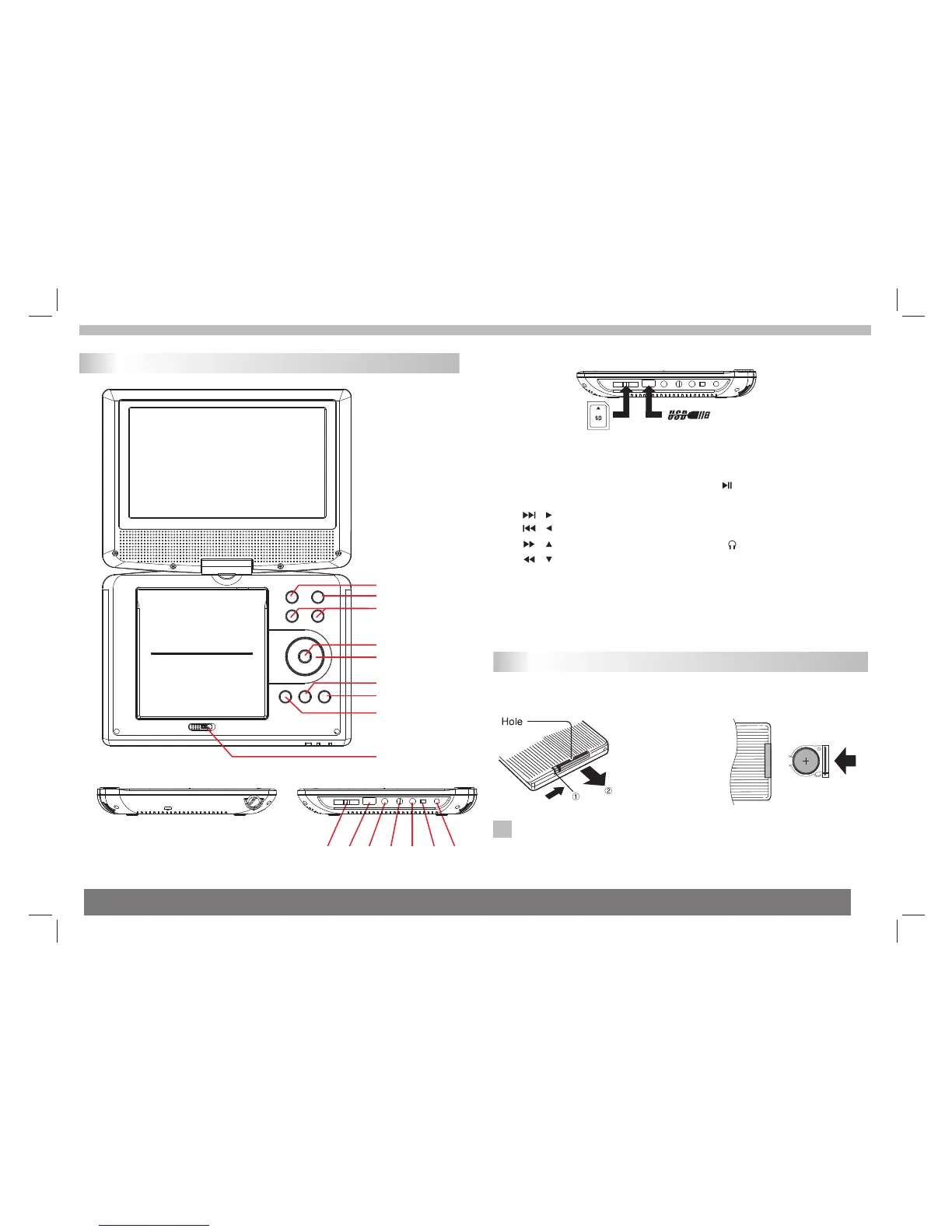
Identification of Controls
Main Unit
Insert the battery
Remove battery during storage or when you are not using the DVD
player for a long time.
2.Insert the battery on the
remote control.
N
NOTES:
1.Open the battery door.
4
6.■ STOP
7.SETUP
8. PLAY/ PAUSE
9.OPEN
10.SD/MMC/MS
11.USB
12. Earphone Socket
13. AV OUT
14. COAXIAL
15.ON/OFF
16.DC IN 9-12V
1.MENU
2.SOURCE
3.VOL- / VOL+
4.ENTER
5. / next / right
/ prev / left
/ forward / up
/ backward / down
short press is up/right/down/left;
long press is forward/next/
backward/prev.
10
11
12 13 14 15 16
1
2
3
4
9
7
5
6
8
PUSH
OPEN
SD/MS/MMC Card