7
Chapter 1: Before You Start
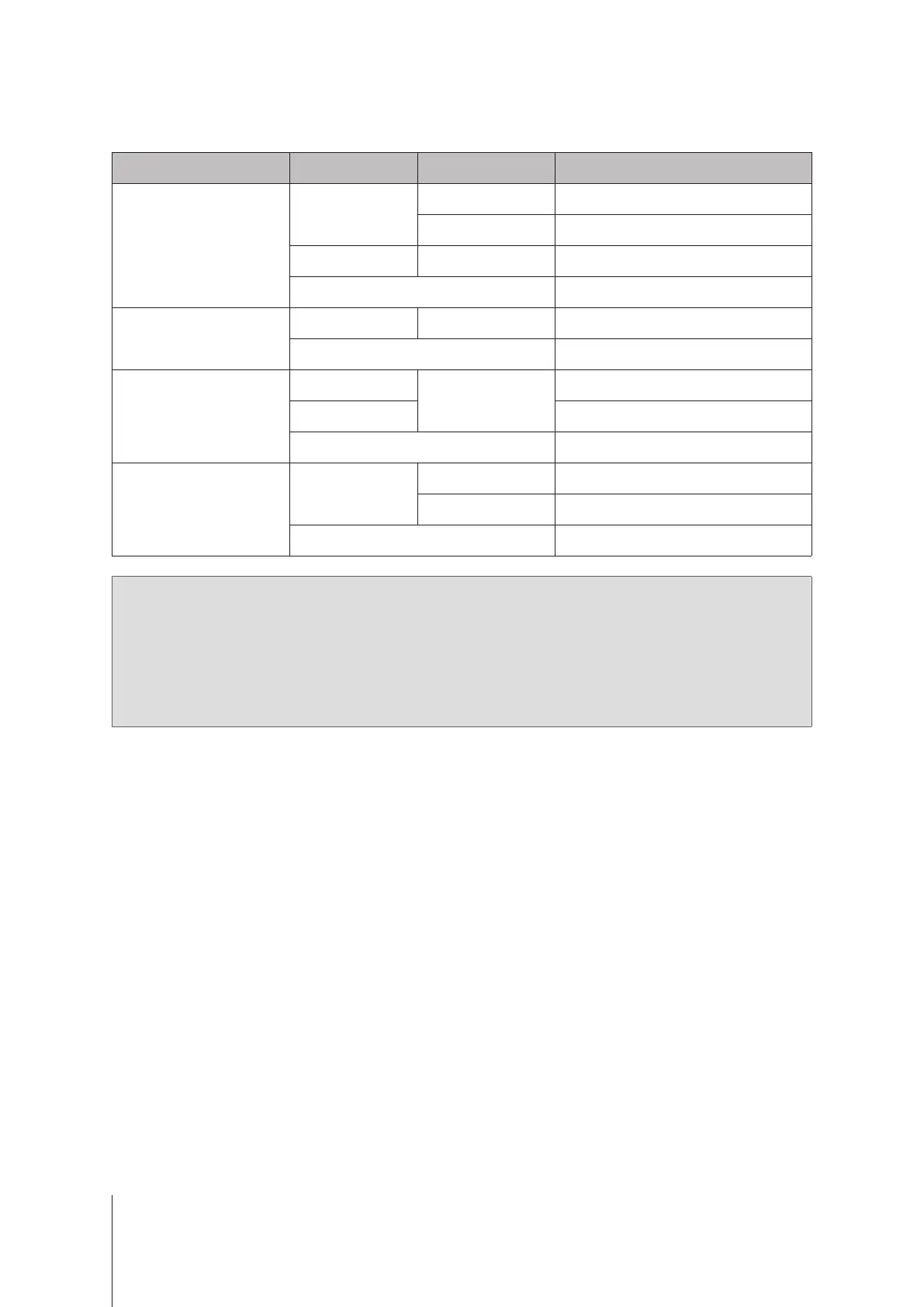
Other LED Indicators
LED Indicator Color Status Description
DRIVE status Indicator
(on tray)
Green
Static Drive ready and idle
Blinking Accessing drive
Orange Static Drive error/Port disabled
1
O No internal Drive
ALERT
Red Blinking System error
2
O System normal
Rear 1GbE LAN
(on upper side of jack)
Green
Static
1 Gbps connected
Orange
100 Mbps connected
O 10 Mbps connected/No network
Rear 1GbE LAN
(on lower side of jack)
Green
Static Network connected
Blinking Network active
O No network
Note:
1
Please try to restart your Synology NAS or re-insert the drives, then run the HDD/SSD manufacturer's
diagnostic tool to check the health status of the drives. If you can sign in to DSM, please run the built-in
S.M.A.R.T. test to scan the drives. If the problem remains unresolved, please contact Synology Technical
Support for help.
2
If the
ALERT LED
continuously blinks red, this indicates there are system errors such as fan failure, system
overheating, or volume degrade. Please sign in to DSM for detailed information.








 To Next Page