The SyncUP DRIVE SD-7000T1 is an On-Board Diagnostics (OBD) device designed to enhance your vehicle's connectivity and provide valuable insights into its status and performance. This device acts as a 4G Mobile Hotspot, allowing you to connect multiple Wi-Fi enabled devices to the internet while on the go. It integrates with the T-Mobile SyncUP DRIVE Application, which serves as the primary interface for managing the device and accessing its features.
Function Description
At its core, the SyncUP DRIVE SD-7000T1 is a connected car device that plugs into your vehicle's OBDII port. Once installed and powered, it establishes a connection to T-Mobile's mobile broadband network, transforming your car into a mobile Wi-Fi hotspot. This enables passengers to surf the internet, stream content, and stay connected during commutes or road trips. Beyond providing internet access, the device also monitors various aspects of your vehicle's health and performance. Through the SyncUP DRIVE Application, you can access real-time data and historical information about your car's condition, including GPS status and network connectivity. This allows for proactive maintenance and a better understanding of your vehicle's operational status. The device is equipped with two LED indicators (LED 1 for Power and LED 2 for Signal) that provide visual cues about its current state, such as power status, low power mode, network connection status, and GPS connectivity.
Usage Features
The SyncUP DRIVE SD-7000T1 offers a range of features designed for ease of use and enhanced connectivity:
- Mobile Hotspot: The device provides a 4G Mobile Hotspot using 802.11 b/g/n/ac Wi-Fi connectivity, supporting both 2.4 GHz and 5 GHz bands. This allows for a robust and high-speed internet connection for multiple devices simultaneously.
- Device Connection: Connecting devices to the Wi-Fi hotspot is straightforward. You can search for the device's Wi-Fi network name (SSID), which is initially "T-Mobile_Broadband##" (where ## are the last two digits of the device's IMEI number), and then enter the password provided in the product gift box.
- SyncUP DRIVE Application Integration: The device works in conjunction with the T-Mobile SyncUP DRIVE Application, available on Google Play and the Apple App Store. This application is crucial for managing the device and accessing its advanced features.
- Vehicle Diagnostics: Through the SyncUP DRIVE Application, you can monitor your vehicle's condition. The app provides a "Device Condition Status" menu, which displays information such as GPS status, network status, and the overall operational health of the SyncUP DRIVE device. This helps in identifying potential issues early.
- Wi-Fi Hotspot Configuration: The SyncUP DRIVE Application allows you to personalize your Wi-Fi hotspot settings. You can:
- Enable/Disable Wi-Fi Hotspot: Turn the Wi-Fi hotspot on or off as needed.
- Modify SSID Name: Change the default Wi-Fi network name (SSID) to something more recognizable.
- Modify Wi-Fi Password: Update the Wi-Fi password for enhanced security.
- Automatic Vehicle Identification: Upon initial installation, the OBD device automatically identifies your vehicle. This simplifies the setup process and ensures compatibility with your car's systems.
- Automatic Network Connection: Once powered up, the OBD device automatically searches for and connects to your network provider's mobile broadband network, ensuring seamless connectivity without manual intervention.
- Status LED Indicators: The device features two LEDs that provide immediate visual feedback on its operational status:
- LED 1 (Power): Indicates if the device is off, in low power mode (green blinking), or fully operational (green solid).
- LED 2 (Signal): Shows the cellular and GPS network connection status. A red solid light indicates configuration issues or no network connection, green blinking suggests it's attempting to connect to cellular or GPS, and green solid means it's fully connected to cellular, data, and GPS.
Maintenance Features
The SyncUP DRIVE SD-7000T1 includes features to help you maintain its functionality and troubleshoot common issues:
- Physical Inspection: The manual emphasizes ensuring the device is adequately plugged into the vehicle's OBDII port. This is a fundamental step for troubleshooting connectivity or power issues.
- LED Indicator Status: Understanding the LED indicator status is a key maintenance feature. The manual provides a detailed table explaining what each LED state (OFF, green blinking, green solid, red solid) signifies, allowing users to quickly diagnose basic problems related to power, network, and GPS connectivity.
- Reset Functionality: The device includes a "Reset pinhole" that allows you to restore it to factory settings. This is a crucial troubleshooting step for resolving persistent software or configuration issues. To perform a reset, you insert a pin into the pinhole while the device is powered and hold it for at least 10 seconds. This action will cause any currently connected devices to lose access, requiring them to be reconnected after the device restarts.
- Troubleshooting via SyncUP DRIVE Application: The SyncUP DRIVE Application's "Help Menu" provides valuable troubleshooting information. It allows you to check historical and current device conditions, including the status of network, GPS, and the overall SyncUP DRIVE application. This helps in pinpointing the root cause of any issues.
- Frequently Asked Questions (FAQ): The manual includes a dedicated FAQ section addressing common problems such as inability to establish Wi-Fi connection, client devices unable to access the internet, and forgotten Wi-Fi passwords. This section offers practical solutions like refreshing network lists, ensuring proper device connection, checking cellular coverage, and performing a device reset.
- Password Management: If you forget your Wi-Fi password, the initial password can be found on the card provided in the device gift box. If you've changed the password and forgotten it, the reset function is the recommended solution to revert to factory default settings.
- Compatibility Check: For users experiencing missing features, the manual directs them to the T-Mobile SyncUP DRIVE compatibility webpage (https://www.t-mobile.com/offers/syncup) to check if their vehicle is fully compatible. This helps in understanding if performance issues are due to vehicle limitations. It also explicitly states that electric cars, heavy-duty trucks, motorcycles, and ATVs are not compliant with the OBD device.
By combining robust connectivity, diagnostic capabilities, and user-friendly management tools, the SyncUP DRIVE SD-7000T1 aims to provide a comprehensive connected car experience.

 Need help?
 General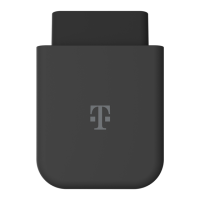

 To Next Page