AR-G2/AR 2000ex/AR 1500ex Getting Started Guide Page 45
Connecting the System
Connecting the system together should present no problems, as long as you use instructions found in the
following sections.
Connecting the Rheometer to the Electronics Control Box
The Electronics Control Box forms the link between the rheometer and the computer. All the required pro-
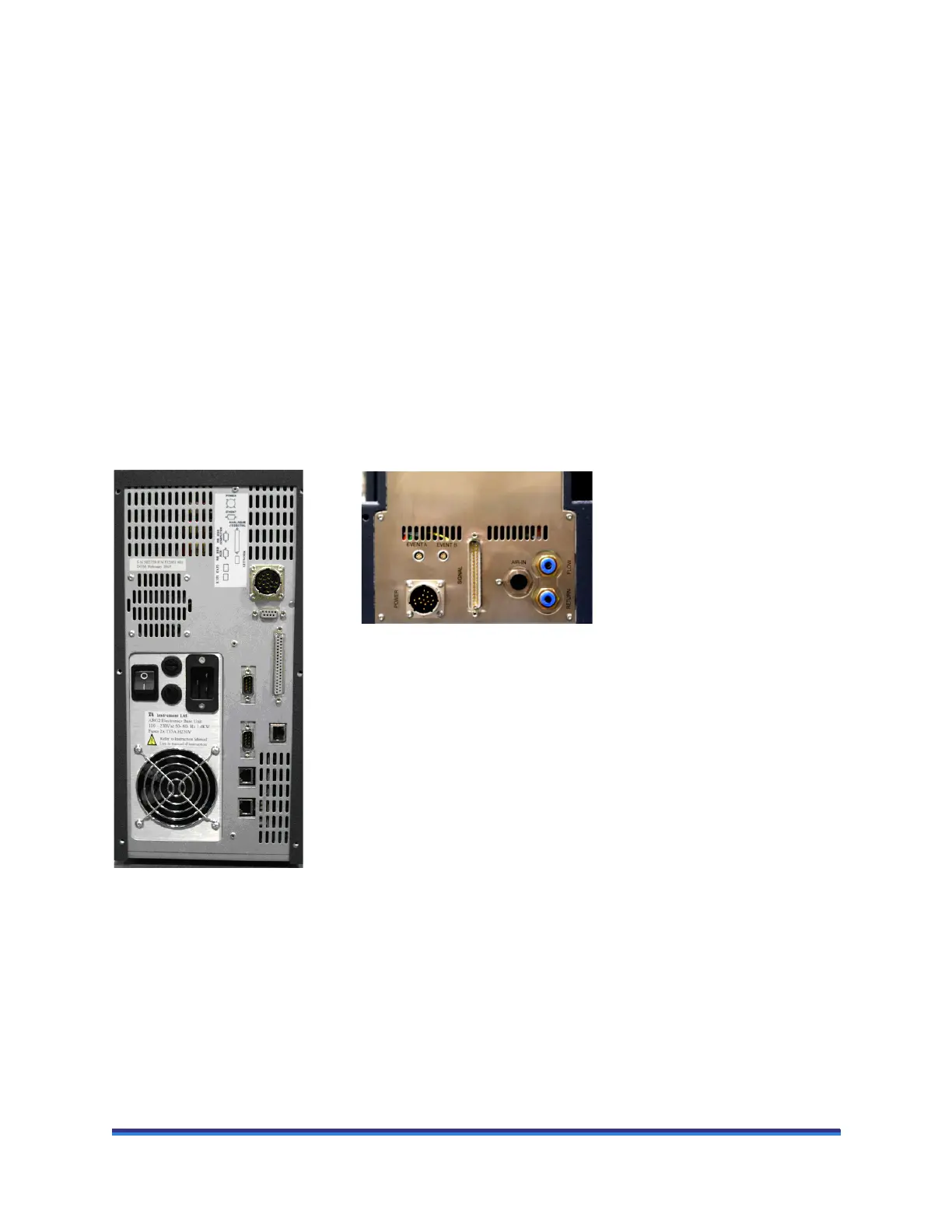
cessing is done within the control box. The following steps should be followed to connect the two units
together (refer to the figure below).
1 Push the female end of the power cable into the Power port on the back of the rheometer and the other
end in the Power port on the back of the control box.
2 Push the D-type cable into the Signal port on the back of the rheometer and connect the other end to the
Signal port on the back of the control box.
The AR-G2/AR 2000ex/AR 1500ex rheometers communicate with the control computer via an Ethernet
link.
Figure 20 Cable connections.
Connecting the Computer to the Electronics Control Box Using
Ethernet Communications
Ethernet communications can be setup in two ways. The electronics control box and computer can be con-
nected directly via a single Ethernet cable, or both can be connected using separate cables to a Local Area
Network [LAN]. Full details are provided in the software installation instructions.


 To Next Page