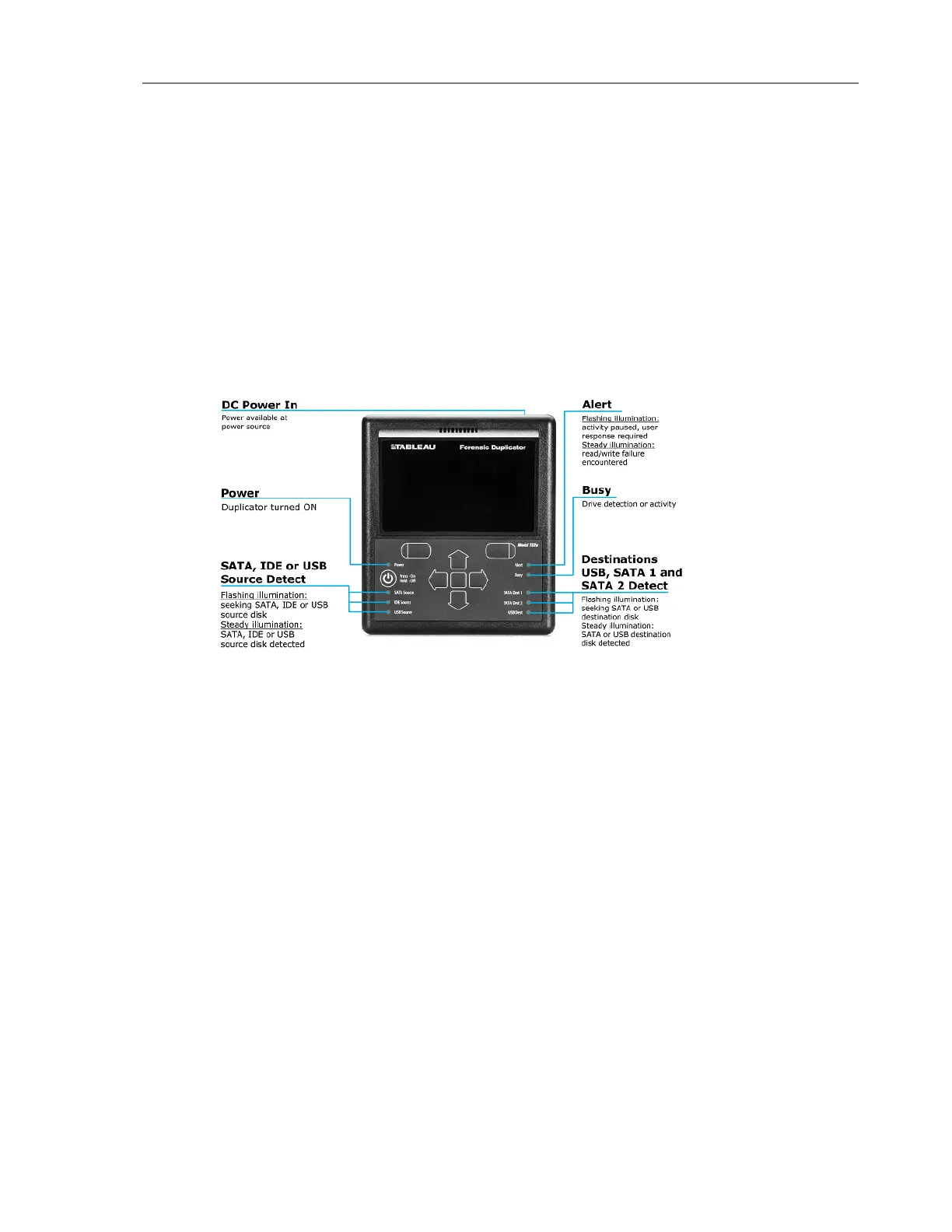
The TD2u ships with a Quick Start card illustrating the layout of the display, buttons,
connectors, and switches on the TD2u. Keep the Quick Start card with the TD2u as you
familiarize yourself with its operation.
Reading the LEDs
The front of the TD2u has nine light emitting diode (LED) indicators. A tenth LED is located on
the rear of the TD2u, near the power connector.
The SATA Source, IDE Source, and USB Source LEDs indicate that the source drive is connected
to the left side of the TD2u The SATA, Dest 1, SATA Dest 2, and USB DestLEDs indicate that
the destination drives are connected to the right side. A yellow Alert LED on the right flashes to
indicate the need for user intervention.
USB Keyboard Support
You can connect a standard USB keyboard to any of the USB ports on the front and back of the
TD2u. Using a keyboard for data entry can be faster and more convenient than using the arrow
keypad on the TD2u.
When using a USB keyboard the Enter key on the keyboard generally corresponds to the right
soft key on the TD2u. The Esc (escape) key on the keyboard generally corresponds to the left
soft key.
If your keyboard has arrow keys or a mouse-like input device, the up and down arrows (or
mouse actions) generally correspond to the up and down (vertical) arrows on the TD2u.
CHAPTER 1 Overview 15


 To Next Page