EasyManua.ls Logo

Tactile Medical Actitouch - User Manual

Tactile Medical Actitouch
36 pages
Print Icon
To Next Page IconTo Next Page
Loading...
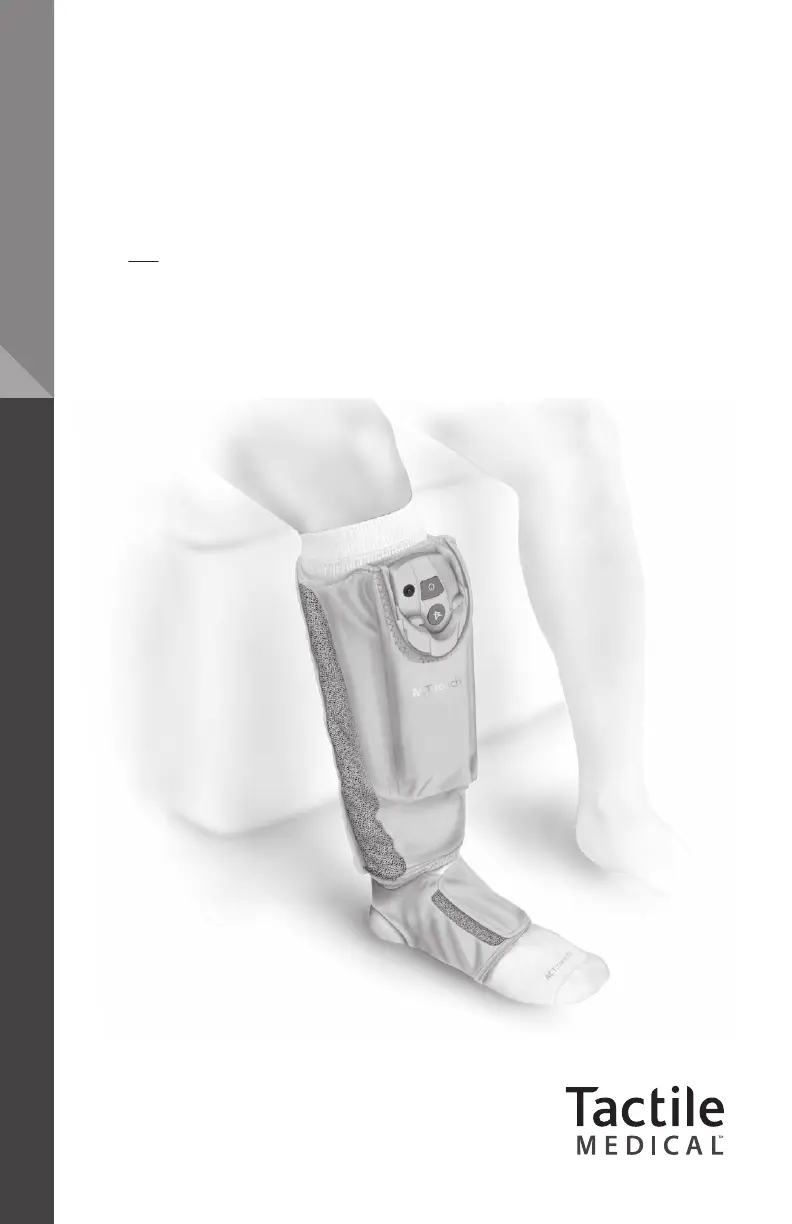
USER GUIDE
ACTITOUCH
®
SYSTEM
Adaptive Compression Therapy

Questions and Answers

  • W
    wperryAug 4, 2025
    Why is my Tactile Medical Equipment compression sleeve not inflating?
    • F
      freemankatherineAug 4, 2025
      The compression sleeve might not be inflating because the control unit hasn't been securely inserted into the compression sleeve, the control unit needs charging, or the control unit hasn't been switched on. Also, the MUTE button may have been activated while operating in sustained mode.
  • R
    rebeccawheelerAug 11, 2025
    What to do if my Tactile Medical Equipment control unit does not respond to buttons?
    • K
      kim92Aug 11, 2025
      If the control unit doesn't respond to button presses, it might need to be charged or switched on. Try charging the control unit, or switching it on. You may also need to reset the event log by removing the control unit from the Compression Sleeve, then pressing and holding the MUTE button for ten seconds until the LCD flashes. Also, try holding the button down for a longer period of time (e.g., Two [2] seconds).
  • R
    Richard SanchezAug 18, 2025
    Why won't my Tactile Medical Equipment control unit operate in sustained compression mode?
    • M
      Matthew BowmanAug 18, 2025
      The control unit might not operate in sustained compression mode if it hasn't been securely inserted into the Compression Sleeve, needs to be charged, or hasn't been switched on. Another reason could be that the MUTE button has been activated, or the event log needs to be reset. To reset the event log, remove the control unit, press and hold the MUTE button for ten seconds until the LCD flashes.
  • W
    William HaleAug 27, 2025
    Why won't my Tactile Medical Equipment control unit operate in Intermittent Pneumatic Compression Mode?
    • B
      brandonphillipsAug 27, 2025
      The control unit might not be operating in Intermittent Pneumatic Compression Mode because it hasn't been securely inserted into the Compression Sleeve, the Power Adapter/Charger isn't securely connected to the charging port and an AC power outlet, or the control unit hasn't been switched on. You may also need to reset the event log. To do this, remove the control unit from the Compression Sleeve and press and hold the MUTE button for ten seconds until the LCD flashes.

Summary

Component List

Product Description

2.1 Sustained Compression Mode

Explains the sustained compression mode of the device and its pressure delivery.

2.2 Intermittent Pneumatic Compression Mode

Details the intermittent pneumatic compression mode and its operation.

Warnings and Cautions

3.1 Warnings

Lists essential safety precautions and warnings for using the device.

3.2 Cautions

Provides important cautionary advice for device operation and maintenance.

Indications and Contraindications

4.1 Indications

Outlines the medical conditions for which the ACTitouch System is indicated.

4.2 Contraindications

Lists medical conditions where the ACTitouch System is contraindicated.

Directions for Use

5.1 Functional Controls

Identifies and explains the functions of the ACTitouch control unit and sleeve.

5.2 First Use

Guides the user through the initial setup and preparation of the device.

5.3 Charging the Device

Provides instructions on how to properly charge the ACTitouch device.

5.4 Applying the ACTitouch System

Details the steps for applying the ACTitouch System to the leg and foot.

5.5 Switching On the ACTitouch System in Sustained Compression Mode

Explains how to turn on the device in Sustained Compression Mode.

5.6 Muted Operation in Sustained Compression Mode

Describes how to activate and deactivate the mute function in Sustained Compression Mode.

5.7 Intermittent Pneumatic Compression Mode

Explains how to use the Intermittent Pneumatic Compression Mode.

5.8 Switching Off the ACTitouch System

Details the procedure for turning off and safely removing the ACTitouch System.

5.9 Removing the ACTitouch System

Instructs on how to properly remove the ACTitouch System from the body.

Wound Dressings

Cleaning, Care and Maintenance

7.1 Cleaning and Disinfecting

Provides instructions for cleaning and disinfecting the device components.

7.2 Storage and Handling

Offers guidance on proper storage and handling of the ACTitouch System.

7.3 Maintenance and Service

Clarifies that the device is maintenance-free and outlines service.

7.4 Disposal

Guides users on the proper disposal of ACTitouch System components.

Troubleshooting Guide

8.1 Limited Warranty for Home Use

Details the warranty terms for the ACTitouch System for home users.

8.2 Obtaining Replacement Products and Service

Provides contact information for obtaining replacement parts and service.

8.3 Limited Warranty and Service for Facility Use

Outlines the warranty and service agreements for facility use.

8.4 Return Policy

Specifies the policy regarding returns and refunds for ACTitouch products.

8.5 Patents

Lists the United States patents protecting the ACTitouch System.

8.6 Product Development and Quality Improvement

States the company's policy on product modification and improvement.

Technical Information

9.1 Symbols

Explains the meaning of various symbols used on the ACTitouch device and its packaging.

9.2 Device Label

Describes how to read and interpret the device label on the control unit.

9.3 Electromagnetic Interference

Details the device's compliance with electromagnetic interference standards.

Recommended separation distances between portable and mobile RF communications equipment and the ACTitouch System

Provides guidance on maintaining safe distances from RF equipment to prevent interference.

Tactile Medical Actitouch Specifications

General IconGeneral
TypePneumatic Compression Device
PortabilityPortable
Power SourceRechargeable Battery
Garment OptionsArm, Leg
IndicationLymphedema

Related product manuals