EasyManua.ls Logo

Tactile Medical Entre Plus - User Manual

Tactile Medical Entre Plus
40 pages
Print Icon
To Next Page IconTo Next Page
Loading...
Entre
®
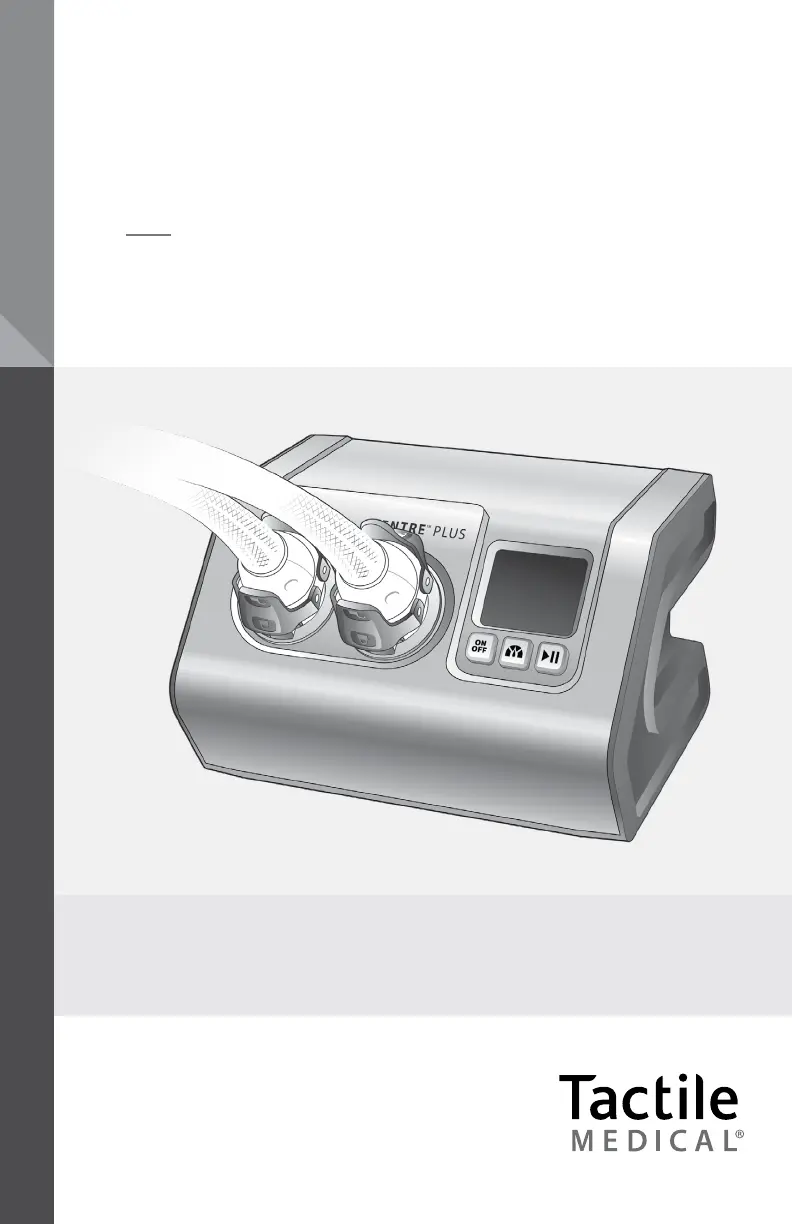
Plus User Guide
Model PD08-NG
ENTRE
®
PLUS
PNEUMATIC COMPRESSION SYSTEM

Questions and Answers

  • M
    Mrs. Deanna PerryAug 13, 2025
    How to troubleshoot a Tactile Medical Entre Plus controller unit that does not function?
    • J
      Jill CaldwellAug 13, 2025
      If the controller unit of your Tactile Medical equipment doesn't function or the display doesn't light up: 1. First, disconnect the power adapter from the back of the controller and reconnect it, ensuring it's fully inserted into both the controller and the wall outlet. Check that the wall outlet is working; a green light on the power adapter indicates it's functional. 2. If that doesn't work, press the power button on the device.
  • S
    Shawn MyersAug 17, 2025
    What to do if Tactile Medical Entre Plus Medical Equipment controller unit does not function and shows an error message?
    • M
      Michelle OrtegaAug 17, 2025
      If the controller unit of your Tactile Medical device isn't working and shows an error message on the LCD screen, it might have detected an issue during its self-test. Here’s how to address it: 1. Power down the device. 2. Power it back up and restart the treatment session.
  • R
    Ronald WelchAug 20, 2025
    What to do if any button does not function on Tactile Medical Entre Plus Medical Equipment?
    • B
      Beverly WilliamsAug 20, 2025
      If none of the buttons on your Tactile Medical device are working: 1. Power down the device. 2. Power it back up by pressing the power button.
  • I
    iesparzaAug 25, 2025
    What to do if Tactile Medical Entre Plus Medical Equipment controller unit does not function and holds pressure in the garments?
    • C
      Cynthia JonesAug 25, 2025
      If the controller unit of your Tactile Medical equipment isn't working and is holding pressure in the garments, the unit may be unable to release pressure. Here's how to try and fix it: 1. Power down the device, disconnect the garment from the controller, and then reconnect it. Power the device back on and restart the treatment session.
  • G
    George ThomasAug 28, 2025
    Why garment chambers of Tactile Medical Entre Plus Medical Equipment do not fill with air?
    • M
      Michelle FloresAug 28, 2025
      If the garment chambers of your Tactile Medical equipment aren't filling with air: 1. Ensure that the power and start buttons have been pressed (the LCD screen should light up). 2. Check that the connectors are properly attached and the hoses aren't kinked. 3. Make sure both upper and lower connector latches are engaged. 4. If the chambers still don't fill, turn the machine off, detach the connectors, and turn it back on. 5. Press the start button to begin a treatment session. 6. Check for air coming out of the controller unit before reconnecting the hose. If using only one garment, ensure the port is attached correctly.
  • A
    Angel CastilloSep 1, 2025
    Why garment pressures are higher or lower than expected in Tactile Medical Medical Equipment?
    • K
      Katherine MorrisSep 1, 2025
      If the garment pressures on your Tactile Medical device are higher or lower than expected: 1. Verify that you've selected the correct pressure setting. 2. Adjust the fit of the garment, ensuring there are no folds or kinks in the fabric. 3. Check that the latches are firmly in place and properly attached.
  • W
    williamscolleenSep 4, 2025
    What to do if the Tactile Medical Entre Plus controller unit makes an abnormal noise?
    • S
      Sierra ConnerSep 4, 2025
      If the controller unit of your Tactile Medical equipment is making an abnormal noise: 1. Stop the treatment session by pressing the power button. 2. Check if the noise has stopped. 3. Restart the treatment by pressing the power button. 4. If the noise continues, stop the treatment and contact Customer Service.
  • W
    Wesley IngramSep 8, 2025
    How to change pressure setting on Tactile Medical Entre Plus?
    • M
      Miranda WardSep 8, 2025
      You cannot change the pressure setting on your Tactile Medical device once a treatment has started unless the treatment program has completed or the power button is pressed. To adjust the pressure settings: 1. Power off the device. 2. Power it back on. 3. Then you can adjust the settings.

Summary

Before You Get Started

How to Contact Tactile Medical

Contact information for customer service regarding the Entre Plus system.

Safety Precautions and Explanation of Symbols

Details important safety warnings, precautions, and symbols used in the manual.

Indications For Use

Outlines the specific medical conditions for which the Entre Plus system is intended.

Contraindications

Lists medical conditions where the use of the Entre Plus system is not advised.

Unpacking Instructions

Provides guidance on how to unpack the system and verify all components are present.

Labels

Explains the location and purpose of labels on the garment and accessory.

The Entre Plus System

System Components

Describes the main parts of the Entre Plus system: controller unit and garments.

Adjustable Pressure Levels

Guides on selecting appropriate pressure settings as recommended by a healthcare provider.

Treating the Lower Extremity

Details full leg and half leg treatment methods, including direction and duration.

Treating the Upper Extremity

Explains the procedure for full arm treatment, including direction and duration.

Controller Unit Set-Up

Setting Up the Controller Unit

Instructions for choosing a location and connecting the power adapter for the controller.

Connecting the Hose to the Controller Unit

Step-by-step guide with diagrams for attaching the hose connector to the controller.

Garment Application

Applying the Full Leg and Half Leg Garment

Detailed instructions for preparing and correctly applying leg garments for treatment.

Applying the Arm Garment

Guidance on preparing and fitting the arm garment for effective treatment.

Conducting a Treatment Session

Selecting Your Pressure Setting

Steps for powering on the unit and selecting the prescribed pressure level.

Starting the Treatment Session

Instructions on positioning and initiating a treatment session for optimal results.

Pausing the Treatment Session

How to temporarily pause and resume a treatment session.

Completing the Treatment Session

Information on the automatic completion of the program and deflation process.

Storing the Entre Plus System

Guidance on safely unplugging, storing tubing, and storing the system.

Cleaning the Entre Plus System

Instructions for cleaning the controller unit and garments, including safety cautions.

Disinfecting the Entre Plus System

Recommended procedure for disinfecting the system between uses.

Warranty

Limited Warranty and Service for Home Use

Details the one-year warranty for home users and its limitations.

Limited Warranty and Service for Facility Use

Information on warranty and service agreements for facility usage.

Return Policy

Outlines the conditions and timeframe for returning products.

Equipment Lifetime

Information on the expected lifespan of the controller unit.

Technical Information

Technical Information

Presents key technical specifications, model details, and operating parameters.

Device Labels

Explains how to locate and read the device labels on the unit.

Tactile Medical Entre Plus Specifications

General IconGeneral
Device TypePneumatic Compression Device
Power SourceAC Power
ApplicationLymphedema
Cycle TimeAdjustable
Garment TypesArm, Leg
PortabilityPortable

Related product manuals