EasyManua.ls Logo

Tactile Medical ENTRE PD08-U - User Manual

Default Icon
40 pages
Print Icon
To Next Page IconTo Next Page
Loading...
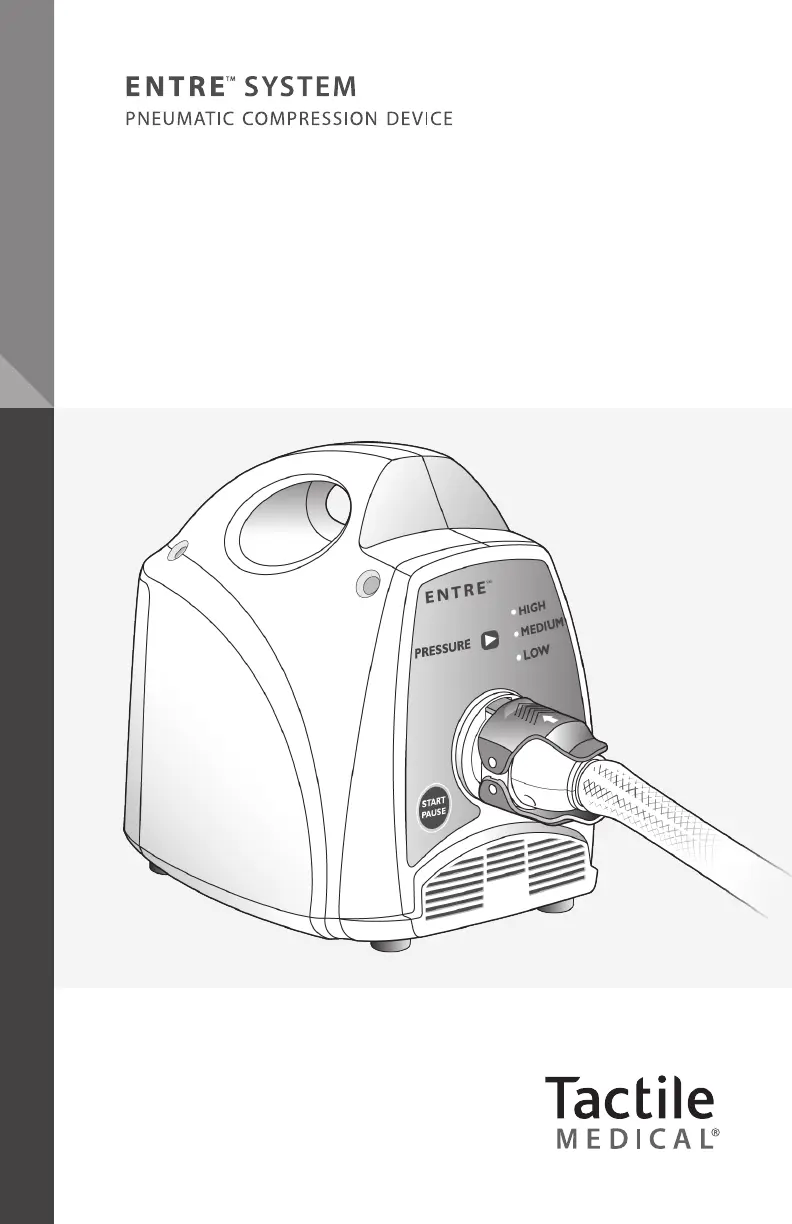
MODEL PD08-U
|
USER GUIDE
User Guide

Questions and Answers

  • A
    Amanda RoblesAug 13, 2025
    Why is my Tactile Medical Equipment controller blinking all LED lights?
    • D
      David PhillipsAug 13, 2025
      If all the LED lights are blinking on your Tactile Medical Equipment's controller unit, it often indicates that the system's pressure is too high, likely due to kinked tubing. Power down the device and wait 5 minutes. If you can, disconnect the garment from the controller unit and reconnect it. Then, power the device back on and restart the therapy session. Also, make sure the garment tubing isn't kinked. Avoid standing on the garment during treatment. To check if the controller unit and garment are working correctly, remove the garment, lay it flat, power on the device, and start a therapy session to see if all chambers inflate one after another. If the problem persists, contact Customer Service for help.
  • R
    Ross ThompsonAug 16, 2025
    How to fix Tactile Medical Equipment when garment chambers don't fill?
    • J
      John CooperAug 16, 2025
      If the garment chambers of your Tactile Medical Equipment are not filling with air, ensure that the ON/OFF and START/PAUSE buttons have been pressed (a green light will illuminate when the START/PAUSE button is pressed). Check that the connectors are properly attached and that both upper and lower connector latches are engaged. If you are using both garments, make sure to use the “Y” connector. If the chambers still do not fill, turn the machine off, detach the connectors, and turn the machine ON again. Feel for air coming out of the controller unit, then reconnect the hose. Finally, press the START/PAUSE button to begin a treatment session.
  • R
    rebekah66Aug 20, 2025
    What to do if Tactile Medical Equipment controller unit doesn't turn on?
    • B
      Brenda SpenceAug 20, 2025
      If your Tactile Medical Equipment controller unit isn't working and no LED lights are blinking, first, disconnect the power adapter from the back of the unit and reconnect it. Make sure the power adapter is fully inserted into both the power inlet and the wall outlet, ensuring the wall outlet is working. A green light should appear on the power adapter if it's functioning correctly. If that doesn't work, try pressing the ON/OFF button.
  • B
    Barbara GarciaAug 25, 2025
    What to do if Tactile Medical Equipment LOW pressure light is blinking?
    • T
      thernandezAug 25, 2025
      If the LOW pressure LED light is blinking and the controller unit of your Tactile Medical Equipment is not functioning, power down the device. If possible, disconnect the garment from the controller unit and then reconnect it. Power the device back on by pressing the ON/OFF button, and then restart the therapy session by pressing the START/PAUSE button.
  • J
    Jerome MillerAug 27, 2025
    How to deflate Tactile Medical Equipment garment?
    • R
      Robert SimsAug 27, 2025
      If the garment on your Tactile Medical Equipment remains inflated, quickly press the ON/OFF button twice (ON, OFF, ON, OFF) to start another deflation cycle. Also, make sure the tubing isn't kinked or pinched. If it still remains inflated, disconnect the connectors to deflate the chambers.
  • B
    brownwayneAug 31, 2025
    How to change pressure setting on Tactile Medical Equipment?
    • M
      Michelle SandersSep 1, 2025
      To change the pressure setting on your Tactile Medical Equipment while a therapy session is in progress, first press the START/PAUSE button. Then, you can adjust the settings by pressing the PRESSURE button.
  • L
    Larry HartSep 4, 2025
    What to do if HIGH and MEDIUM pressure lights blink on Tactile Medical Equipment?
    • I
      Ian HicksSep 4, 2025
      If the HIGH and MEDIUM pressure LED lights are blinking and the controller unit of your Tactile Medical Equipment isn't working, power down the device. Then power it back on by pressing the ON/OFF button and restart the therapy session by pressing the START/PAUSE button.
  • B
    Barbara HinesSep 8, 2025
    What to do if buttons don't work on Tactile Medical Equipment?
    • A
      Anna MonroeSep 8, 2025
      If any button on your Tactile Medical Equipment does not function, power down the device and then power it back up by pressing the ON/OFF button.

Summary

Before You Get Started

Safety Precautions and Explanation of Symbols

Details important safety warnings and explains common symbols used in the manual.

The Entre System

Adjustable Pressure Levels

Explains how to select and adjust pressure settings for therapy.

Controller Unit Set-Up

Setting Up the Controller Unit

Provides step-by-step instructions for setting up the controller unit.

Connecting the Hose to the Controller Unit

Explains how to properly connect the hose to the controller unit.

Garment Application

Applying the Full Leg and Half Leg Garment

Guides users on how to prepare and apply leg garments.

Applying the Arm Garment

Guides users on how to prepare and apply arm garments.

Conducting a Therapy Session

Select Your Pressure Setting

Instructs on how to select the appropriate pressure setting for therapy.

Starting the Therapy Session

Details the steps for initiating a therapy session.

Tactile Medical ENTRE PD08-U Specifications

General IconGeneral
Device TypePneumatic Compression Device
Model NumberPD08-U
ApplicationLymphedema
Compression Chambers8
Power SourceAC Power
Warranty2 years
Weight4.5 lbs

Related product manuals