12
tado° Bridge
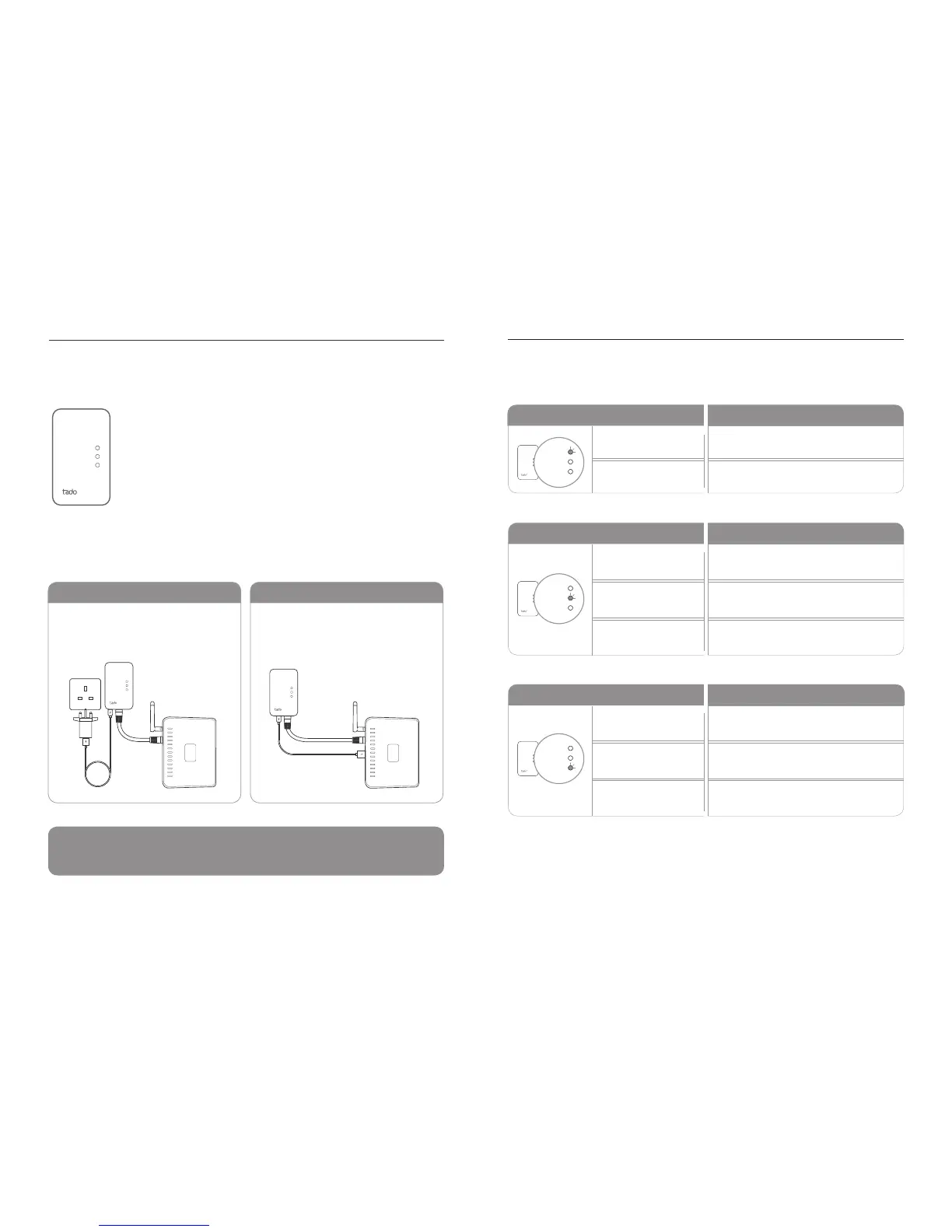
The tado° Bridge is the intermediary device between the Smart
Thermostat, the Extension Box (if present) and the tado° Servers.
It is connected to a router via an ethernet cable and communica-
tes wirelessly with the Smart Thermostat and the Extension Box.
Bridge Bridge LED Actions
Connecting the Bridge
INFO: Upon plugging in the Bridge, all three LEDs should light up once. If this doesn‘t
happen, the Bridge is either not sufciently supplied with power or is defective.
Connect the ethernet port to the router
and the USB port to power via the power
adapter.
Connect the ethernet port to the router and
the USB port to power via the router.
USB POWER ADAPTER USB JACK ON ROUTER
link
router
internet
link
router
internet
LINK LED ACTION
ROUTER LED ACTION
INTERNET LED ACTION
MEANING
MEANING
MEANING
Off
Off
Off
No power
No ethernet link detected
Off until IP address has been assigned
Blinking (Fast)
Blinking
Blinking
Pairing
Ethernet link detected. Awaiting
DHCP IP address assignment
Establishing connection to tado° Server
On
On
IP address assigned successfully
Connection to tado° Server
has been established
link
router
internet



 To Next Page