CNC-110A Series C-03/C-13 User's manual
3
έᚊཝҋજѣࢨΦ
TAILY AUTOMATION CO.,LTD.
3. FRONT PANEL DESCRIPTION
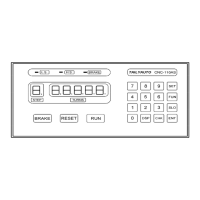
3.1.Key pads
~
:
10 key, for entering numerical values.
:
Enter into PARAMETER SETTING mode.
:
During READY mode , to get into the function select mode.
While setting SLOW STOP TURNS it used to select the winding direction.
:
While setting TURNS, it used to switching between TOTAL TURNS and SLOW STOP
TURNS.
:
Saving the data to the memory, and finish the setting procedure.
:
To shows all the winding parameter from first to last STEP.
:
To change the display mode.
:
To start winding or to pause winding.
:
At any time, discontinues current operation and return to READY mode.
:
Hold or release the brake.
3.2. Digit display
STEP
:
Shows the current step number being wound or being set.
When the number is blink its means in READY mode.
TURNS
:
Shows TURNS, PRODUCTION, or WINDING SPEED(RPM).
□
L.S.
:
LOW speed winding indicator.
□
H.S.
:
HI speed winding indicator.
□
BRAKE
:
Brake status indicator.


 To Next Page
 Loading...