12
External Equipment Connections
Connection
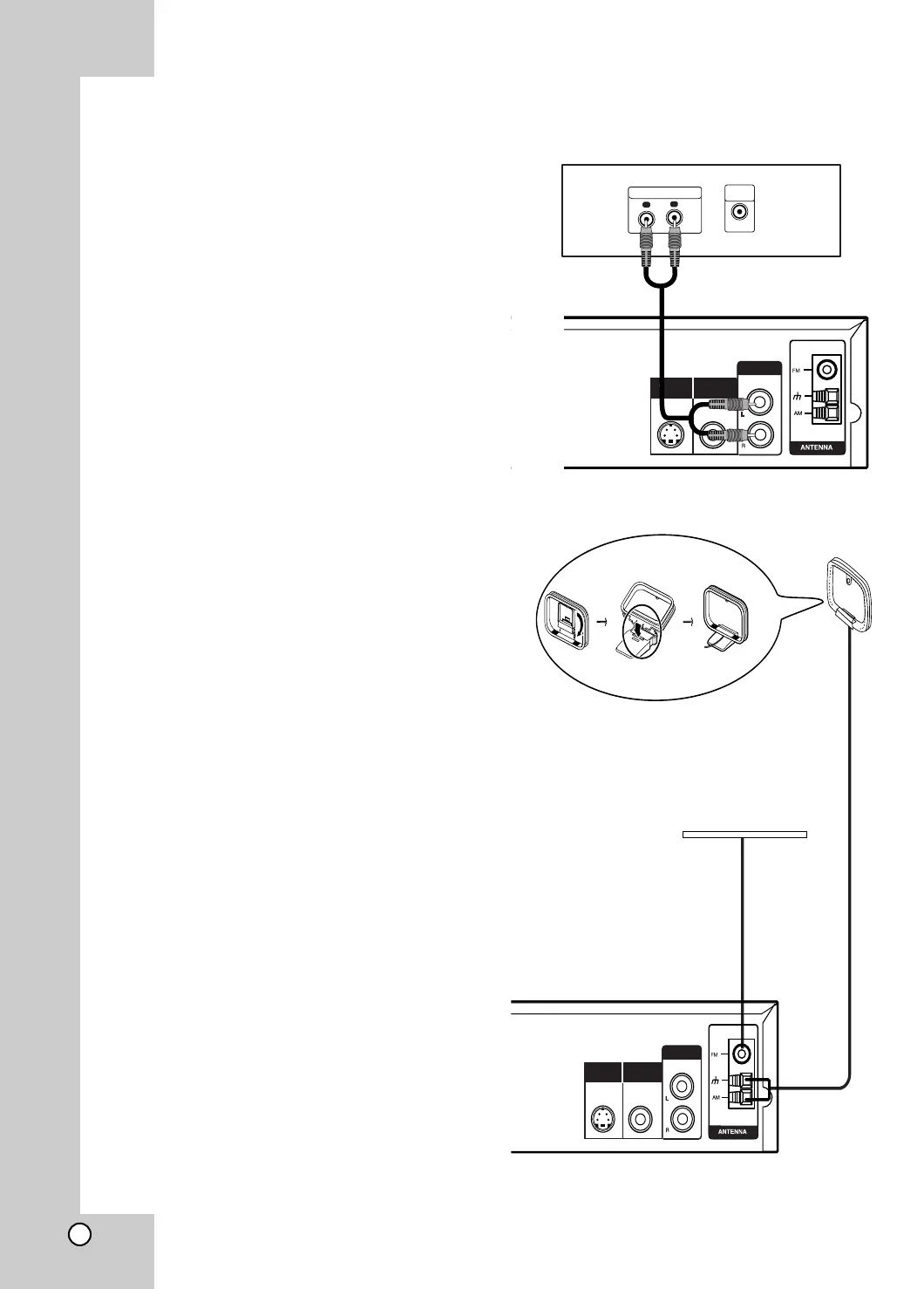
Connect the AUX IN (L/R) jacks on the DVD/CD
receiver to the AUDIO OUT (L/R) jacks on the VCR,
LD player, etc using the audio cables.
Tip:
Press AUX on the remote control to select input to
these jacks.
AUX appears on the Display Window.
Aerial Connections
Connect the supplied FM/AM aerial for listening to the
radio.
Connect the AM loop aerial to the AM aerial
connector.
Connect he FM wire aerial to the FM aerial
connector.
Notes:
•To prevent noise pickup, keep the AM loop aerial away from
the DVD/CD receiver and other components.
• Be sure to fully extend the FM wire aerial.
• After connecting the FM wire aerial, keep it as horizontal as
possible.
Rear of VCR (or LD player, etc)
L
R
AUDIO OUTPUT
VIDEO
OUTPUT
S-VIDEO OUT
MONITOR OUT
AUX IN
FM Wire aerial (supplied)
AM Loop aerial
(supplied)
S-VIDEO OUT
MONITOR OUT
AUX IN



 To Next Page