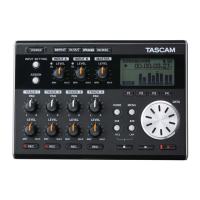
TASCAM Model 16
15
Contents
IMPORTANT SAFETY INSTRUCTIONS .................................... 3
Wireless equipment precautions ........................................... 6
1 - Introduction ......................................................................17
Features .................................................................................................... 17
Items included with this product .................................................... 17
Conventions used in this manual.................................................... 17
Precautions for placement and use................................................ 18
Notes about power supply ................................................................ 18
Beware of condensation .................................................................... 18
Cleaning the unit .................................................................................. 18
About SD cards ...................................................................................... 18
Precautions for use .......................................................................... 18
SD card write protection................................................................ 18
Note about formatting ................................................................... 18
Bluetooth® ............................................................................................... 18
Profiles .................................................................................................. 18
Codecs .................................................................................................. 19
Content protection .......................................................................... 19
Transmission security ..................................................................... 19
Using the TEAC Global Site ................................................................ 19
Product registration ............................................................................. 19
About TASCAM customer support service .................................. 19
2 - Names and Functions of Parts .........................................20
Top panel ................................................................................................. 20
Analog input jack section.............................................................. 21
Input channel mixing section ...................................................... 22
Analog output jack section .......................................................... 23
Screen operation section .............................................................. 23
Built-in effects operation section ............................................... 24
Analog output adjustment section ........................................... 25
Rear panel ................................................................................................ 25
Home Screen .......................................................................................... 26
Meters Screen......................................................................................... 27
Meter Screen details ........................................................................ 27
Menu structure ...................................................................................... 28
Basic MENU screen operations ........................................................ 28
Menu operation procedures ........................................................ 28
3 - Preparation .......................................................................29
Connecting other equipment .......................................................... 29
Connecting microphones ............................................................. 30
Connecting guitars, basses and similar instruments........... 30
Connecting electronic devices and other audio equipment
... 30
Connecting monitor speakers ..................................................... 30
Connecting headphones ............................................................... 30
Connecting a computer ................................................................. 30
Connecting with Bluetooth devices .......................................... 30
Inserting and removing SD cards ................................................... 31
Inserting SD cards ............................................................................ 31
Removing SD cards .......................................................................... 31
SD card write protection switches ............................................. 31
Turning the power on and off .......................................................... 31
Setting the built-in clock date and time ....................................... 32
Adjusting the display........................................................................... 32
Adjusting the display contrast .................................................... 32
Adjusting the display brightness ................................................ 32
Preparing an SD card for use ............................................................ 32
4 - Managing Songs ...............................................................33
Viewing the song list ........................................................................... 33
Song Operation ..................................................................................... 33
Creating a New Song ........................................................................... 33
Loading Songs ....................................................................................... 34
Saving the current song ..................................................................... 34
Viewing song information ................................................................. 34
Clearing all marks ................................................................................. 34
Deleting songs ....................................................................................... 34
Protecting/unprotecting songs ....................................................... 35
Editing song names ............................................................................. 35
Editing text ......................................................................................... 35
5 - Basic recording .................................................................36
Selecting the input source ................................................................ 36
Setting the MODE switch ................................................................... 36
Setting phantom power ..................................................................... 36
Monitoring .............................................................................................. 36
SIG indicators and level meters ....................................................... 37
Recording ................................................................................................ 37
Undoing operations ............................................................................. 38
Undoing the previous operation ................................................ 38
Using the built-in effects .................................................................... 38
Setting the built-in effect .............................................................. 38
6 - Recorder functions ........................................................... 40
Locate function ...................................................................................... 40
Changing the playback position................................................. 40
Using the direct locate function to locate ............................... 40
Repeat playback function .................................................................. 40
Punch in/out function ......................................................................... 40
Using the footswitch to punch in/out ...................................... 40
Setting up the footswitch ............................................................. 41
Setting the footswitch polarity ................................................... 41
Automatic punch in/out function.................................................. 41
Setting the punch in/out points ................................................. 41
Setting a pre roll point ................................................................... 42
Rehearsing punching in and out ................................................ 42
Using automatic punching in and out ..................................... 42
7 - Track editing ..................................................................... 43
Clearing tracks ....................................................................................... 43
Importing tracks .................................................................................... 43
Stereo mix export function ............................................................... 44
8 - Mark functions .................................................................. 45
Using mark functions .......................................................................... 45
Adding marks ......................................................................................... 45
Moving between marks ...................................................................... 45
Clearing individual marks ..................................................................
45
9
- Settings and Information ................................................. 46
Viewing information ............................................................................ 46
CARD Screen ...................................................................................... 46
SONG Screen ...................................................................................... 46
FIRMWARE Screen ............................................................................ 46
Setting the song name format ......................................................... 46
Setting the WORD item .................................................................. 46
Setting MIDI time code operation .................................................. 47
Restoring factory default settings .................................................. 47
Formatting SD cards ............................................................................ 47
Playing WAV files on SD cards (SD PLAY mode) ......................... 48
10 - Using a computer to transfer data ................................49
Connecting with a Computer ........................................................... 49
Disconnecting ................................................................................... 49
Loading WAV files from a computer ............................................... 50
11 - USB audio interface functions ....................................... 51
Installing the dedicated software ................................................... 51
Installing the Windows dedicated software ........................... 51
Installing the Mac dedicated software ..................................... 52
Working with Gatekeeper ............................................................. 52
Uninstalling the dedicated software ............................................. 54



 To Next Page