4 – Recorder
TASCAM 2488 User’s Guide 45
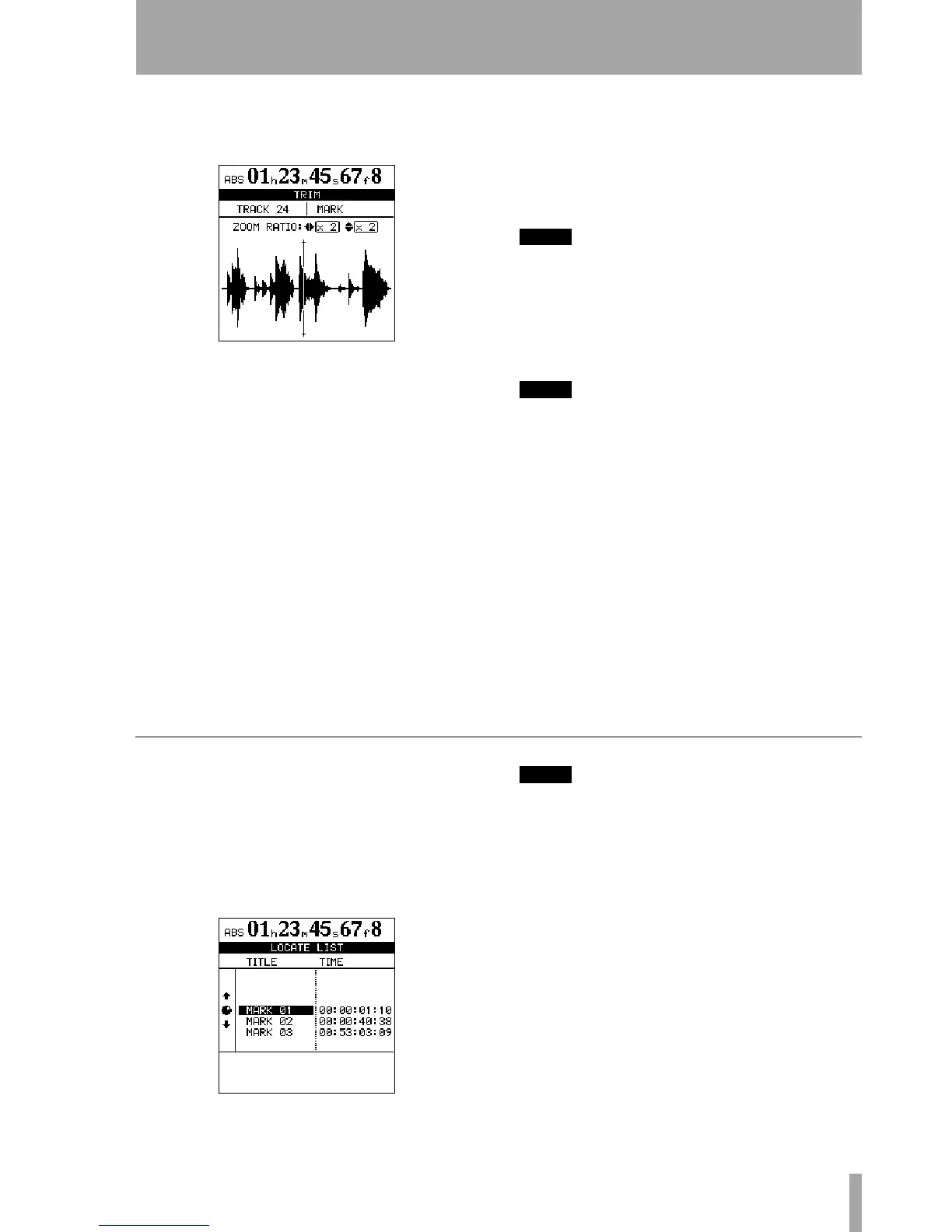
2 Press the TRIM key. The display shows TRIM
and a view of the waveform of the currently
selected track at the active mark.
3 Press the SELECT key of the track that you
want to view. The display changes to the wave-
form of that track.
Although the location mark applies to all
tracks, if you have a track selected with noth-
ing or little recorded on it at that point, it will
be impossible to see or hear anything using
this function.
4 Use the Ó and Á keys to zoom out and in
respectively horizontally. This is, pressing the
Á key will increase the amount of space on
the screen taken by a certain amount of time,
and pressing the Ó key will make the same
amount of time take less space on the screen.
The three zoom levels available are: x 1, x 2 at
about single-frame accuracy), and x 32 at
about 10-sub-frame accuracy (shown below
the time display).
5 Use the § and ¶ keys to adjust the vertical
scale (the way that the volume of the sound is
shown). The zoom levels here are x 1, x 2, x 4, x
8, x 16 and x 32. Pressing the § key increases
the vertical scaling of the display, and pressing
the ¶ key decreases the scale.
NOTE
If you can’t see any waveforms when you first enter this
display, press the
§
key to zoom the volume so that
you can see the quiet passages.
6 Use the wheel to move the cursor. You can
monitor the jogged sound of the selected track
through the monitoring system.
NOTE
You cannot move the mark to a position before the pre-
vious mark or after the next mark.
7 To move past the edge of the screen, press and
hold the
F FWD and REW keys to play the
tracks forwards or backwards at normal
speed for a rough position. When you release
the keys, the playback will stop.
8 Press ENTER to accept the new position as the
location mark value (the playback position is
now the new position), and return to the home
screen.
9 Press EXIT to return to the home screen with
the playback position being the point which
has just been set, but the location mark value
is unchanged.
Using the location mark list
Every time a location mark is stored, it is entered into
a list, and every time a mark is deleted, it is removed
from the list.
You can use this list to select a mark for location, or
for giving a title to a mark. You cannot edit the time
value of a mark, or delete a mark using the list.
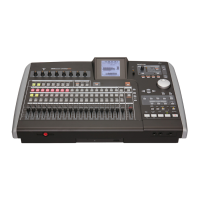
To see the list, press the
LOCATE key:
NOTE
Even when the time display on the home screen is
shown in bars and beats, or the MTC time display is
selected, the marks’ time values are always shown using
the absolute time values.
Items in the list are always sorted in time order, not
the order of the location mark names or numbers.
Locating using the list To locate using the
location mark list:
1 Press the LOCATE key.
2 Select the location mark using the wheel (or
the cursor keys).
3 Press ENTER. The playback point jumps to
the selected location mark.


 To Next Page