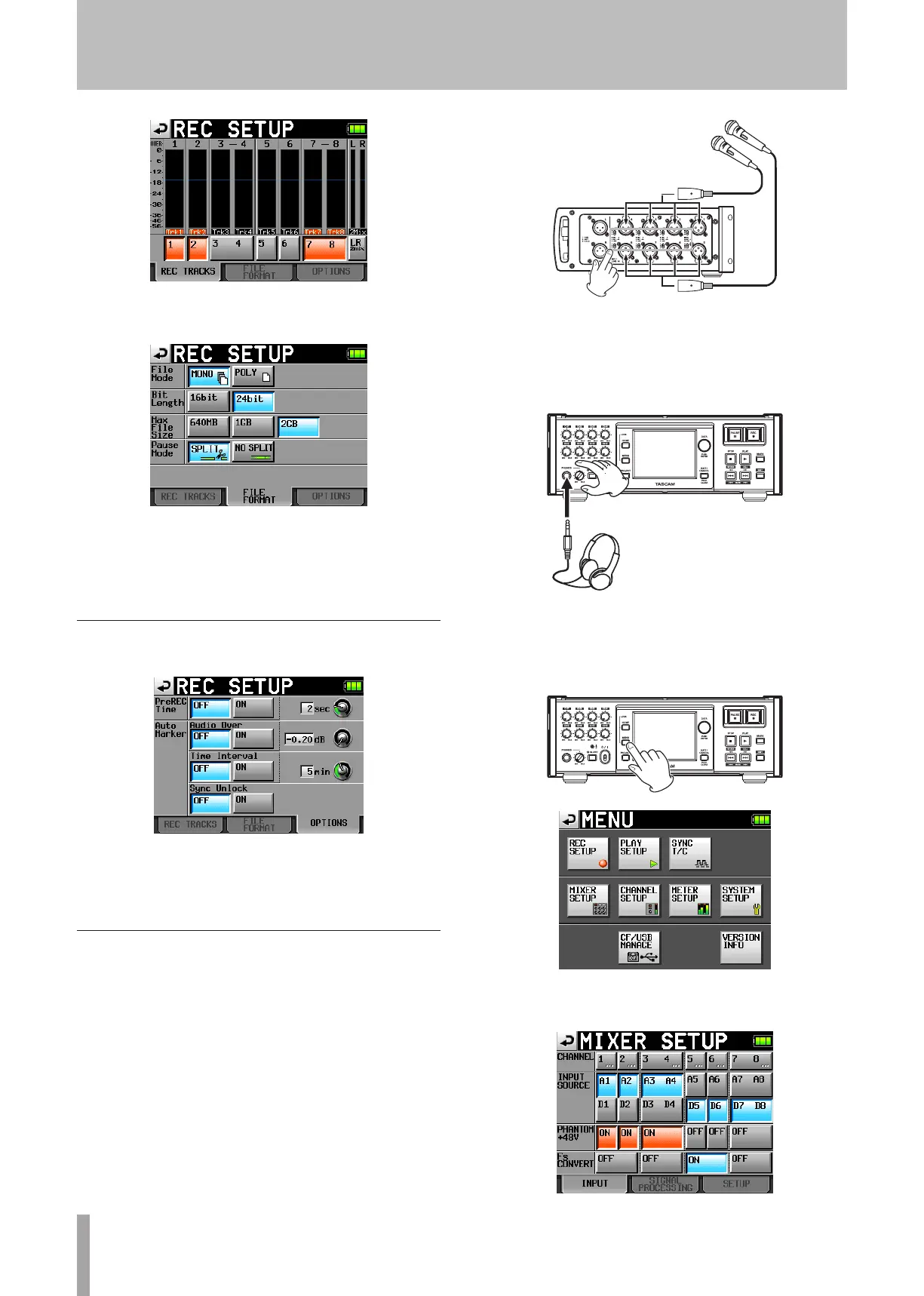
3 Touch the
FILE
FORMAT
tab to open the following
screen.
On the
FILE
FORMAT
page, you can set the file mode, bit
length, maximum file size, and behavior when a recording
is paused. For details, see “FILE FORMAT page” on page
39.
Make other recording settings
Touch the
OPTIONS
tab to open the following screen.
On the
OPTIONS
page, you can set the pre-recording time
and the use of auto markers. For details, see “OPTIONS
page” on page 39.
Connecting microphones and headphones
Connect a microphone to the MIC/LINE connector.
Set all the MIC/LINE switches next to the input
connectors on the right side panel to MIC 0.
Connect headphones to the PHONES connector on
the front panel. Keep the headphones knob turned
to MIN (all the way to the left) when connecting
headphones.
When using a condenser mic, follow the procedures below
to turn phantom power ON.
1 Press the MENU key on the front panel to open the
MENU
screen.
2 Touch the
MIXER
SETUP
button to open the
MIXER
SETUP
screen.
4 − Recording and Playback



 To Next Page